Close
Jira: Cloud vs. Data Center

Orchestrate, plan and track projects across teams

Find out what sets Cloud apart from Data Center

Only-in-cloud

Exclusive capabilities to unlock new experiences and advantages

Project management for every team

Flexible and collaborative work management that brings every team into one shared system to stay aligned on goals.

Learn more →

Project management screenshot
Bullseye icon

Shared goals

Create Atlassian Goals to map daily work to higher objectives and track progress.

Avatar icon

Flexible project views

Personalize a view that fits how you plan and track work, including List, Calendar, and Timeline.

Binoculars icon

Fit your team's style

Customize what terminology you use to better reflect your team’s workflows and processes.

Page icon

Templates for all

Start with tailored templates so new Jira spaces feel instantly familiar.
Project configuration screenshot

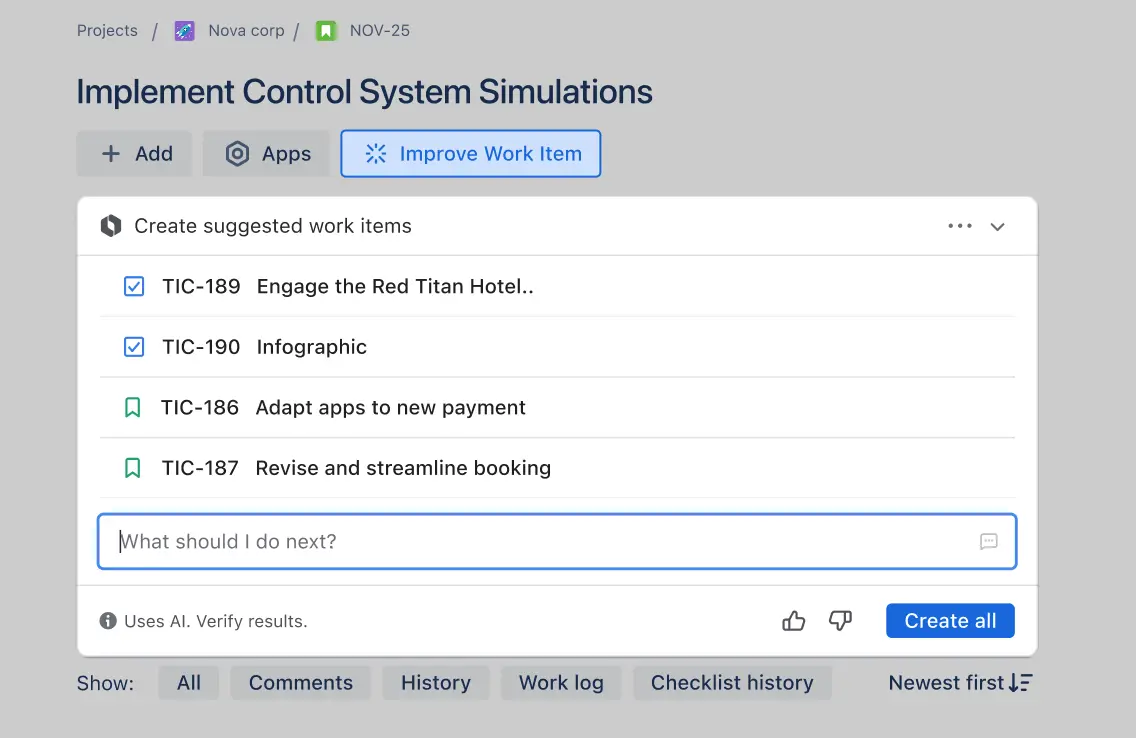
Build your human-AI super team

Let Rovo, Atlassian’s AI offering, do the heavy lifting by automating routine handoffs, helping you find what you need fast, and powering agents to take on real tasks so you can work smarter and faster.

Learn more →

Bullseye icon

Spend less time searching

Type what you’re looking for in natural language, no JQL or filters required.

Avatar icon

Automate task flow

Create rules to move tasks to the next step, nudge partners, collect reviews and approvals.

Binoculars icon

Bring agents to the team

Assign and @ agents like teammates, to move projects forward without losing oversight.

Page icon

Stay in control

Jira keeps teams firmly in charge with permissions, approvals, and audit trails.

Team autonomy and cross-functional visibility

Empower every team to tailor projects to their needs—while giving leaders a real-time, unified view across teams and work streams. No more manual rollups or rigid, one-size-fits-all setups.

Learn more →

Cross-function screenshot
Bullseye icon

Team-managed spaces

Self-serve project configuration in controlled workspaces without needing to involve a Jira admin.

Avatar icon

Custom space templates

Move quickly with templated boards, workflows, and fields.

Binoculars icon

Cross-functional visibility

Coordinate and manage work across multiple teams, projects, and dependencies.

Page icon

Live views across apps

Embed live plans in Confluence so all teams can get quick context and stay up to date.

Better-in-cloud

Critical Jira product capabilities that make your job easier on cloud

Jira screenshot

Project management for software teams

Plan, track, and release from a single source of truth, with Rovo Dev and third-party agents like GitHub built-in, ready to help you build what’s next.

Learn more →

Clouds icon

Project command center

Manage your toolchain from Jira, with cloud-native automations and embedded AI agents.

Binoculars icon

Intent-aware search

Source issues faster with Rovo-powered, natural language search instead of JQL syntax.

Binoculars icon

No-code automation

Build intricate automation rules for repetitive tasks in just a few keystrokes.

Binoculars icon

Instant context

Let Rovo write your project summaries and release notes so you can focus on what’s next.

Centralized vulnerability management

Centralize vulnerability tracking and improve response by connecting security tools natively, surfacing real-time context, and automating triage, instead of mapping issues across disconnected systems.

Learn more →

Project management screenshot
Page icon

A unified view

Connect your security tools and view containers to identify, prioritize, and triage vulnerabilities.

Checkbox icon

Informed prioritization

Pre-populate issues with security details to help devs stay focused and minimize ad hoc interruptions.

Traffic cone icon

Immediate response

Use Rovo insights to prioritize and triage vulnerabilities, accelerating response and reducing risk.

Data visualization screenshot

Data visualization

Native reports and dashboards offer critical insights into your work, so you don’t need to develop and maintain expensive integrations.

Learn more →

Board icon

All in one place

Visualize collective data from your entire toolchain for holistic insights without leaving Jira.

Graph icon

Iterative improvement

Access scrum metrics in various views like sprint progress, sprint burndown, and issues for attention.

Emoji icon

No set up required

Have sprint insights at the ready to adapt processes, drive outcomes, and plan with confidence.

Jira Cloud differentiation

The leading features and functionality utilized by Jira users. Contact our sales team for a full, comprehensive list of features that appear on Cloud and Data Center.


Cloud

Data Center

Project management


Project templates

Team-managed projects


Customizable boards

Customizable screens, workflows, issue types, fields, and transitions


Custom roles


No-code automation

Advanced planning (Plans)

Limited functionality

Summary, list, timeline, and calendar views

Limited functionality

Goals in Jira


Approvals


Forms


Rovo and AI Agents


Rovo search in Jira


Agents in Jira


Generative AI in editor


Build and manage workflows


Natural language automation rules


AI-powered summaries


AI work breakdown


Integrations & Apps


Advanced security integrations


Jira mobile app

Limited functionality


Cloud

Data Center

Project management

Project templates

Cloud

Data Center

Team-managed projects

Cloud

Data Center


Customizable boards

Cloud

Data Center

Customizable screens, workflows, issue types, fields, and transitions

Cloud

Data Center


Custom roles

Cloud

Data Center


No-code automation

Cloud

Data Center

Advanced planning (Plans)

Cloud

Data Center

Limited functionality

Summary, list, timeline, and calendar views

Cloud

Data Center

Limited functionality

Goals in Jira

Cloud

Data Center


Approvals

Cloud

Data Center


Forms

Cloud

Data Center


Rovo and AI agents

Rovo search in Jira

Cloud

Data Center


Agents in Jira

Cloud

Data Center


Generative AI in editor

Cloud

Data Center


Build and manage workflows

Cloud

Data Center


Natural language automation rules

Cloud

Data Center


AI-powered summaries

Cloud

Data Center


AI work breakdown

Cloud

Data Center


Apps, integrations and customization

Advanced security integrations

Cloud

Data Center

Jira mobile app

Cloud

Data Center

Limited functionality

Exclamation illustration
Speech bubble
Speech bubble illustration
Exclamation illustration

Curious about what’s coming soon?

Check out the features we’re working on in the Jira Cloud Roadmap.

Jira Cloud plans and pricing options

Browse all Jira Cloud plans to see which option is the right fit for your team.

FAQs

What is the cost difference between Jira Cloud and Jira Software Data Center?
  

For the most accurate look at Cloud and Data Center costs, please contact one of our pricing specialists. To get a baseline comparison, you can use our cost calculator. You can also learn about the differences between Jira Cloud plans and pricing here.

How does the Cloud migration trial work?
  

We offer the Cloud migration trial to Jira Data Center customer with a commercial or academic license for 11 or more users. This trial can last up to 12 months and will match the duration and user tier of your current Data Center license, up to a maximum of 20,000 users.

Customers with a Starter tier (10 users or less) or Social Impact license are not eligible for this trial.

What’s next for Jira Cloud?
  

Our Cloud roadmap has all the details on the latest features we’re building in Jira Cloud. The roadmap is updated quarterly to help you stay up-to-date on what’s coming next for Jira Cloud.

Where can I learn more about Jira Cloud?
  

You can learn more about Jira Cloud on the Jira Cloud product page.

Where can I learn more about migrating my Data Center products to Cloud?
  

The Atlassian Ascend Program offers detailed step-by-step guidance for planning, initiating, and effectively executing your Cloud migration.

What is the Jira Cloud Migration Assessment (JMCA) and how can it help me plan my migration?
  

The Jira Cloud Migration Assessment (JMCA) is a free tool that helps you evaluate your current Jira Data Center or Server instance for migration readiness. It scans your environment to identify potential blockers, app compatibility, and data complexity, providing a detailed report to help you plan a smoother migration to Jira Cloud.
Learn more.

How does Atlassian ensure data security and compliance in Cloud?
  

Jira Cloud meets rigorous security and compliance standards, including SOC2, ISO 27001, GDPR, and more. Learn more.

Want to learn more about how Cloud compares to Data Center?