AI Team Microlearning
Turn solo AI tinkering into a shared team ritual. These short, low-stakes AI experiments during team meetings help everyone boost confidence, share what works, and turn the best ideas into team‑wide ways of working.


PREP TIME
10m

Run TIME
30m

Persons
3-10
5-second summary
- Build AI learning into your regular team meetings.
- Give everyone a simple challenge to experiment solving with AI solo or in pairs.
- Share quick demos and capture team learnings.
WHAT YOU WILL NEED
- Meeting space or video conferencing
- Shared document, like a Confluence page or whiteboard
- AI tool, such as Atlassian’s Rovo or your preferred AI tool
- Timer (optional)
PLAY resources
How to run an AI Team Microlearning session
Turn solo AI tinkering into a shared team ritual. These short, low-stakes AI experiments during team meetings help everyone boost confidence, share what works, and turn the best ideas into team‑wide ways of working.
What is AI Team Microlearning?
AI Team Microlearning is a short session inside a recurring team meeting where everyone experiments with AI at the same time, then shares what they learned.
During the session, teams will:
- Choose a simple challenge to solve with AI
- Take 10–15 minutes to learn how to use AI to solve the problem individually or in pairs
- Come back together for lightning demos of what worked (and what didn’t)
Capture what they learned so everyone can apply their AI learnings in the future
Instead of sending people off to learn AI on their own, microlearning makes practice:
- Collective: Everyone is trying something at the same time.
- Low‑stakes: The goal is AI learning, not shipping something perfect.
- Accountable: The time is on the calendar with a clear start and end.
Efficient: AI practice gets embedded into existing schedules so it happens without extra meetings.
Microlearning sessions create a lightweight way to get comfortable with experimentation, learn as a group, and help people take the first steps toward building and refining AI teammates that fit their real workflows.
Why run the AI Team Microlearning Play?
Most teams know AI is important but struggle to use it in everyday work. To unlock the full value of AI, all teams – not just technical ones – need freedom to experiment.
Atlassian’s research shows:
- The companies that empower every team to use AI – even if their strategy isn't set in stone – are twice as likely to make innovation gains than slower adopting companies.
- 24% of knowledge workers say they could work faster if their teammates used AI more.
Team members who have seen their manager model AI are 4x more likely to consistently experiment with AI and 3x more likely to be a strategic AI collaborator.
AI experimentation can feel daunting, isolating, and lower priority than other work. Team microlearning tackles those problems by:
- Making time for purposeful AI learning, on purpose
- Countering the classic “I’ll learn AI someday” drift by scheduling short, predictable sessions
- Shifting the default from optional, one-off training to a recurring practice that’s built into the meeting agenda
- Turning solo speed into shared AI learning and coordination
Modeling experimentation
When should you run an AI Team Microlearning Play?
Run this Play when:
- Your organization has rolled out AI tools, but usage is patchy.
- Teammates say they’re curious about AI but don’t know where to start or feel nervous trying it alone.
- You’ve recently run an AI Training Workshop and want to keep momentum going.
- You want to narrow the gap between AI “super‑users” and everyone else by giving the whole team a safe, shared learning environment.
You’re drafting or refreshing AI Working Agreements and need a concrete ritual that helps those agreements live in day‑to‑day work.
It’s especially useful:
- At the start of a new project, quarter, or initiative, when you want to explore how AI can support your goals
- After a leadership AI demo, to turn inspiration into regular habits
With hybrid or distributed teams, where people might not otherwise see how colleagues use AI
You can start by running this Play once a month during your regular team meeting, then adjust the cadence as your team’s appetite and confidence grow.
5 benefits of AI Team Microlearning
Research inside and outside of Atlassian shows that intentionally making time and space to learn AI within existing team routines helps:
- Boost productivity by 33%
- Drive confidence and clarity
- Increase follow-through, especially when they face distractions and competing demands
- Fight the “status quo bias,” or the natural temptation to skip it
- Improve team accountability
Seeing leaders use AI is a key ingredient to inspiring learning and adoption. Atlassian’s AI Collaboration Index survey of 12,000 knowledge workers found that people who watched a leader demo an AI use case were 4x more likely to work with AI throughout the day and 3x more likely to be strategic AI collaborators. During an internal experiment at Atlassian, Rovo AI usage spiked by 90% after a single manager demo.
1. Pick your microlearning time slot
Est. time: 5 MIN
Choose a recurring meeting where most or all of the team already attends, like a weekly stand‑up, project sync, or team meeting. Reserve 20-30 minutes in an upcoming meeting specifically for AI Team Microlearning. (If the meeting is weekly, you can slot this microlearning session in monthly to start.)
Add “AI Team Microlearning” as a visible agenda item, and let the team know what to expect. You might say something like:
“Once a month, we’ll spend 20-30 minutes in this meeting trying something new with AI together and sharing what we learn. The goal is practice and learning, not perfection.”
If you’re a manager or team lead, plan to join as a learner, not the expert. Your participation helps model that it’s okay to experiment and not have all the answers.
2. Choose a simple problem to solve
Est. time: 5 MIN
Before or at the start of the session, choose a basic challenge for the team to try to solve. You can either:
- Offer 1–3 prompts or use case ideas tied to current work (e.g., write a project update, summarize a customer call, turn messy notes into a checklist, improve a Confluence page, or draft a meeting agenda)
Invite each person to pick their own new experiment, like a new prompt style, a new workflow, or a new way of collaborating with an AI agent.
As team members are deciding on an experiment, remind them it should be:
- Small enough to explore in the short time block
- Clear what the desired outcome or “better” end state looks like
- Comply with company data and privacy guidelines
-
Align with any existing AI Working Agreements
By the end of this step, every person or pair should have a small, clear challenge they can attempt to solve 10–15 minutes.
tip: Include non‑work options
Some people feel more comfortable starting with low‑stakes, personal use cases, like planning a meal, learning a skill, rewriting a tricky email, or brainstorming ideas for a hobby. These non-work experiments can still build important AI skills and help them learn tips that they can bring back to their work.
3. Run solo or pair experiments
Est. time: 15 min
Next, ask everyone to step away from the main discussion and spend 10-15 minutes individually or in pairs working on the problem at hand with AI.
Everyone can work silently, or pairs can go into separate breakout rooms or video calls.
Encourage people to try at least 2-3 variations on their prompt or workflow. You can offer simple guidance like:
“Start with a basic prompt, then:
a. Add more context from your documents or tasks.
b. Ask the AI to improve or refine its own output.
c. Change the tone, length, or audience, and see what happens.”
It’s ok if they don’t finish the experiment. The goal is to learn something new, notice what AI does well vs. poorly, and build momentum to continue later.
tip: Use real data if possible
If your AI tool (like Rovo) is connected to your team’s work apps (like Confluence, Jira, Slack, or Teams), encourage people to work with their actual content rather than fictional examples. This makes learnings more relevant and easier to reuse.
4. Share lightning demos
Est. time: 10 min
Bring everyone back to the main meeting for quick, informal sharing. Give each person or pair 2–3 minutes to walk through:
- What they tried
- What AI did well, and what it did poorly or got wrong
- Whether they’d use this again and how they’d tweak it next time
-
How this workflow compares to how they’d do the task without AI
Keep the tone curious and non‑judgmental. Emphasize that failed attempts are just as valuable as successes because they show what to avoid or how to adjust.
As people share, lightly facilitate by asking questions like:
- What worked surprisingly well? What didn't?
- What did you change to get better results?
-
Where did this save you time, or not?
You can capture prompts or screenshots for later, but the main goal here is noticing patterns and making sense of what’s happening, not judging anyone’s results.
tip: Be a role model
Managers and leaders: Model experimentation by doing your own demo, even if it didn’t work as you expected. You can use the AI Use Case Demo Play for tips and inspiration.
5. Capture team learnings
Est. time: 5 min
Before you move on to the rest of the meeting agenda, open a shared page or document (like a Confluence page), and name it “AI Team Microlearning Log.”
As a group, discuss these prompts, and write short answers or bullet points for each one.
- One workflow to test as a team: What’s one AI‑powered workflow we could adopt or test as a team before our next meeting?
- One prompt or pattern to remember: What’s one prompt structure, pattern, or trick we want to reuse?
One insight or open question: What feels promising but needs more testing?
Over time, this document becomes your living library of tried‑and‑tested prompts, potential AI teammates or agents to build, and ways AI fits (or doesn’t yet fit) into your real workflows.
tip: Link to AI Working Agreements
If you already have AI Working Agreements, link this page to them, and note any updates or new norms you want to try.
6. Make it a habit
Est. time: 1 min
To turn a one‑off experiment into an actual practice, decide how often you’ll run AI microlearning sessions. Most teams find once a month to be a good cadence.
Assign a rotating owner for each session (similar to a facilitator role), so no one person is responsible every time. That owner can choose the challenge or prompt ideas for that round, keep time during the experiment, and take notes on the learnings page during sharing.
These steps will help keep the ritual small, repeatable, and community‑driven, while giving everyone a safe place to regularly practice making AI part of the team.
Follow-up
Level up your AI learning
As your team gets more comfortable and crystallizes what they’ve learned so far, they can work together to:
- Gradually move from basic prompts to more complex workflows
- Adjust AI Working Agreements with new workflows and prompts
- Choose ideas that could be worth exploring further on an AI Innovation Day or Fix It Friday
- Spot opportunities to build or refine AI teammates that support repeated tasks

Still have questions?
Start a conversation with other Atlassian Team Playbook users, get support, or provide feedback.
Other plays you may like

Optimize with AI
AI Innovation Day
Get the most out of GenAI with a focused day of learning and doing.

Optimize with AI
AI Teammate
Build your first AI agent

Innovate with AI
AI Training Workshop
Run a workshop to help anyone learn the basics of how to use AI at work.

Innovate with AI
Define AI’s Project Role
Identify opportunities to use AI to support the success of your next project.
Stay up to date
Get the latest Plays and work life advice when you sign up for our newsletter.


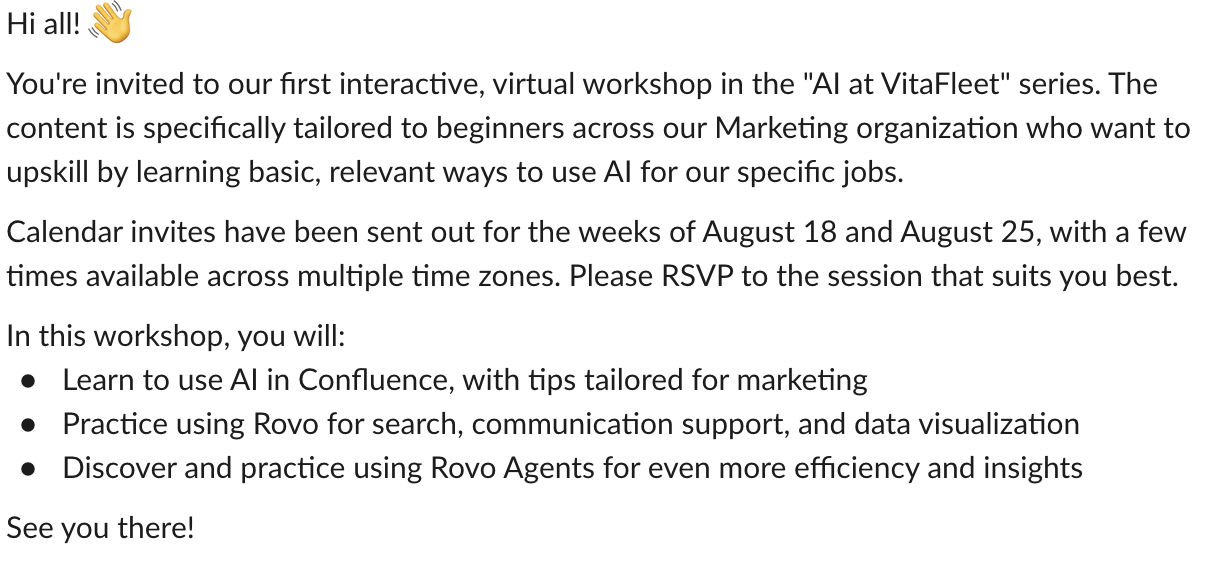
Sample announcement in Slack
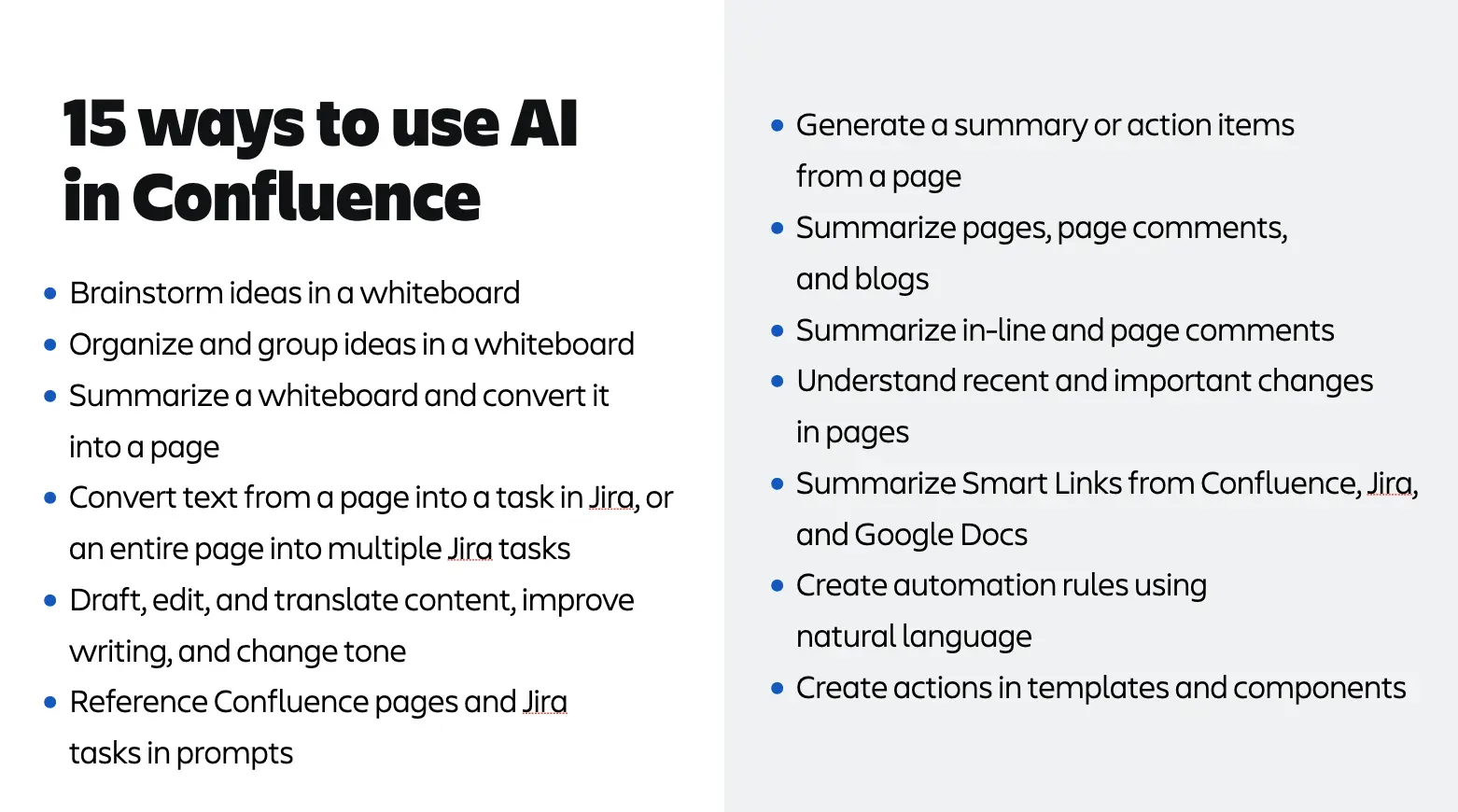
Sample use cases: AI in Confluence