Record a Great Loom
Without structure, Loom videos can become long and ineffective. Take your Looms to the next level with these tips for planning, structuring, recording, and editing.


PREP TIME
10m

Run TIME
15m

Persons
1
5-second summary
- Plan your Loom video before you record to maximize impact.
- Easily edit for clarity and engagement.
- Enhance and share your Loom video.
WHAT YOU WILL NEED
-
Loom video communication tool
-
A document for notetaking, such as a Confluence page
PLAY resources
How to record a great Loom video
Plan, record, and edit effective Loom video messages.
What is a Loom?
Loom is an asynchronous (async) video messaging tool that helps you communicate through instantly shareable videos.
Loom videos offer teams a better way to collaborate, communicate, and share information without having to meet at the same time – especially helpful for distributed, global, and busy teams. These videos can reduce or eliminate meetings, especially when one person would do the majority of the talking.
People use Loom in countless ways, from sharing announcements, to participating in training, to getting support, to showing demos and ideas, and more.
Why run the “Record a Great Loom Video” Play?
Without structure, videos can become long and ineffective. Once you’ve had a chance to use Loom, take your videos to the next level with this Play. We’ll walk you through how to plan it, structure it, effectively deliver the message, distribute it, and reach your goals.
When should you record a Loom?
Anytime you can’t or don’t want to have a meeting, or you want to record a message to share with others.
There are endless opportunities to use Loom videos to connect and collaborate across your team and business, including:
- Getting your team aligned around an announcement or plan
- Recording videos for prospects and leads to boost outreach engagement, accelerate deals, and streamline customer onboarding
- Helping engineers add visual context to code, shorten development cycles, and reduce meetings
- Giving creative professionals a way to easily present, share, and work together
- Collaborating on marketing campaigns and initiatives
- Educating viewers on a specific topic
- And more
4 benefits of recording a Loom video
Here are a few benefits to using Loom videos:
- Decrease meetings: 78% of workers say they’re expected to attend so many meetings, it’s hard to get their work done. On average, Loom reduces meeting overload for customers by 30%.
- Speed up sharing: Employees say difficulty finding information is the #1 barrier to moving fast. Loom reduces information silos by allowing teams to capture, organize, and search knowledge, making it accessible to anyone at any time.
- Improve engagement: As opposed to text alone, researchers find video increases emotional engagement and improves recall.
- Perfect async communication: Optimizing your Loom video with the tips in this Play can help keep people engaged and make your message easier to follow, absorb, and act on.
1. Plan your message
Est. time: 10 MIN
Like any form of communication, Loom videos work best when you first clarify the goal of your message and the key points you want to deliver. Create an outline by considering these questions:
- Goal: What do you want viewers to know or do after watching?
- Key messages:
- What’s the main topic of your video? What do you want people to know is happening or changing?
- When can they expect this to happen or change?
- Who is affected and how?
-
How will this affect the viewer and their team?
Next, use those goals and key messages to create a basic script. You can use this script structure as a starting point:
- The Ask (30 sec): State what you need and from who
- The Context (1 min): Explain why this matters
- Go Deeper (3-4 min): Demonstrate your work or explain your thinking/idea concisely
The ask:
- Primarily for Molly and Allison.
Review my page and leave comments, particularly regarding page readability and content clarity.
The context:
- I made a page detailing our decision to shift directions on the latest project.
- It is to be shared with stakeholders Jolene and Dolly to keep them informed.
They have lots of competition for attention, so this should be crisp.
Go deeper:
- The page is about the new project direction.
- We’re pivoting from the old feature to a new one because of recent feedback from leadership.
The new direction requires a slight change of roles, especially for Molly and Allison.
Tip: Get writing help
Use the Comms Crafter Rovo Agent to draft your outline and/or script.
Tip: Get help clarifying your goal
You can run the Change Management Kick-off Play first to develop a clear message and an action plan for communication.
2. Record your video
Est. time: 5 MIN
When you record your Loom, you’ll reference your outline—but instead of reading it word for word, focus on talking through your key points like you would in a team meeting.
While it may feel awkward at first to record a video, your team will thank you for it. You’re delivering a clear message in a way that feels personal. Here are some other tips and features to consider:
- Set the scene: Find a spot with good lighting, and get comfortable before recording.
- Record with confidence with Loom’s Speaker Notes: Forget the stress of remembering what to say or worrying about re-recording. With Loom Speaker Notes, you can keep your talking points right in front of you while you record, and here’s the best part: your audience won’t see them. It’s like having a cheat sheet that only you know about.
- Pause and restart: If you lose your train of thought or need a moment to refocus, use Loom’s Loom’s Live Rewind feature. It allows you to delete mistakes or do another take, without interrupting your recording session. This will help you maintain composure and deliver your message more effectively.
Tip: Choose the right tone
Consider not only what you say, but also how you say it.
Think about how your audience might be feeling when they hear this message. Excited? Frustrated? Skeptical? Stressed? Then, read your script out loud before recording, and adjust your tone accordingly.

3. Edit your video
Est. time: 5 min
Feel like you stumbled? Want to add some extras to make the video more engaging? Editing your Loom is as simple as editing a document.
- Easy edits: Use Loom AI to remove your filler words and silences, then remove any unwanted sections by simply deleting them from the transcript.
- Engage with overlays: Engage your audience with eye-catching shapes, arrows, and text.
- Styled captions: Highlight your closed captions to engage your viewer and get your message across even more clearly.
- Summary and Chapters: Loom AI will automatically write a summary and break content into sections for easy navigation. You can edit this information by clicking on it and making your changes.
- Clickable links and calls to action: Add a link or call to action button to the video to make it easy for viewers to access the content you’re referencing.
- Tasks: Loom AI Tasks automatically identifies action items you discuss in your video and provides suggested tasks that you can accept or edit.

Follow-up
Distribute your video
Sharing your Loom is simple, and with the right plan, you can make sure your message reaches the right people, at the right time, in the right way. Your plan should include the channels, senders, messaging, and deadlines for distributing your video.
Here’s how to get started:
- Who needs to see this? Identify your audience—everyone who will be impacted by or needs to act on this change.
- Where do they look for info? Consider the tools or platforms they use daily, like Slack, email, or your intranet.
Who can help amplify the message? If applicable, ask other stakeholders, leaders, or managers to share the video within their teams to help drive adoption.
Reiterate what’s required of team members and by when, keeping the message clear and actionable.
Pro Tip
Use Loom AI workflows to save time writing your distribution message. AI can summarize your Loom video and draft a message ready to share on Slack, Teams, or email.
Finally, remember: people often need to hear the same message multiple times before it fully sticks. If your video contains an important announcement, reinforce the message across other touchpoints, like all-hands meetings, team meetings, one-on-ones, your intranet, or even physical spaces like office screens or bulletin boards.
Variations
Change Management Communication with Video
If you’re communicating a significant change, use this Play to convey the message in a faster, clearer, more personal way.

Still have questions?
Start a conversation with other Atlassian Team Playbook users, get support, or provide feedback.
Other plays you may like

Meetings
Weekly Team Updates
Share how things are going—without scheduling another meeting.

Meetings
Page-Led Meetings
Better meetings start with a page that outlines the purpose, expected outcomes, and key discussion points.

Communication
User Manual
Help your teammates understand how best to work with you.

Debrief
Retrospective
Provide a safe space to discuss what worked and what didn’t.
Stay up to date
Get the latest Plays and work life advice when you sign up for our newsletter.
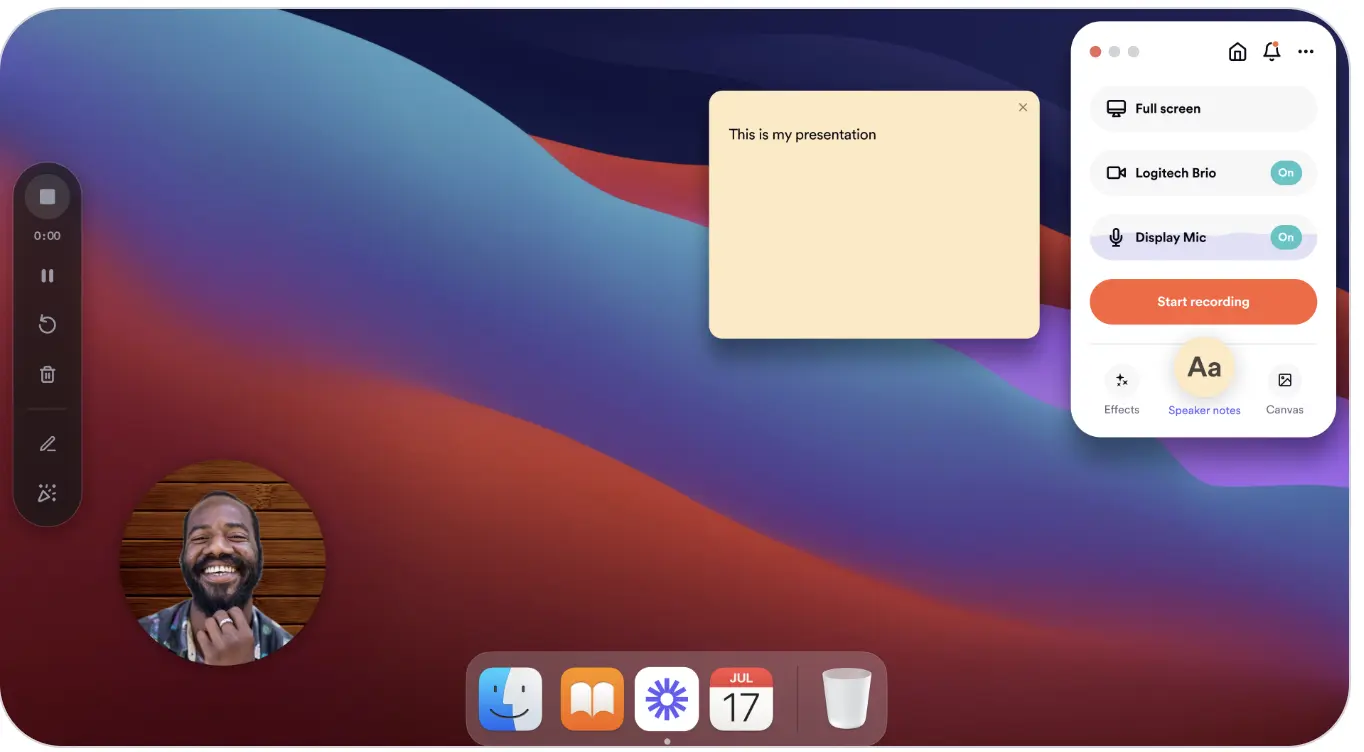
Loom speaker notes show up while you’re recording, but aren’t visible to viewers.

Edit your video quickly and easily using Loom AI’s editing suite

Developers give feedback on their product manager’s planned innovation cycle upgrades