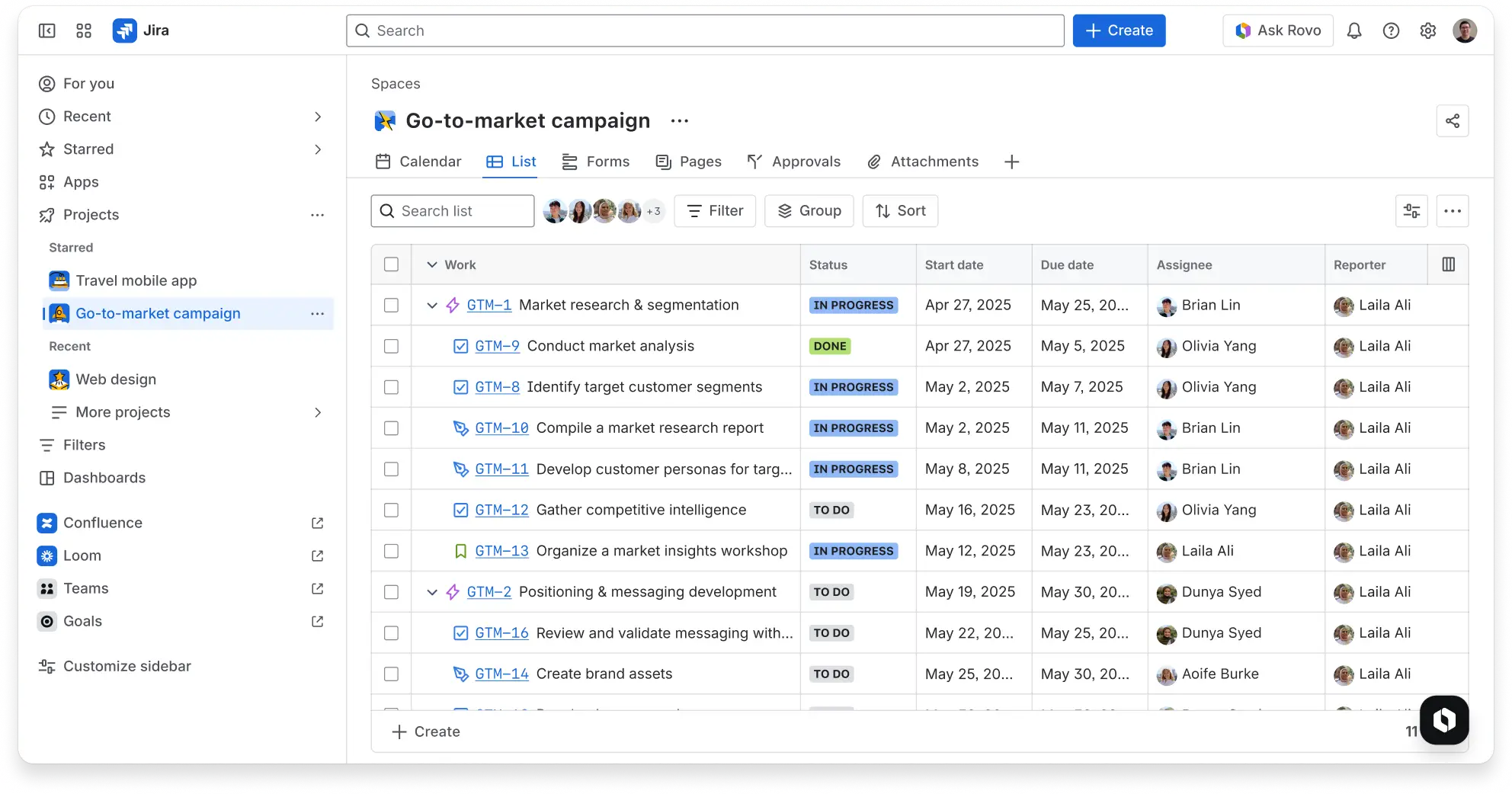
Run of show template
Coordinate timing, speakers, and segments in one place to keep events organized and on track.
BEST FOR
Marketing
Project Management
KEY FEATURES
Agile Project Management
Marketing
What is a run of show template?
A run of show template is a structured document that organizes the timing, sequence, and ownership of tasks for an event or project. It maps out each activity in chronological order, specifying start times, durations, and the people responsible for execution.
The template helps event planners visualize and coordinate all the moving parts in one central place. Whether it’s a detailed project roadmap, list, or timeline, these templates highlight potential gaps or overlaps that could cause issues on event day.
For everyone involved, the template lays out the full sequence in advance so everyone sees what’s coming next and how their work connects to the bigger picture.
What’s the purpose of a run of show template?
The main purpose of a run of show template is to ensure smooth execution by clearly defining timing and task order. When everyone knows exactly when their responsibilities begin and end, there’s no confusion about who should be doing what at any given moment.
This structure significantly reduces errors, confusion, and last-minute issues that often derail events. Instead of discovering problems during execution, teams identify potential conflicts or timing challenges during planning, when there’s still time to adjust.
The template creates accountability by assigning specific tasks to specific people, making it an essential project timeline software that ensures nothing falls through the cracks.
Who typically uses a run of show template?
Teams managing events, product launches, or cross-functional projects rely on run of show templates to coordinate complex activities. Event coordinators use them to synchronize speakers, vendors, and logistics teams.
Additionally, marketing teams deploy them for product announcements that require precise timing across multiple channels.
What does the run of show template include?

Backlog
The backlog provides a list of all tasks, stories, or issues that must be completed for your event. It’s your primary task repository where you capture everything from pre-event setup activities to post-event follow-up items.
As you identify new requirements or deliverables during planning, you can add them to the backlog and prioritize them based on urgency and dependencies.

Calendar
This view makes it much easier to schedule milestones, deadlines, and time slots for activities. Visualize when different components of your event happen and identify potential scheduling conflicts before they become problems.
See your project timeline at a glance and communicate key dates to your team.

Workflows
Define the steps each task follows from start to finish with Agile workflows. Create custom stages that reflect your event’s specific requirements.
For example, your stages could be: Script Draft → Review → Approved → Rehearsed for presentation content. And for vendor management, you can set it up as: Vendor Contact → Contract Sent → Contract Signed → Payment Processed.
These workflows ensure tasks move through the proper approval and execution stages.

Dashboard
The dashboard provides a visual overview of progress, task status, and key metrics. Quickly see which items are complete, which are in progress, and which are at risk of missing their deadlines.
This visibility helps you make better decisions and intervene when tasks are falling behind schedule.
How to build your custom run of show template in Jira
- 1
Set the stage with a blank Jira project in a timeline or list view
Create a blank project with the timeline or list view to track all tasks and responsibilities. This gives you a dedicated workspace where your team can focus specifically on event project management.
Prevent mixing different activities or creating issues with dependencies in a single view. Starting with a clean project lets you customize the structure to match your event’s unique requirements and project scope.
- 2
Build your backlog of work items that will happen during the event
Add tasks, assign owners, set priorities, and include deadlines for every activity in your event run of show template. Break down large activities into smaller, manageable tasks that can be tracked individually.
For example, instead of a single Stage Setup task, create separate items for lighting installation, audio testing, backdrop placement, and stage props. This granular approach makes it easier to monitor progress and identify exactly where delays are occurring.
If you need to document the process, use Confluence’s event planning template as a starting point to outline the entire event and list all aspects to successfully run the show.
- 3
Define workflows for each task
Map out each task’s steps, such as: To Do → In Progress → Done. You can customize transitions based on how your team actually works.
Some tasks might need approval stages, while others move directly from planning to execution. Create workflows for different types of activities—one for content creation tasks that require review and approval, another for logistical tasks that simply need completion.
This flexibility ensures your run of the show template reflects your real process.
- 4
Schedule milestones using the calendar or roadmap
Once you have your list or timeline view in a decent place, start to assign dates so you can visualize everything in Jira’s Calendar view or Basic Roadmap. Mark key moments like rehearsal dates, vendor arrival times, and go-live deadlines.
This scheduling creates a clear sequence that helps your team understand dependencies. For instance, you can’t start the sound check until the audio equipment arrives.
The calendar view also helps with strategic planning by showing how different workstreams need to converge at specific points.
- 5
Monitor progress with dashboards and insights
Use dashboards and Jira reports like burndown charts and sprint insights to track execution in real time. Create an action plan for addressing issues as they arise.
Set up alerts so you know immediately when tasks are overdue or blocked. Being proactive helps you catch problems early when they’re easier to fix, rather than discovering them minutes before your event starts.
Ready to use this free template?
Explore more templates to supercharge teamwork
Empower everyone, on every team. Build, connect, and deliver your biggest ideas seamlessly across Atlassian apps using our complete collection of ready-made workflows.