Task use case
Confluence and Jira work better together
Unify tools and workflows to get the most out of any team effort.
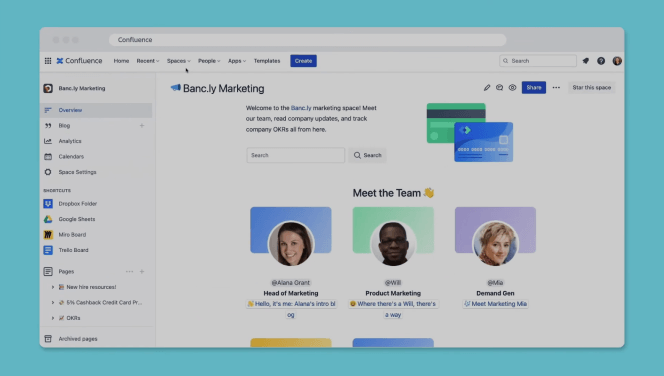
Get work done in Confluence
Your collaborative knowledge hub
Confluence is a virtual workspace where teams of all types can centralize work from Jira to build and test software, improve service delivery, and execute business plans faster.
From development to delivery
Combine Confluence and Jira for a seamless end-to-end workflow, from planning through execution.
Create, view, and edit Confluence pages across Jira products––Jira Software, Jira Service Management, and Jira Work Management.
Contextualize tasks with direct links to Confluence documents.
Keep stakeholders updated in real-time with Jira issues linked to Confluence pages.


Your entire team on one platform
Bring all your teams together in one place to work more efficiently.
Keep work moving forward with real-time and async collaboration using in-line comments, editing, likes, and @ mentions.
Gain holistic insights into how work gets done across teams with Atlassian Analytics.
Bring all your favorite tools into one place for end-to-end workflows with Atlassian Marketplace.
Your entire team on one platform
Eliminate minor tasks that can affect project progress and achieve your goals faster.
Scale project planning and management with templates for all team types.
Create automated processes with no-code, if-this-then-that rules and get a head start with pre-built automation rules.
Reduce context switching and ship faster by working in one platform.

Choose from hundreds of templates
Confluence has templates for every kind of team and project, so you never have to start from scratch.


Why Confluence?
Versatile content creation
Bring your ideas to life with a rich palette of content: Whiteboards, Databases, and videos within every Confluence Page.
Organization that scales
You’ll never outgrow Confluence. Project resources and company knowledge stay centralized and discoverable.
Powerful integrations
Connect Confluence to thousands of your favorite tools to access data and manage workflows across apps.
Data protection
User-level permissions keep your information private. Company data stays secure and always remains in your control.

“At Docker, you can’t do your job without using Jira and Confluence. The tools work seamlessly together. It’s how we communicate between teams and get new developers up and running quickly.”
Justen Stepka
Director of Product Management, Docker
96% of customers say our integrations are superior*
Designed for depth and speed—and it shows. Try Confluence with Slack, Jira, Trello, Microsoft, or 3,000 others to see for yourself.
*according to Atlassian's customer survey


Discover all the ways you can use Confluence

Knowledge management
Scale fast and be more productive when you manage information efficiently.

Company-wide collaboration
Be more productive and efficient while collaborating with other teams.

Technical documentation
Be more productive and efficient while collaborating with other teams.