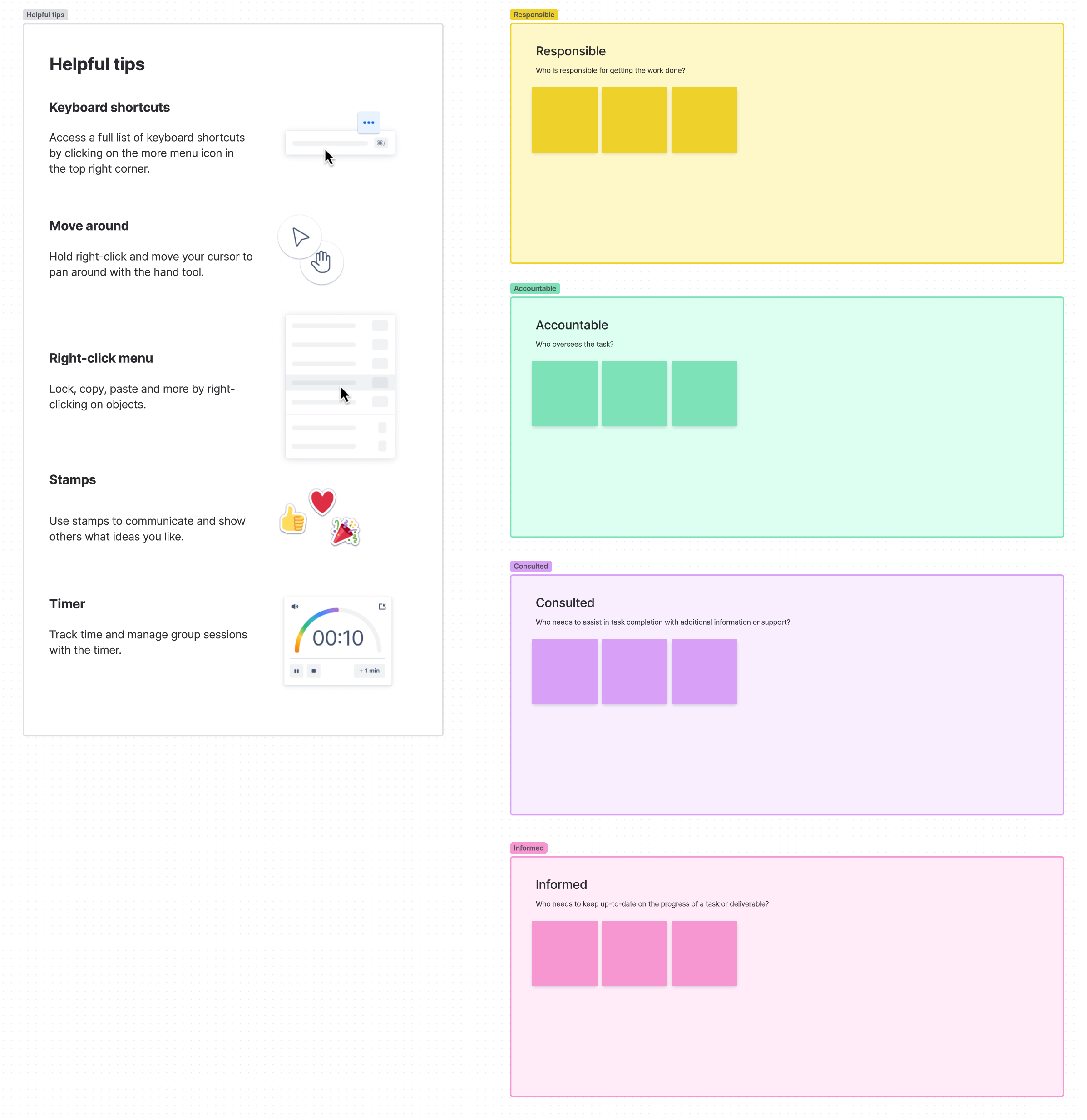
RACI chart template
Created by:

Improve how you clarify roles and responsibilities throughout the project life cycle
Categories
- Project Management
- Human Resources
- Whiteboard Template
KEY FEATURES
Stakeholder Alignment
Task Tracking
Team Collaboration
Have you ever been on a project where no one knew what they were in charge of? Or, worse, where everyone thought someone else was handling a critical task? A RACI chart template solves these common workplace headaches by mapping out who is involved with each project activity and exactly how they are involved.
By documenting who's Responsible, Accountable, Consulted, and Informed for each task, you create a visual roadmap that prevents confusion, reduces duplicate work, and ensures nothing falls through the cracks. The best part? You can easily create your own RACI chart in Confluence to keep your team aligned from kickoff to completion.
What is a RACI chart template?
A free RACI chart template is a resource planning tool that helps teams clearly define and document the roles and responsibilities for every task in a project. Think of it as your project's responsibility map, showing at a glance who's doing the work, who's making decisions, who needs to provide input, and who just needs updates.
The template provides a consistent format for capturing these role assignments across different projects, making establishing accountability easier and ensuring nothing gets overlooked. While many project management tools get complicated, a RACI chart stays refreshingly simple: it's typically just a matrix with tasks down one side and team members across the top, with the appropriate RACI designation at each intersection.
What does RACI stand for?
The RACI acronym stands for the four core responsibility types that can be assigned to team members:
R - Responsible: The person (or people) who does the work to complete the task. Every task needs at least one responsible person, but you can have more than one.
A - Accountable: The person who owns the final result and has ultimate decision-making authority. Each task should have precisely one accountable person to maintain clear ownership.
C - Consulted: People whose input, expertise, or opinions are sought before decisions or actions are taken. This is typically two-way communication.
I - Informed: People who need to be kept informed about progress or decisions but don't need to provide input. This is one-way communication.
What is a RACI chart used for?
RACI charts are used in complex projects where multiple teams or departments must collaborate efficiently. They provide a simple visual reference that prevents confusion about who's doing what, eliminating the dreaded "I thought you were handling that" conversations.
Teams use RACI charts to streamline workflows by clearly identifying who needs to be involved at each project stage. This clarity improves project collaboration by setting expectations upfront about each person's level of involvement. Instead of endless email chains trying to figure out who's responsible for a deliverable, team members can consult the RACI chart and immediately know who to contact.
Types of RACI chart templates
While the standard RACI model works for most teams, you can adapt your template to fit different project needs:
Basic RACI: The classic four-role model that works for most projects and teams.
RASCI: Adds an "S" for Support — people who assist the responsible person but aren't primarily responsible themselves.
RACI-VS: Adds "Verify" and "Sign-off" roles for regulated industries with strict approval requirements.
When creating your own RACI chart in Confluence, you can start with a basic template and customize it based on your team's needs.
Benefits of using a RACI chart
Clarifies roles and responsibilities
A RACI chart eliminates ambiguity by clearly defining who is responsible for what. When roles are explicitly assigned, everyone knows their responsibilities, reducing the chances of duplication or, worse, nobody taking ownership. Each task is assigned one accountable person, ensuring clear ownership from start to finish.
Teams can also use a roles and responsibilities template to complement the RACI chart, further defining broader roles beyond specific tasks.
Improves accountability
With clear roles and responsibilities, team members are more likely to follow through on their commitments. The transparency of a RACI chart makes it easier to track who’s accountable for delays or roadblocks, allowing for quicker resolution. Managers can immediately identify the right person to address an issue, removing the guesswork of determining who should take action.
Enhances communication
A RACI chart establishes clear expectations about who should be included in different conversations and decisions. By designating those who need to be consulted and those who just need to be informed, you avoid both overcommunication (copying everyone on every email) and undercommunication (excluding key stakeholders).
This targeted approach to communication fosters a collaborative culture where information flows to the right people at the right time.
Streamlines decision-making
A major project bottleneck is unclear decision-making authority. RACI charts eliminate this problem by defining who is accountable for each deliverable. This person has the final say, which reduces confusion and delays in the approval process. Teams that regularly make complex decisions can further benefit by using a decision document to formalize their process.
Boosts project efficiency
By minimizing redundant tasks and clearly defining roles at each stage, RACI charts help teams work more efficiently. When everyone knows exactly what they’re responsible for, they can focus on their tasks without getting pulled into areas where they're not needed. This alignment leads to smoother workflow, making meeting deadlines and achieving goals set during planning sessions easier.
How to create a RACI chart
- 1
Identify project tasks
List all key tasks, deliverables, and milestones that require role assignments. Ensure tasks are specific and relevant to the project scope. Consider using a formal project plan to organize and track your tasks for complex projects.
- 2
Define roles and stakeholders
Determine which team members will take on the four RACI roles for each task. Map out who will be responsible for doing the work, who is accountable for decisions, who needs to be consulted, and who should be kept informed. Make sure these assignments match each person's actual job responsibilities and expertise.
- 3
Build the RACI matrix
With your tasks and team members identified, create a simple table or matrix. List all tasks down the left side and all team members across the top. At each intersection, assign the appropriate R, A, C, or I designation based on each person's involvement with that task.
- 4
Review assignments
Once your draft is complete, review the chart with key project stakeholders to verify it accurately reflects how work should flow. Look for potential issues like overloaded team members or tasks missing clear ownership. Make necessary adjustments to balance responsibilities appropriately.
- 5
Share the chart with the team
After finalizing your RACI chart, share it with everyone involved in the project planning process. Explain how it works and answer any questions. Ensuring everyone understands their specific responsibilities will significantly improve project execution.
- 6
Monitor and update
Remember that your RACI chart isn't set in stone. As your project progresses, review and update the document regularly. Responsibilities may shift as team members change or the project scope evolves, so treat it as a living document.
- 7
RACI chart example
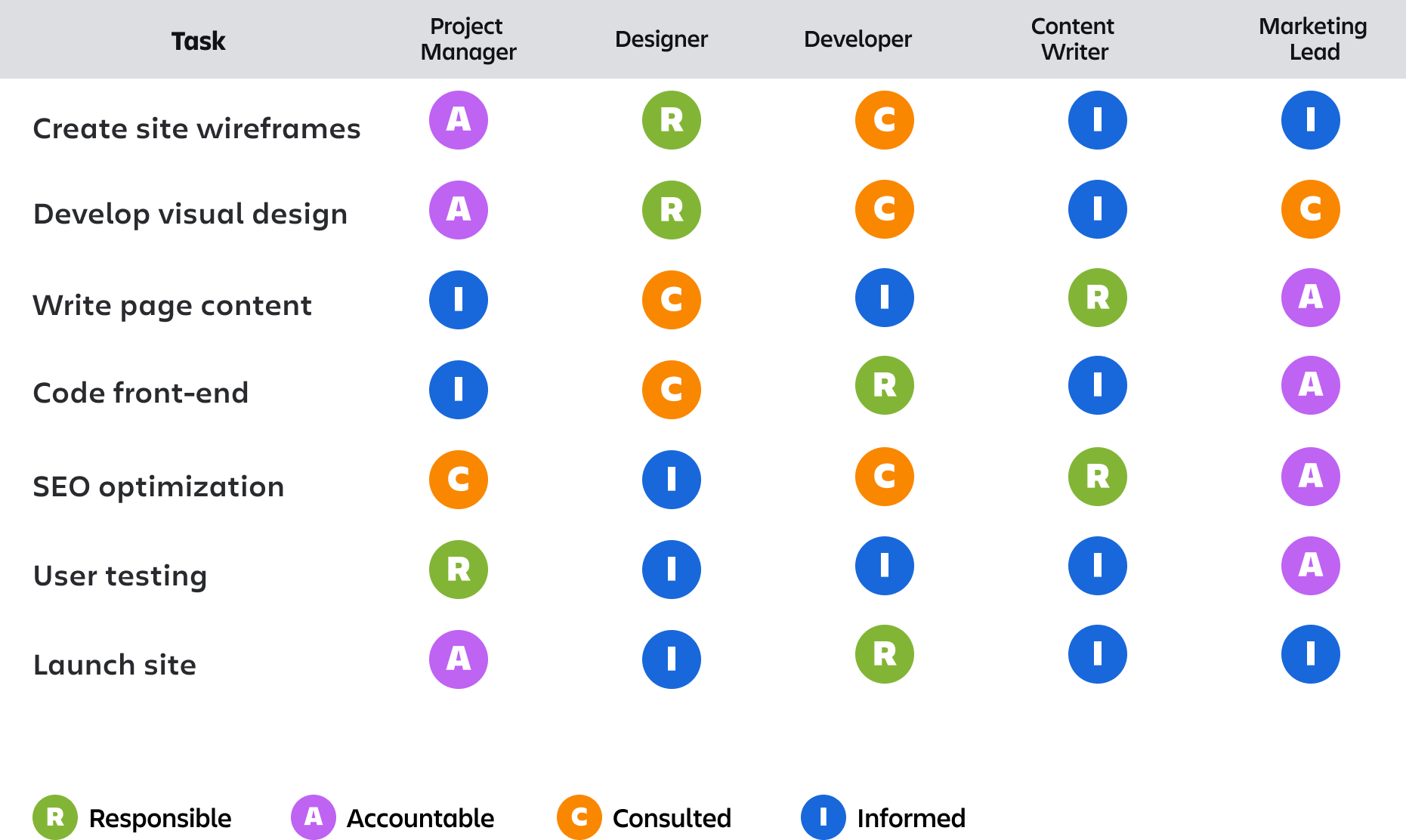
To help you understand how to put your RACI chart template together, here’s an example of how it might look for a web development project.
In this example, you can see how responsibilities shift across different tasks. The designer is responsible for wireframes and visual design, while the developer oversees coding. The marketing lead is accountable for several tasks, showing their ultimate authority over project outcomes.
Create a RACI chart with Confluence whiteboards
Confluence makes it simple to create, share, and update RACI charts that your whole team can access in real-time. Using Confluence whiteboards, you can build interactive RACI charts that become living documents that evolve as your project progresses.
The visual nature of whiteboards makes it easy to color-code responsibilities or add additional context through sticky notes and comments. You can even link tasks directly to your action plan or other project documentation, creating a connected workspace where all project information lives together.
Improve project collaboration with Confluence by keeping your RACI chart and all related project information in one centralized location accessible to everyone, regardless of where they're working from.
Related templates


Human Resources
Team poster template
Get your team on the same page about what they should be working by creating a team poster.

Teamwork
Meeting minutes template for teams
Set meeting agendas, take notes, and share action items with your team.
Explore more templates to supercharge teamwork
Empower everyone, on every team. Build, connect, and deliver your biggest ideas seamlessly across Atlassian apps using our complete collection of ready-made workflows.