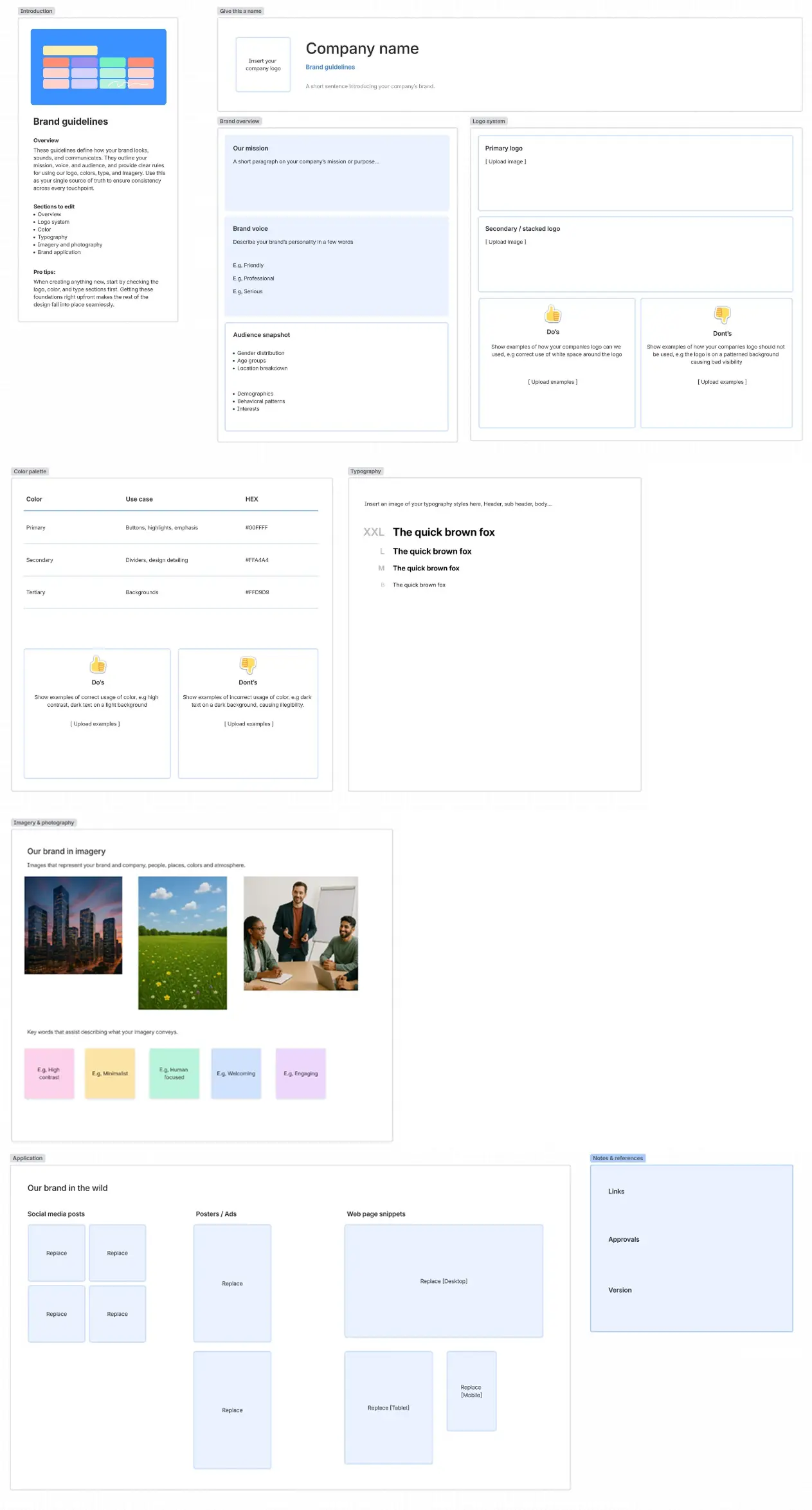
Brand guidelines template
Created by:

Keep your brand consistent, memorable, and professional
Categories
- Marketing & Sales
- Design
- Whiteboard Template
KEY FEATURES
Documentation
Communication
Content Management
Inconsistent brand guidelines can lead to mixed messaging, diluted brand value, and missed opportunities to connect with your audience. From mismatched logos to off-brand colors or conflicting tones in content, the lack of alignment can confuse your customers and undermine your brand's credibility.
A brand guidelines template can help you maintain consistent branding across your business. A clear and well-documented brand identity ensures that every touchpoint—a social media post, a website design, or internal communication—feels cohesive and authentic. Without consistency, your brand risks coming across as disorganized or unprofessional.
A central hub for brand guidelines is crucial for successful project collaboration, especially for marketing teams. Having a free brand guidelines template that you can build and customize gives your teams a resource that grows with your business. By creating a centralized, easily accessible brand guideline document in Confluence, your team can stay aligned and deliver consistent, meaningful branding at every level.
How to use the brand guidelines template
- 1
Step 1. Define brand identity
Clarify your mission, vision, values, and target audience as the foundation for your guidelines. This foundational work will inform every subsequent branding decision and ensure your visual identity aligns with your company’s core purpose. Research your target audience's preferences and behaviors to create guidelines that resonate with them.
- 2
Step 2. Choose visual elements
Select and standardize your logo, color palette, and typography. Document specific use cases for each element, including minimum sizes, spacing requirements, and color variations for different backgrounds and applications.
Create a new Confluence page for a flexible way to take notes, plan projects, and embed knowledge from third-party apps. Invite the whole team to edit, offer suggestions, and provide feedback. - 3
Step 3. Outline brand voice and tone
Establish how your brand communicates through language, including tone and style. Create detailed examples of appropriate voice across different channels and scenarios, from formal communications to social media posts. Include specific vocabulary lists with preferred and avoided terms to maintain consistency.
- 4
Step 4. Set guidelines for imagery
Define the style, types, and rules for photos, illustrations, and other visuals. Provide specific guidance on image composition, lighting, and subject matter to maintain a consistent visual narrative. Document technical requirements such as file formats, resolution standards, and cropping guidelines.
- 5
Step 5. Document content guidelines
Include rules for writing headlines, messaging, and calls to action. Provide examples of successful content across different platforms, formats, and templates for common content types. Create a clear hierarchy for messaging to ensure critical brand communications maintain their impact.
- 6
Step 6. Include examples
Provide clear "do" and "don't" examples of branding. Create side-by-side comparisons that illustrate common mistakes and their corrections. Include real-world applications across different mediums to show how guidelines translate into practice.
- 7
Step 7. Make it user-friendly
Organize the guidelines in an accessible, easy-to-follow format. Include a clear table of contents, searchable sections, and quick-reference guides for commonly needed information. Consider creating interactive elements or checklists that help users quickly find and implement the necessary guidelines.
Collaborate with your team to create the template using Confluence, where you can share in-line comments, reactions, and engaging visual elements like GIFs.
Explore more templates to supercharge teamwork
Empower everyone, on every team. Build, connect, and deliver your biggest ideas seamlessly across Atlassian apps using our complete collection of ready-made workflows.