AI Use Case Demos
One of the best ways to encourage AI adoption is to show specific ways to use it. Learn how to create live AI demos that inspire others and drive adoption.


PREP TIME
30m

Run TIME
30m

Persons
2-10+
5-second summary
- Brainstorm a real-world challenge your teammates encounter that can be solved with AI.
- Plan a live or recorded demo that wows them.
- Deliver it, inspire your colleagues try it, and come prepared to answer questions.
WHAT YOU WILL NEED
- Video conferencing with screen sharing or meeting space
- AI tool, such as Atlassian Rovo
- Optional: Video communication tool for recorded demos
PLAY resources
How to create demos of AI use cases
Create live demos of AI use cases that inspire others and drive adoption.
What is an AI use case demo?
An AI use case demo is a presentation or interactive example that shows how AI solves a real-world problem or enhances a process. It demonstrates AI in action to illustrate its practical value and functionality for your specific audience.
Why run the AI Use Case Demos Play?
A well-crafted, relatable demo is a proven catalyst for adoption. This Play guides you to create live AI demos that are approachable and inspiring.
When should you use an AI use case demo?
You can run this Play whenever you need to introduce AI to a new audience, inspire adoption, or show off new capabilities.
3 benefits of AI demos
Atlassian’s Teamwork Lab analyzed weekly Rovo chat activity among Atlassians who did and did not attend a live AI use case demo led by a company leader.
The results showed that Rovo usage increased by 90% among those who saw an Atlassian leader demonstrate one of their own AI use cases.
Additional benefits of AI use case demos include:
- Emphasizing lasting value over fleeting features, while building confidence in Rovo’s core capabilities—Search, Chat, and Studio.
- Striking a balance between foundational value, practical examples, and memorable “wow moments” to keep demos engaging and relevant.
- Equipping leaders and AI advocates to deliver demos that are clear, delightful, and memorable.
1. Set your demo’s north star
Est. time: 5 MIN
Brainstorm a relatable problem or workflow your audience faces to ground your demo in practical value and help participants envision how they could use AI too.
Start by defining the goal of your AI use case demo in one sentence. Questions to consider:
- Who is your audience? (e.g., a specific team, group, or person)
- What do you want them to feel, know, and do after this demo?
- What story do you want to tell? Include the problem, solution, and a moment that will delight.
- How will you balance basic value and practical features with a touch of magic?
- Which one or two AI features or capabilities will you focus on? (e.g., Rovo Search, Chat, or Agents)
2. Structure your demo
Est. time: 10 MIN
Demonstrating a single AI use case should take about 5-10 minutes total, including:
- Context (1-2 mins): Help your audience understand why this example matters to them. Start with the relatable problem or workflow you identified in Step 1.
- Demo (2-4 mins): Demonstrate how to use AI as a teammate to complete the task and alleviate these challenges. Include a “wow” moment, like building an agent live or showing how much time AI helped save and how much better it made the final product.
- Wrap up (2-4 mins): Show a variation or edge case, answer questions, and invite viewers to try it themselves.
Examples of “wow” moments to include in demos:
- Build a custom agent live in under two minutes, showing how anyone can automate a workflow.
- Use speech-to-text to trigger a search, create a summary, or launch an agent, demonstrating accessibility and speed.
- Show how AI can summarize a long page or thread in seconds, distilling key points for the audience.
- With a single prompt, trigger a multi-step workflow. (e.g., Use Rovo to “Find all open Jira tickets, summarize blockers, and send a Slack update”)
- Integrate with external tools (such as Google Calendar, Slack, Jira, etc.) to automate a real-world task live.
- Answer a complex, multi-part question that would normally require searching across several tools.
- Show off real-time language translation, highlighting inclusivity for global teams.
- Visualize data instantly. (e.g., Use a single Rovo prompt to create a chart from a table in Confluence or a Jira board.)
-
Highlight how internally approved AI tools, like Rovo, respect permissions, security measures, and data boundaries in a live scenario. (e.g., Do a search in Rovo, and show how the results only provide pages that you have access to.)
3. Practice
Est. time: 10 min
Rehearse your AI use case demo at least once, time yourself, and trim if needed. Demos should feel like a conversation, not a lecture. Try to use plain language instead of jargon or technical deep-dives, and anticipate questions your audience might ask.
For live demos, it’s also helpful to have a backup plan, like screenshots or videos of your AI use case.
Use AI to improve your demo
You can also use AI to brainstorm questions the audience might ask during your demo. Here is an example using Rovo. Your next prompt could be to draft answers to these questions.
1. What exactly is Rovo, and how is it different from regular Jira/Confluence search or other AI tools like Copilot?
2. What data does Rovo use, and does it fully respect our existing permissions in Jira, Confluence, SharePoint/Google Drive, etc.?
3. How hard is it to build and maintain these Rovo agents—who can do it, and how long does it realistically take?
4. What are the 2–3 highest-impact starter use cases you recommend for my team (e.g., product, engineering, support)?
5. How do we measure success—what metrics or outcomes should we expect if we adopt Rovo agents and automations?
6. What guardrails exist for automation so we don’t spam projects, spaces, or people with AI-generated content?
7. If we already use tools like GitHub Copilot or other AI assistants, how does Rovo fit in rather than overlap?
8. What’s the recommended way to roll this out (pilot, champions, training) so people actually adopt it?
tip: Use AI to refine AI demos
Ask AI to refine your demo by providing feedback on the structure, asking it questions (like “How would you make this more concise?”), and brainstorming questions the audience might ask. See the AI Prompt Engineering Play and Define AI’s Project Role Play for inspiration.
4. Present your AI use case demo
Est. time: 5-10 min
Share your demo live or use a video recording tool like Loom. In live demos, invite participation by asking questions like, “What would you search for? How would you start the prompt?” Delivering with excitement and empathy keeps the good energy going. Here are a few demo examples:
Video: Rovo AI: Create work items from Loom
Video: Rovo use cases for agile project management teams
tip: Make it interactive
Keep live demos engaging by inviting questions, suggestions, or even letting someone try a feature live.
Follow-up
AI Training Workshop
Run a workshop to help anyone learn the basics of how to use AI at work to save time, build knowledge, and create new value.
Build Your AI Teammate
Realize the full potential of AI teammates by building your first agent, specifically tailored to meet your unique needs and workflows.
AI Innovation Day
Embracing new technology can be challenging, especially when it’s as powerful as AI. Build your team’s confidence in AI with the AI Innovation Day Play, a focused day of learning and doing with AI.

Ciągle masz pytania?
Rozpocznij rozmowę z innymi użytkownikami Porad strategicznych dla zespołów Atlassian, uzyskaj wsparcie lub przekaż informacje zwrotne.
Inne gry, które mogą Ci się spodobać

Optymalizacja dzięki SI
Dzień innowacji SI
Wykorzystaj pełny potencjał GenAI, spędzając dzień na nauce i działaniu.

Optymalizacja dzięki SI
Kolega z zespołu oparty na SI
Stwórz swojego pierwszego agenta opartego na SI

Innowacje dzięki SI
Warsztaty szkoleniowe z zakresu SI
Poprowadź warsztaty, aby pomóc wszystkim opanować podstawy wykorzystania SI w pracy.

Innowacje dzięki SI
Określanie roli sztucznej inteligencji w projekcie
Określ możliwości wykorzystania SI, aby zapewnić sukces swojego kolejnego projektu.
Zawsze aktualne informacje
Po zapisaniu się do naszego newslettera będziesz otrzymywać aktualne porady dotyczące gier i życia zawodowego.


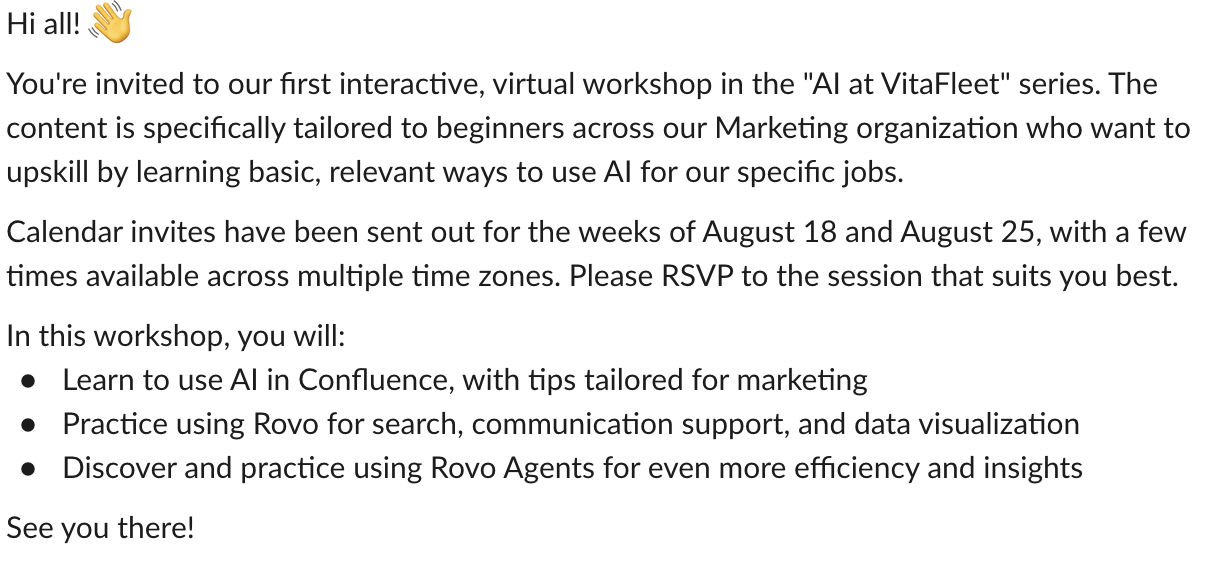
Sample announcement in Slack
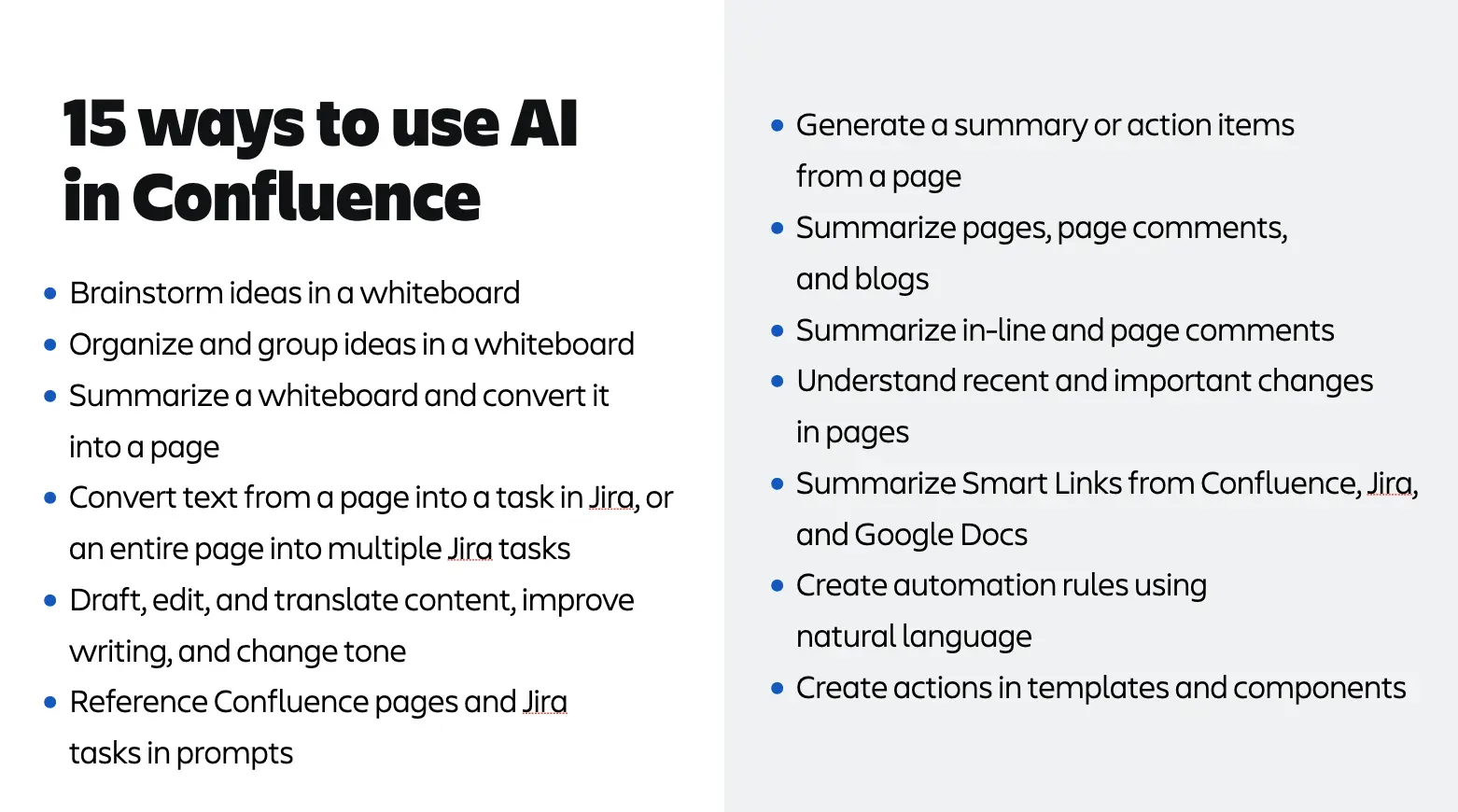
Sample use cases: AI in Confluence