Most teams have already adopted AI in some form. The bottleneck now is orchestration: knowing who’s accountable, what agents are actually doing, and how they fit into your existing process. AI coding tools boost productivity by 10-15%, but the orchestration gap limits teams from realizing AI’s full value (Source: DX).
Agents living outside of where the work happens means more context switching, manual bridging, and accountability blind spots. Jira closes that gap by giving agents first-class citizenship, making them assignable, mentionable, and woven into the workflows your team already uses every day.
At Team ’26 Anaheim, our Jira teams shared a look into what’s possible to bridge the gap between your real teammates and AI agents. Read on to understand how to bring these learnings to your organization and catch the on-demand recording.
The orchestration problem
A year ago, AI helped developers write unit tests or reword a paragraph. Useful, but still a single-player tool. You asked it something, it answered, and you moved on.
In 2026, LLMs can reason through complex, multi-step goals. Agents then execute entire workflows, not just providing answers to individual prompts, and AI task complexity is roughly doubling every seven months.
The problem still stands: most agents still operate in silos, causing developers to lose time they could spend within their workflows. You receive output from a chat window, copy it, and manually integrate it into your team’s workflow. Jira agents eliminate this gap entirely.
Agents as true teammates in Jira
Agents in Jira are AI teammates that live directly in your workspace. They’re assignable, mentionable, and integrated into your workflows just like your real-life teammates. Every agent action is visible and traceable, so accountability is built in from the start of your projects.
The same coordination patterns your team already uses for people now work for agents. Here’s what that looks like across four core capabilities.
1. Assign work to agents
Agents appear in the assignee field alongside human teammates. Assign an issue to an agent, and it receives the work, processes it based on its configuration, and takes actions while keeping the human in the loop — updating fields, adding comments, and transitioning issues. You know exactly which agent is responsible for which project or task.
2. Mention agents in comments
Type @ and select an agent, exactly like mentioning a colleague. The agent reads the full issue context and conversation thread, then responds with relevant information or takes the requested action right in the comment thread. No switching to a separate chat window, no copy-pasting context.
3. Third-party agents
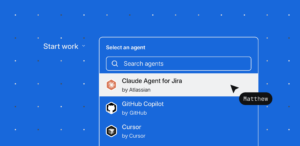
Jira isn’t locked to only Atlassian’s own agents. Connect agents from other platforms, including GitHub Copilot, Cursor, and custom-built agents, through Atlassian’s agent framework. Once connected, those agents get the same first-class citizenship: assignable, mentionable, and workflow-integrated. For a deeper look at how this works across platforms, see Atlassian’s guide to Rovo Agents.
4. Scale agents with automations
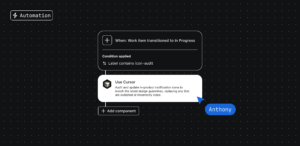
Jira Automation lets you trigger agents from rules or board columns, so agents run at scale without manual handoffs. Conditions and branches let you target only the right issues, and agents act within your existing permissions, leaving a full activity trail.
Set a trigger (e.g. when a work item is created, when a field is updated, on a schedule) and add an action to run an agent. You can also configure a board column so that any issue dragged into it automatically assigns it to a chosen agent.
What this looks like in real workflows
The overnight bug fix
Let’s set the scene: a bug comes in at 5pm on a Friday. The on-call engineer reviews the Jira work item, watches a Loom walkthrough of what the customer is experiencing, and sees that an automation rule has already kicked in.
When the bug was filed, it moved to the backlog, where a coding agent was automatically assigned. The agent analyzes the code path, opens a PR with a fix, and posts its progress directly on the work item. All while the engineer is off for the weekend.
Monday morning, the engineer reviews the approach in the Jira comments and requests a small change by @mentioning the agent: “Can you also add a unit test covering the null payload case?” The agent updates the PR and the engineer approves. When the fix merges and the issue transitions to “Ready for Release,” another automation-triggered agent drafts release notes and posts them to the team’s Confluence space.
The entire loop, triage, fix, review, and release stays visible in one place. The person stays accountable, and the agent does the heavy lifting.
The quarterly planning crunch
A program manager is wrapping up Q2 and needs to pull together a last-minute brief to kick off Q3 planning.
She @mentions a planning agent on the work item, which breaks the task into subtasks and keeps the team informed as things progress. She then assigns individual subtasks to different agents. One subtask, “Gather insights and learnings from Q2,” goes to a custom “Quarterly Briefing Agent” built in Rovo Studio.
Powered by the Teamwork Graph, this agent pulls context across the Atlassian ecosystem: JPD ideas, sprint retros, research, and competitive intel. It also calls third-party skills, pulling analytics from Amplitude and customer insights from Intercom, combining qualitative and quantitative data in one pass.
The output is a consolidated brief with summaries, highlights, and opportunities, with citations linking back to Confluence pages, JPD ideas, Amplitude dashboards, and Intercom conversations. What would normally take days of digging through retros and dashboards comes back in minutes. The program manager can then focus on prioritizing the data to make that call.
The campaign launch pipeline
A growth marketing team runs the same workflow every time a feature ships: send out the launch email, draft the blog post, and update the sales enablement messaging. Each deliverable needs to be tracked as a Jira task under a “Feature Launch” epic.
They configure their board so that when a task labeled “copy content needed” moves to “In Progress,” an automation rule triggers a Content Drafting Agent. Because of how Jira automation rules work, the trigger is specific and only fires on the right issues.
The agent reads the feature’s PRD (linked on the parent epic), pulls tone-of-voice guidelines from Confluence, and generates a first draft posted as a comment with a link to a new Confluence page. Two tasks hit “In Progress” simultaneously. Both agents run in parallel, and the team can see progress on the board without anyone checking in.
The content lead reviews the blog draft, opens the agent session within the work item, and refines it: “Make this punchier. Lead with the customer pain point, not the feature name.” She iterates, accepts the final version, then @mentions the Canva agent to generate a blog header image. Copy and creative, coordinated from one work item.
How to get started
Step 1: Access Rovo Studio and build your agent
Go to the App Switcher, select Studio, then Agents. Browse over 20 out-of-the-box Rovo agents, connect third-party agents, or build a custom one from a template or from scratch. Define a clear, specific purpose, similar to writing a job description. The more specific the instructions, the better the agent performs. Configure what knowledge the agent can access: all organizational knowledge, specific Confluence spaces, specific Jira projects, or a narrower scope.
Step 2: Wire agents into your workflows
For workflow transitions: go to Project Settings, open the workflow editor, select a transition, and add a “Trigger agent action” rule. For team-managed software boards: click the three-dot menu on any board column, select “Add agents,” pick the agent, and the agent’s avatar appears on the column so the whole team can see it.
Step 3: Set up automations
Go to Space Settings, then Automation, and create a new rule. Set your trigger, add a “Use Rovo agent” action, select your agent, and write a prompt. Add a second action using the {{agentResponse}} smart value to tell the system what to do with the output: post it as a comment, send it to Slack, or update a field. Add conditions and branches so agents only act on the right issues.
Step 4: Test before going live
Use the Preview pane in Rovo Studio to test your agent’s responses with a few different prompts. For automation rules, trigger them manually on a test issue first and review the agent session on the work item.
Step 5: Monitor and iterate
Every agent action is logged on the work item. To debug: open Rovo Chat, go to Chat history, find the agent session, and review the raw output. Update the agent’s instructions, adjust automation triggers, add or remove knowledge sources. The best setups are the ones teams refine over time.
What this means for Jira
Jira is evolving from a place where you track work into a place where you orchestrate it, across people and agents together. Agents fit into existing Jira structures rather than requiring new tools or parallel processes. Assignments, mentions, workflows, automation: the infrastructure teams already rely on now extends to AI.
This connects to a broader shift in how Atlassian is building toward a unified system of work. Teamwork Collection brings together Jira, Confluence, Loom, and Rovo into a coordinated platform, and agents are a core part of how that coordination happens in practice.
Watch the full session on-demand »
Want to go deeper? Atlassian’s guide to Rovo Agents covers how agents are built, governed, and deployed at scale.