For more than two decades, Jira has been the place where millions of teams plan and track their work. Now is the time for AI agents to join them, working side-by-side with human teammates to get things done at unprecedented speed and quality.
If you work in an enterprise, you know very well that the secret to orchestrating agents is way more than simply handing work over. It’s about constant iteration until you get the right outcome, and leaving a trail behind to measure the impact.
Enter: agents in Jira, now in open beta, so teams can iterate, agents can execute, and Jira can track it all.
10x the work, without 10x the chaos
With both people and agents on the team, Jira is how you do 10x the work, without 10x the chaos. Instead of agents firing off work for individuals with no way to tie it back to the team’s broader plans and goals, Jira promises the center of gravity for who’s doing what, why, and when.
With agents in Jira, you can:
- Assign work to agents
- @mention agents in comments for further iteration
- Cement agents directly into your workflows
Assign Jira work items to agents, just like you always did to a teammate
An agent shows up as an assignee, with the same fields and patterns your teams already know. Your board now clearly indicates which tasks are with an agent, what state each work item is in, and how it fits into the sprint, release, or incident timeline.
You decide which agents are available to who, where they can be used, and what “done” looks like. Jira keeps track, so agents become accountable members of the team.
@mention agents in comments for ongoing, in-context collaboration
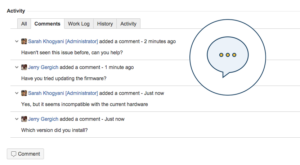
Most agent work today happens in one‑off chats that never make it back to where the work lives and is coordinated. Now, you can pull agents into the conversation right on the work item.
Need a quick summary of a long thread? Deep research on a topic? A proposed fix or follow‑up plan? @mention an agent in a comment, give it a short instruction, and let it respond right there, in context. Then, keep flowing.
The exchange—what was asked, what the agent suggested, and what the team ultimately decided—lives in the work item for everyone with permission to see.
Run agents in Jira workflows
ToDo → Doing → Done just got a major upgrade. Now you can add agents to Jira workflows so they can take on discrete jobs.
For example, you can add an agent directly to your workflow to design a new user onboarding flow: the agent automatically kicks in at an assigned status, drafts the end-to-end flow, then you review, approve, and share the final design for hand-off.
Because agents operate inside Jira’s existing structures, they respect your permissions, project configurations, workflows, and audit trails. Approved agent updates are captured alongside the rest of the work item history, so teams can adopt AI confidently and admins can govern usage centrally.
Jira quickly becomes the place where agents own increasingly meaningful parts of the work, without creating more noise than progress.
All your favorite tools and agents, working together in Jira
Not every team wants the same agent, and not every use case should rely on a single vendor. Atlassian’s open toolchain approach already lets teams plug their favorite tools into Jira and see work from across the stack in one place. With agents in Jira, that now includes agents themselves. Jira becomes the surface where you can see the work and the history for:
- Rovo agents, tuned for teamwork and powered by Atlassian’s Teamwork Graph
- Third‑party and MCP‑enabled agents, many with skills from Amplitude, Box, Canva, Figma, GitHub Copilot, HubSpot, Intercom, and more available through our gallery of MCP servers
Because MCP gives agents an open, standardized way to talk to the tools and data you already use, you can bring your own models and agents, wire them up to your unique tools and data, and shape how those agents behave in your workflows.
All of this runs through Jira’s existing permissions, context, and guardrails. You get deep customization, powerful agents, and stay in the flow, without giving up control.
A new Jira for the AI era
This is the first step in a new Jira for the AI era, and a natural continuation of how Atlassian has always championed teamwork. Between a System of Work purpose-built for human-AI collaboration, years spent developing powerful Rovo agents, and a decades-long commitment to an open ecosystem, Jira is ready to bring it all together.
With you in the conductor’s seat, Jira helps keep projects coordinated so teams can stay focused on the work that matters most.
Be among the first to try agents in Jira
We’re just at the beginning of what teams and agents can do together in Jira, and we want you with us from day one. This open beta is a chance to help shape the future of orchestrating teams of people and AI agents, and we want to listen, learn, and evolve together.
We are rolling this out and it will be available in the coming week. Try the new agents in Jira experience and learn more about how to assign work to agents, @mention them in comments, and run them in workflows. Then let us know what you think.
Explore MCP skills in Rovo
To discover MCP‑compatible skills from your favorite apps and use them with Rovo across experiences like Jira, visit our gallery of MCP servers and start connecting them to your work today.
Watch our new digital series, Rovo at Work, to see product demos and real-world examples of how Atlassian teams use Jira and AI agents together.