Make your Forge connector production-ready with orchestration — recurring schedules, hierarchical fan-out, failure classification, and resilient ingestion.
This is Part 2 of a two-part series on building Teamwork Graph Connectors. Part 1 covered the architecture, module design, and connection lifecycle. This post dives into orchestration — the scheduling, fan-out, and failure handling layer that makes connectors production-ready.
In Part 1, we built a connector that declares its data model, collects admin configuration, and reacts to connection lifecycle events. But a connector that can only ingest data when manually triggered is not production-ready.
Real connectors need to run on a schedule, handle hierarchical data sources, survive transient failures, and communicate health to admins. That is what orchestration provides.
What is orchestration?
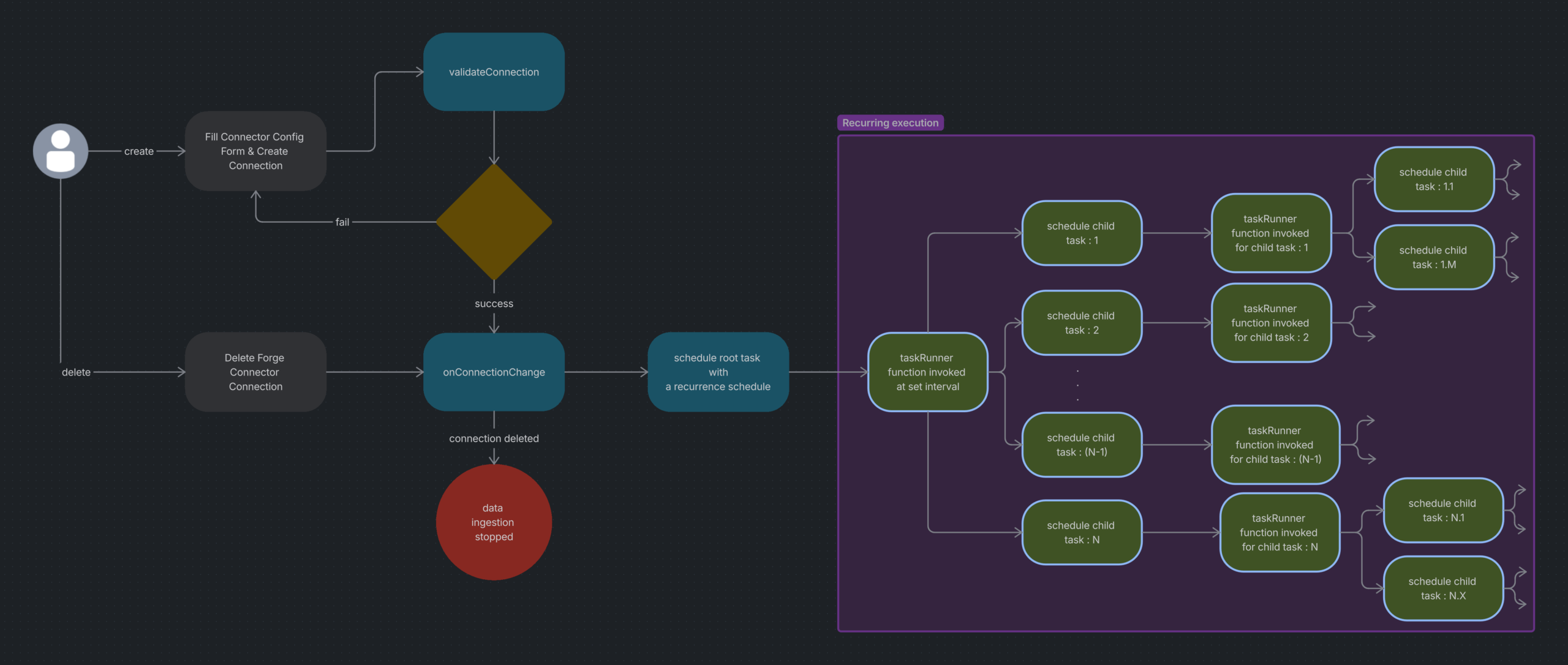
Orchestration is the Teamwork Graph scheduling and execution layer that runs background ingestion work for a Forge connector. Instead of your app trying to ingest an entire data source in a single web request, you describe the work as a graph of tasks and hand them to Teamwork Graph.
The platform then:
- Invokes your
taskRunnerfunction when each task is due to run - Runs tasks on a recurring schedule, such as every 30 minutes for incremental sync
- Lets a task fan out by spawning child tasks — one per sub-folder, page, or shard
- Tracks each task’s status as
successorfailure - Retries or backs off based on the failure reason you report
In short: you write small task handlers, and Teamwork Graph handles when, how often, and in what order they run.
Why you need this
Forge functions have short execution budgets and no built-in concept of resumable, recurring work. Building an ingestion pipeline directly on top of them forces you to solve several hard problems yourself.
| Without orchestration | With orchestration |
|---|---|
| You manage cron or external scheduling yourself | The platform schedules recurring work |
| You try to process large datasets in one execution | You split work into root and child tasks |
| You invent your own retry semantics | The platform responds to failure reasons |
| You stitch state together manually across runs | Task metadata travels with the task |
| Admin visibility into failures is limited | Task status becomes part of connector health reporting |
You should reach for orchestration whenever your connector needs to periodically pull data, walk a large or hierarchical source, survive transient failures, or communicate ingestion health.
Step 1: Declare the task runner in your manifest
Under your graph:connector module, add an orchestration block pointing at the function that will execute tasks.
modules:
  graph:connector:
    - key: my-connector
      # ... datasource, objectTypes, etc ...
      orchestration:
        taskRunner:
          function: taskRunnerFn
  function:
    - key: taskRunnerFn
      handler: index.taskRunner
Step 2: Schedule root tasks on connection creation
Root tasks are typically scheduled from onConnectionChange when the connection is CREATED or UPDATED. Use graph.scheduleOrUpdateTask — it will create a new schedule on first call and update the existing one on subsequent calls if you reuse the same taskId.
export async function scheduleInitialTask(connectionId, taskType) {
  const existingTaskId = await getRootTaskId(taskType);
  const taskId = existingTaskId ?? crypto.randomUUID();
  const result = await graph.scheduleOrUpdateTask({
    connectionId,
    scheduleInterval: {
      value: 30,
      timeUnit: 'minutes'
    },
    task: {
      taskType,
      taskId
    }
  });
  if (result.status === 'ACCEPTED') {
    await storeRootTaskId(taskType, taskId);
  } else {
    throw new Error(`Failed to schedule task: ${result.message}`);
  }
}
The idempotency detail matters: if you reuse the same root taskId, the platform updates the existing schedule instead of creating duplicate schedules. Always look up an existing root task ID before scheduling.
Step 3: Implement the task runner
The taskRunner function is the execution entry point. The platform invokes it with a TaskRunnerPayload containing:
taskId— which task is executingscanId— opaque identifier for this scan cycletaskExecutionId— unique to this specific executionconnectionId— which connection this belongs toconnectorFormFields— the admin-provided configurationtaskMetadata— for child tasks, the metadata you attached when scheduling
Your handler dispatches by task type, performs ingestion work, optionally schedules children, and reports status.
export async function taskRunner(request) {
  try {
    const taskInfo = await getTaskInfo(request.taskId);
    switch (taskInfo.taskType) {
      case types.FORGE_TASK_TYPES.ENTITY_INGESTION_INCREMENTAL:
        await runEntitySync(request, taskInfo);
        break;
      case types.FORGE_TASK_TYPES.USER_INGESTION_INCREMENTAL:
        await runUserSync(request, taskInfo);
        break;
      default:
        throw new Error(`Unsupported task type: ${taskInfo.taskType}`);
    }
    await graph.updateTaskStatus({
      scanId: request.scanId,
      taskExecutionId: request.taskExecutionId,
      status: 'success',
      task: { taskId: request.taskId },
      connectionId: request.connectionId
    });
    return { success: true };
  } catch (error) {
    await graph.updateTaskStatus({
      scanId: request.scanId,
      taskExecutionId: request.taskExecutionId,
      status: 'failure',
      task: { taskId: request.taskId },
      failureReason: classifyFailureReason(error),
      connectionId: request.connectionId
    });
    return { success: false, message: error instanceof Error ? error.message : 'Unknown error' };
  }
}
Step 4: Fan out with child tasks
Many external systems are hierarchical — repositories contain projects, which contain folders, which contain files. Trying to traverse that in one task is a poor fit for bounded execution windows.
Instead, a running task discovers more work and schedules child tasks with graph.scheduleChildTask.
await graph.scheduleChildTask({
  scanId: request.scanId,
  taskExecutionId: request.taskExecutionId,
  connectionId: request.connectionId,
  task: {
    parentTaskId: request.taskId,
    taskType: types.FORGE_TASK_TYPES.ENTITY_INGESTION_INCREMENTAL,
    taskId: crypto.randomUUID(),
    persistentTaskMetadata: {
      folderId: folder.id,
      folderName: folder.name
    }
  }
});
Key points:
- You do not provide
scheduleIntervalfor child tasks, it is run as part of parent/root task schedule. persistentTaskMetadatadefines what slice of data the task owns.- Each child task gets a unique
taskId.
Step 5: Report status and classify failures
Every execution must end with a status update. This is how the platform knows whether the connector is healthy and how to respond to failures.
| Failure reason | When to use |
|---|---|
UNAUTHORIZED | Authentication failed (HTTP 401). Can surface re-auth prompts. |
AUTH_TOKEN_REVOKED | The upstream credential was explicitly revoked. |
AUTH_TOKEN_EXPIRED | The token expired and refresh is required. |
RATE_LIMITED | Upstream rate limit hit (HTTP 429). The platform backs off. |
ENTITY_NOT_FOUND | Referenced resource no longer exists (HTTP 404). |
RETRYABLE_ERROR | Transient error; another attempt may succeed. |
RETRY_LIMIT_EXCEEDED | You have decided to stop retrying. |
NON_RETRYABLE_ERROR | Default catch-all for unclassified errors. |
function classifyFailureReason(error) {
  if (!(error instanceof Error)) return 'NON_RETRYABLE_ERROR';
  const message = error.message.toLowerCase();
  if (message.includes('unauthorized') || message.includes('401')) return 'UNAUTHORIZED';
  if (message.includes('token') && message.includes('revoked')) return 'AUTH_TOKEN_REVOKED';
  if (message.includes('token') && message.includes('expired')) return 'AUTH_TOKEN_EXPIRED';
  if (message.includes('rate limit') || message.includes('429')) return 'RATE_LIMITED';
  if (message.includes('not found') || message.includes('404')) return 'ENTITY_NOT_FOUND';
  return 'NON_RETRYABLE_ERROR';
}
Step 6: Manage state between executions
A good rule of thumb:
- Use
persistentTaskMetadatafor what a task is responsible for — folder ID, shard ID, cursor position - Use app storage (
@forge/kvs) for cross-task bookkeeping — the current root task ID for a connection
export async function getRootTaskId(taskType) {
  return await kvs.get(`root_task_${taskType}`);
}
export async function storeRootTaskId(taskType, taskId) {
  await kvs.set(`root_task_${taskType}`, taskId);
}
export async function deleteRootTaskId(taskType) {
  await kvs.delete(`root_task_${taskType}`);
}
On connection deletion, clean up stored root task IDs:
case 'DELETED':
  await deleteRootTaskId(types.FORGE_TASK_TYPES.ENTITY_INGESTION_INCREMENTAL);
  await deleteRootTaskId(types.FORGE_TASK_TYPES.USER_INGESTION_INCREMENTAL);
  break;
Task types
Use the SDK constants — don’t hard-code strings:
| Constant | Use case |
|---|---|
ENTITY_INGESTION_FULL | Full re-ingestion of all entities |
ENTITY_INGESTION_INCREMENTAL | Delta sync — only changes since last run |
USER_INGESTION_FULL / _INCREMENTAL | User identity sync |
GROUP_INGESTION_FULL / _INCREMENTAL | Group membership sync |
RELATIONSHIP_INGESTION_FULL / _INCREMENTAL | Entity relationship sync |
Always reference via types.FORGE_TASK_TYPES.<NAME>.
The end-to-end lifecycle
Putting it all together:
- Admin configures the connector in Atlassian Administration.
- Your app validates configuration using
validateConnection. - Atlassian establishes the connection and invokes
onConnectionChangewithCREATED. - Your app schedules root tasks for entity and user ingestion.
- On schedule, Teamwork Graph invokes your
taskRunner. - The task fetches data, transforms it, ingests via
graph.setObjects, and schedules child tasks for sub-items. - The task reports
successorfailurewith a classified failure reason. - Child tasks fire on the same schedule, receive their
persistentTaskMetadata, and may fan out further. - On connection deletion,
onConnectionChangewithDELETEDcleans up KVS; the platform handles data removal.
Best practices
- Make scheduling idempotent. Reuse existing root
taskIdvalues — don’t create duplicates. - Keep tasks small. One folder, one API page, one project per task. Fan out the rest.
- Classify failures precisely.
RATE_LIMITEDvs.UNAUTHORIZEDvs.RETRYABLE_ERRORall trigger different platform behaviors. - Always report status. Both success and failure paths must call
updateTaskStatus. - Sanitize logs.
connectorFormFieldscan contain API keys and tokens. - Use SDK task types. Reference
types.FORGE_TASK_TYPESdirectly. - Design for scale from day one. A connector that works for 10 records but fails at 10,000 is not production-ready.
SDK reference
Three methods on the graph export from @forge/teamwork-graph:
import { graph, types } from '@forge/teamwork-graph';
// Schedule (or update) a recurring root task
graph.scheduleOrUpdateTask(request: TaskScheduleRequest): Promise<TaskScheduleResponse>;
// Spawn a child task from inside a running task
graph.scheduleChildTask(request: ChildTaskScheduleRequest): Promise<ChildTaskScheduleResponse>;
// Report success/failure for the current execution
graph.updateTaskStatus(request: TaskStatusUpdateRequest): Promise<TaskStatusUpdateResponse>;
Final thought
For a long time, integrating external data into enterprise tooling meant building a bespoke ingestion pipeline and then repeating the same effort for search, AI, and reporting. Teamwork Graph Connectors with orchestration offer a different model: build the connection once, describe work as tasks, let the platform handle scheduling and retries, and your data lights up across every Atlassian surface.
For Forge developers, that is the exciting part. You are not just syncing data. You are extending Atlassian’s system of work.
Getting started
npm i @forge/teamwork-graph- Build a Teamwork Graph connector — step-by-step tutorial
- Manifest reference: graph:connector — full module schema
- Orchestration for Forge connectors — scheduling, fan-out, and failure handling