Architecture, module design, and connection lifecycle for bringing external data into Atlassian’s system of work.
This is Part 1 of a two-part series on building Teamwork Graph Connectors. This post covers the architecture, module design, and connection lifecycle. Part 2 covers production-grade orchestration — scheduling, fan-out, and failure handling.
Engineering teams rarely work in just one system. Source code lives in one place, incident data in another, customer records somewhere else, and internal knowledge is spread across docs, tickets, and chat. The hard part is not just moving data around. It is making that data useful across the products where teams already work.
That is where Teamwork Graph Connectors for Forge come in.
With Teamwork Graph Connectors, developers can ingest data from external SaaS products, internal platforms, or custom systems into Atlassian’s Teamwork Graph, where it becomes available across Rovo Search, Rovo Chat, Rovo Agents, and Atlassian Analytics. Build the connector once, and the data becomes part of a broader system of work.
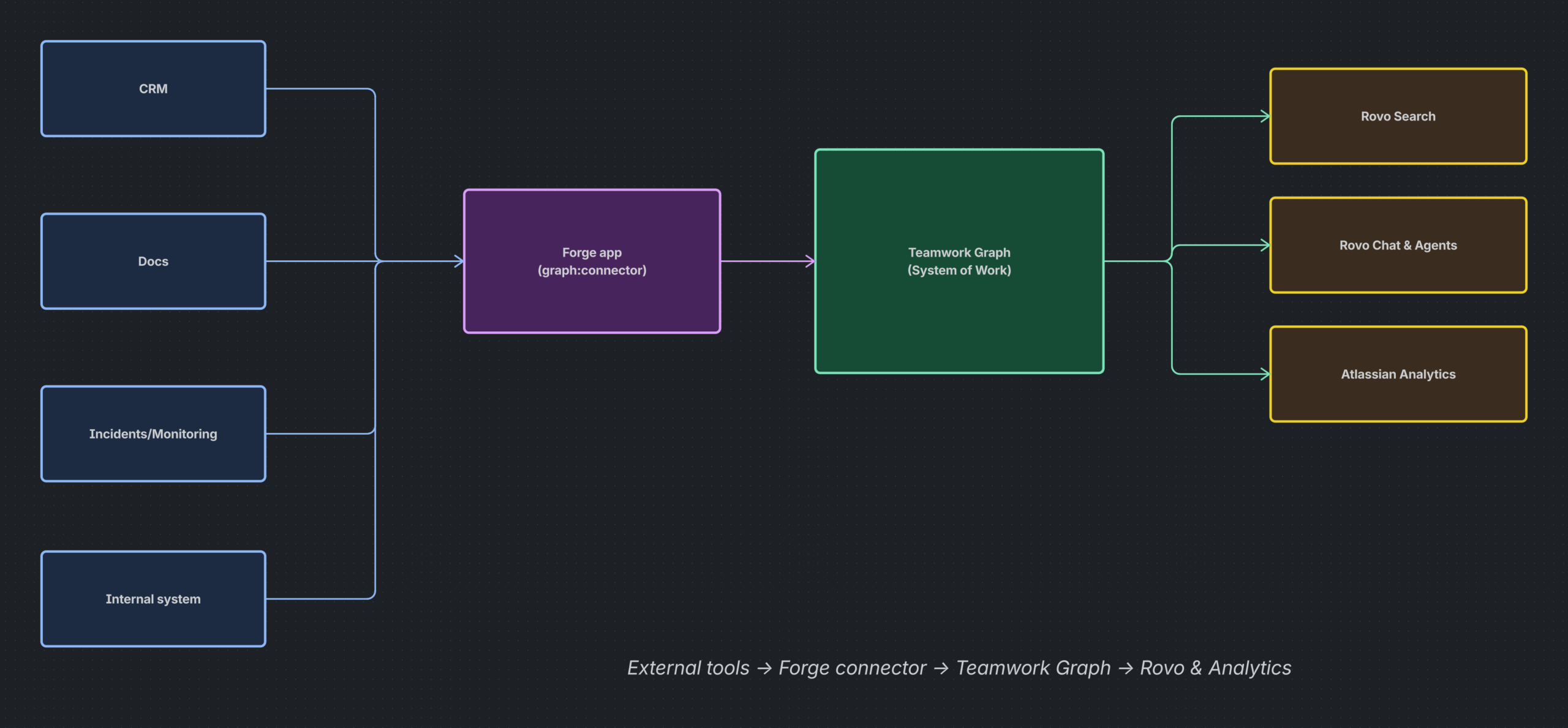
For developers, this means you are no longer building a point integration for one screen or one workflow. You are building a graph-powered data integration that can show up across multiple Atlassian experiences.

What changed for developers?
Teamwork Graph Connectors are now generally available, giving Forge developers a supported way to model external data as Teamwork Graph entities, configure connections in Atlassian Administration, and run recurring ingestion using orchestration.
Why this matters to engineering teams
Most organizations already have critical data outside Jira and Confluence. That data might include feature flags, incidents, repositories, runbooks, contracts, CRM records, customer escalations, design documents, or custom application records. Historically, getting that information into an AI-ready, searchable, connected experience required custom pipelines, one-off ETL jobs, or brittle integrations.
Teamwork Graph Connectors simplify that model:
- Ingest external data once into Teamwork Graph.
- Map it to supported object types so it becomes part of a consistent data model.
- Respect access controls when the source system supports permission replication.
- Make it available across surfaces instead of rebuilding the same integration for search, AI, and reporting separately.
That is a meaningful shift. It turns connector development from a narrow integration task into platform development.
What a Teamwork Graph Connector actually is
A Teamwork Graph Connector is a Forge app module declared with graph:connector. At a high level, that module lets your app:
- Define the external system being connected
- Specify what object types it will ingest
- Collect admin configuration through Atlassian-managed setup screens
- Validate connection details before activation
- React to connection lifecycle events
- Run ingestion jobs and update sync state
Once connected, the ingested data becomes accessible across Atlassian experiences powered by Teamwork Graph.
The developer mental model
If you are building one of these connectors, the architecture is easier to reason about if you think about it in four layers:
- Connection definition — what admins configure
- Ingestion model — what objects, users, groups, or relationships you sync
- Execution model — how and when sync runs happen
- Surfacing model — where the data becomes useful inside Atlassian
The first two come from the manifest and your ingestion logic. The third is where orchestration becomes especially important (covered in Part 2). The fourth is the payoff: search, AI, analytics, and richer context.
The connector module: the contract between your app and the platform
The graph:connector module is the backbone of the integration. It defines what the connector is, how it appears to admins, what data it handles, and what lifecycle functions the platform should invoke.
A typical connector declaration includes:
keyandnameiconsfor light and dark themesobjectTypesto declare the data being ingestedcapabilitiesto describe permission replication, sync fidelity, and incremental sync supportauth.providerwhen end-user auth is requireddatasource.formConfigurationto collect admin configurationdatasource.onConnectionChangeto react to create, update, and delete eventsorchestration.taskRunnerfor recurring task execution
modules:
  graph:connector:
    - key: my-connector
      name: My Connector
      icons:
        light: https://static.example.com/icon-light.ico
        dark: https://static.example.com/icon-dark.ico
      objectTypes:
        - atlassian:document
        - atlassian:feature-flag
      capabilities:
        replicatesPermissions: true
        syncFidelity: mirror
        supportsIncrementalSync: true
      auth:
        provider: myAuthProvider
      datasource:
        formConfiguration:
          instructions:
            - Have your API token ready before starting setup.
          form:
            - key: connectionDetails
              type: header
              title: Connection details
              description: Provide the credentials required to connect
              properties:
                - key: apiKey
                  label: API key
                  type: string
                  isRequired: true
                  isSensitive: true
          validateConnection:
            function: validateConnectionFn
        onConnectionChange:
          function: onConnectionChangeFn
      orchestration:
        taskRunner:
          function: taskRunnerFn
  function:
    - key: validateConnectionFn
      handler: index.validateConnection
    - key: onConnectionChangeFn
      handler: index.onConnectionChange
    - key: taskRunnerFn
      handler: index.taskRunner
Refer the manifest documentation for more details.
Capabilities are not just metadata
The capabilities block is optional in syntax, but in practice it should almost always be present. These values are shown to admins during connector setup, and they shape trust in the connector before it is enabled.
| Capability | What it communicates |
|---|---|
replicatesPermissions | Whether the connector mirrors source-system access controls into Teamwork Graph, or whether all ingested data is visible to the Atlassian workspace. |
syncFidelity | Whether the connector behaves like mirror, upsert, or append, which helps admins understand how closely the graph tracks the source system. |
supportsIncrementalSync | Whether the connector can process only changes since the last run instead of re-ingesting everything each time. |
If these are omitted, the configuration UI shows that the developer did not declare them. For production connectors, that is usually not the message you want to send.
Admin configuration is part of your developer experience
One of the nicer aspects of Teamwork Graph Connectors is that Atlassian owns the admin configuration surface. Your app defines the form schema and validation behavior, and the platform renders the experience in Atlassian Administration and related setup surfaces.
That means you should treat connection setup like part of your API design:
- Ask only for the minimum required fields
- Mark sensitive values appropriately
- Provide useful setup instructions
- Return clear validation errors
- Hide values in edit flows where appropriate
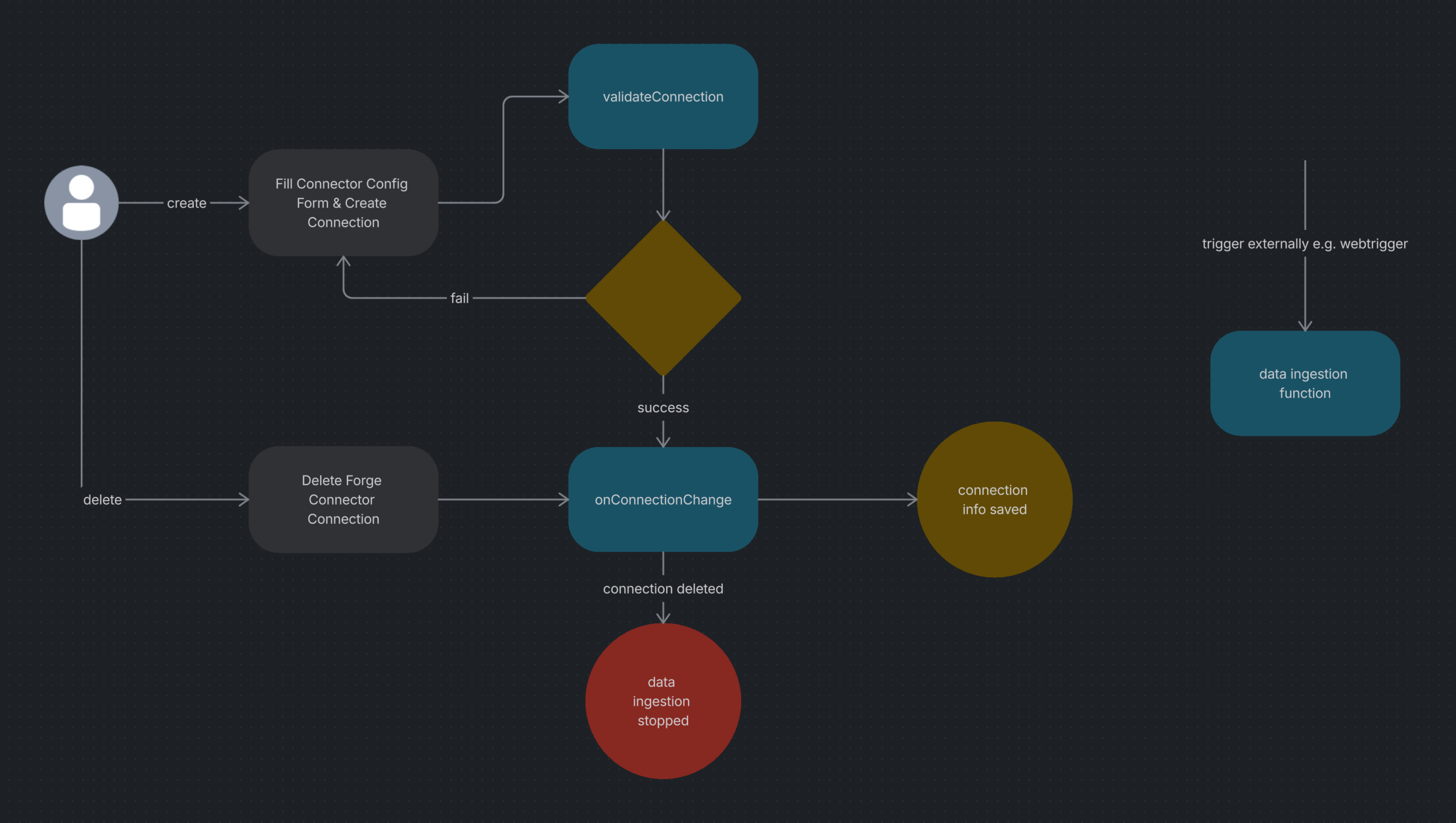
If your connector requires custom configuration properties, validateConnection becomes a key quality gate. Atlassian will only proceed with setup after validation succeeds.
The lifecycle hook that starts everything: onConnectionChange
One of the most important implementation details is that a connector does not begin recurring ingestion by magic. The platform notifies your app when a connection is created, updated, or deleted, and your app is responsible for turning those lifecycle events into scheduled work.
Developers understand the model faster when they see that onConnectionChange is what initializes the schedule, and that taskRunner only starts getting invoked after tasks are actually scheduled.
That means your onConnectionChange function should usually do three things:
- Persist or update connection configuration
- Schedule or reschedule root ingestion tasks
- Clean up local state when the connection is deleted
export async function onConnectionChange(event) {
  const { action, connectionId, name, configProperties } = event.body;
  switch (action) {
    case 'CREATED':
    case 'UPDATED':
      await storeConnectionConfig(connectionId, name, configProperties);
      await scheduleInitialTask(connectionId, types.FORGE_TASK_TYPES.ENTITY_INGESTION_INCREMENTAL);
      await scheduleInitialTask(connectionId, types.FORGE_TASK_TYPES.USER_INGESTION_INCREMENTAL);
      return { statusCode: 200 };
    case 'DELETED':
      await cleanupConnectionState(connectionId);
      return { statusCode: 200 };
    default:
      throw new Error(`Unsupported action: ${action}`);
  }
}
This is the real handoff point from configuration to ingestion — and the bridge to Part 2 of this series.
What’s next
At this point you have a connector that declares its data model, collects admin configuration, validates connections, and reacts to lifecycle events. But the real engineering challenge begins when you need to run ingestion reliably at scale — recurring schedules, hierarchical fan-out, retries, and failure classification.
That is exactly what orchestration solves, and it is the focus of Part 2.
→ Continue to Part 2: Production-Grade Ingestion with Orchestration
References
- Teamwork Graph connector manifest reference
- Build a Teamwork Graph connector
- Orchestration for Forge connectors
Install the SDK: npm i @forge/teamwork-graph