


New features – capacity planning, project budgeting, custom reporting, and more – all in one place, connected to the work and ready for AI to act on.
Every team plans – who has capacity, what things cost, whether the work is on track. But your capacity plan, budget, status updates, and tasks all live in different systems. Plans change. And keeping every system in sync is impossible: the spreadsheet goes stale the moment you share it, the budget page hasn’t been updated in a week, and the status deck is already wrong.
New features in Jira – individual capacity planning, formula fields, and space insights – bring the work, the capacity plan, and budget calculations, and the reporting together in one system, helping your team deliver on time and on budget.
With everything in one place, your plans stay current, your teams stay aligned, and Rovo and your AI tools have access to complete context to flag risks, surface what matters, and launch projects that drive real impact.
Team leads: know who’s overloaded before it becomes a fire drill
Use the Capacity view to see each team member’s bandwidth in one place: who’s working on what, how much availability they have, and where someone’s stretched too thin. You assign time in hours, percentages, or days, and account for leave, on-call, and operational work alongside real project allocations.
No more asking “does my team have bandwidth?” or copy pasting into side tools – when capacity and work live in the same system, availability is always up to date, even when workstreams change.
What you can do:
- See who’s overloaded before it becomes a missed deadline or a burn out conversation
- Plan in hours, percentages, or days
- Plan work across multiple spaces without losing track of who’s got room
- Account for leave, on-call, and keep-the-lights-on work alongside project-specific time
- Use Rovo to update your plan in natural language – add people, shift allocations, or make bulk changes without editing cell by cell
- Import an existing spreadsheet – Rovo analyzes the data and maps allocations that you can review and accept

Ask Rovo.
Use /manage-capacity-plan to create, update, or bulk edit your plan in natural language – like “Add Jordan to Summer Campaign for 60% through this month”, then review and accept the change.
Do the math where the work lives
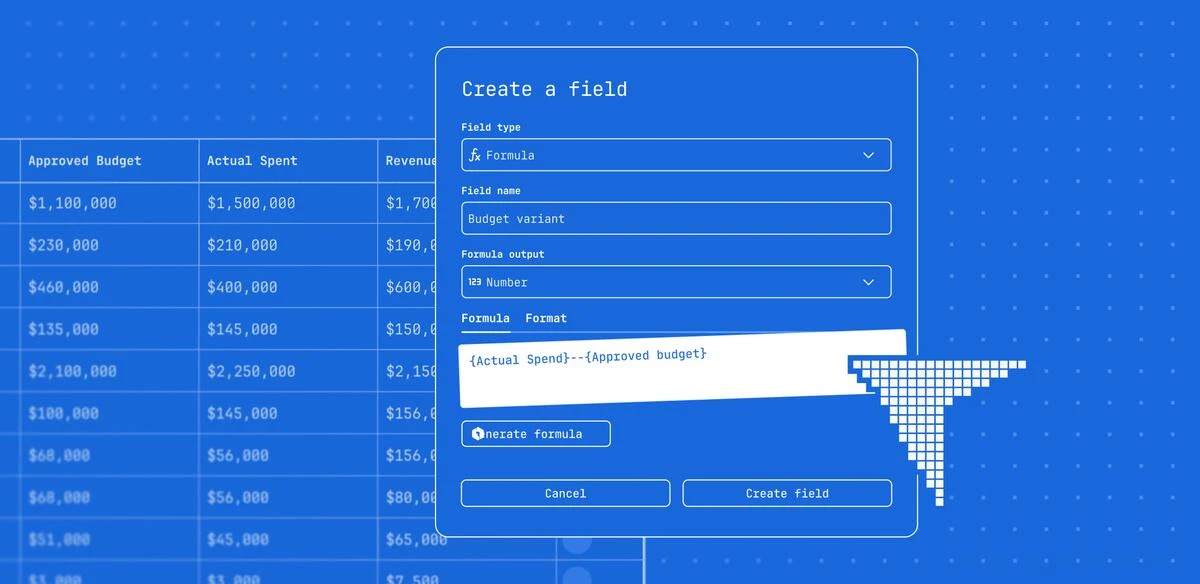
Formula fields are a new custom field type that runs calculations directly on work items. Describe the math or business outcome you want – like “show which projects have actual costs that exceed 80% of budget” – and Rovo writes the formula for you. Or set one up yourself. Either way, results show up in dashboards, they’re searchable in JQL, and you can use them to trigger automations.
Some things teams are already using it for:
- Project budgeting: Approved budget minus actual costs, recalculated automatically as work gets logged
- Prioritization: turn data into dynamic scores and insights, helping teams prioritize the work that matters most
- Campaign ROI: Revenue minus cost, always current with no export required
- Time-to-hire: Days between application and offer date, auto-calculated on every hiring work item
- At-risk flags: A formula that flags overdue items and can trigger automations or surface them in dashboards
Ask Rovo.
“Which campaigns are over budget this quarter?” – Rovo queries your formula fields and surfaces the answer. Or if you want a visual, navigate to the Reports view, describe what you need, and Rovo builds a visual for your dashboard that pulls from the Budget Variance field.
Dashboards that don’t go stale
Space insights give every Jira space live, custom dashboards connected to the work itself – no exports or manual updates. Just tell Rovo what you want to see – “Show me work completed vs. created this month” – and it builds the chart. Click Insights and Rovo explains the trend in plain language. Because the dashboard lives where the work lives, it’s always current.
What space admins can do:
- Build a dashboard tailored to your team’s metrics – delivery, workload, blockers, fields – without query syntax
- Generate charts with Rovo in natural language and pin them to your space
- Customize the layout of your chart
- Configure default dashboard filters to standardize the initial view for your team
What teams can do:
- Get insights on any chart for plain-language read on trends and what’s driving them
- Drill into a chart segment to see the underlying work items directly
- Filter the dashboard down to what’s relevant for them – work assigned to them, work due today, etc
- See the metrics that matter without requesting a side report or static status update – the data’s always there and always current
Ask Rovo.
Want to build a new visual for your dashboard? Just ask Rovo to build it for you. Then, click Insights for plain-language summary of what’s happening in the data.
When your plan, your budget, and your reporting all live in the same place, three things happen: you stop maintaining side systems, your team stops asking you for updates, and your AI tools get the full context they need to be genuinely useful.
That context compounds. Capacity plans, budget formulas, and project data that live in Jira feed the Teamwork Graph – the connected layer across your work, your people, and your tools – that powers Rovo. The more teams adopt it across your org, the better the picture gets for everyone. That’s what it means for Jira to be where your work actually lives.
More ways to work smarter in Jira
Capacity planning and formula fields are two recent additions, but they’re part of a broader set of updates. Some other highlights:
- Rovo across the board : Rovo can update your capacity plan, create work items from a conversation, build a custom workflow, and even write your formulas for you.
- A better way to view work: If you’re used to managing work in spreadsheets, our List view has been refreshed for cleaner inline editing and easier grouping/filtering to see what’s priority. Save any view and share it directly with stakeholders so everyone’s working off of the same information.
- Business team templates: Pre-configured spaces for marketing campaigns, hiring, budget tracking, and event planning with work types, fields, and status already set up so you’re not starting from scratch. Want to match your team’s exact language? You can edit work types so they fit how you work – not epics and bugs but workstream and deliverable.
Get started
All of these features are available now for Jira Cloud customers.
- Open any Jira space and go to the Capacity view to get started with Individual Capacity Planning (available on Premium and Enterprise, for all space types) → Plan individual capacity for your team
- Add a Formula field in your space settings, or just describe your calculation to Rovo → Create a formula field
- Build a custom space dashboard on the Reports view → What are space insights?
- Browse templates for business teams in the template gallery → Jira Templates for Every Team


