


AI coding assistants were only the start. AI is now showing up across every part of the software delivery lifecycle: planning work, writing code, reviewing pull requests, and helping with incidents.
In Atlassian’s 2026 AI SDLC study, 94% of engineering leaders said their teams are already using AI, yet only 6% said they have the systems to scale and govern it.
Atlassian recently shared a playbook for building an AI-native SDLC. The CliffsNotes version: strengthen the foundation – context and measurement – then rethink the everyday work of planning, design, development, review, and maintenance. Rather than layering AI onto the old process, the playbook shows teams how to build a faster operating model where people still set direction, make judgment calls, and decide what “good” looks like.

This week at Team 26 Europe, Atlassian is turning that playbook into shipped product. New capabilities across Jira, Confluence, Loom, DX, and Jira Service Management connect agent work to the Teamwork Graph; orchestrate work across planning, development, and review; and give leaders a clearer view of what is actually helping. People apply judgement, agents execute, then the team learns from the loop and tightens it up.
It all starts with context
AI agents need good context, or they get very confident about the wrong thing. Atlassian’s Teamwork Graph connects code, docs, decisions, standards, 80+ third-party sources in one permissions-aware layer. That gives agents more of the system understanding that your team has built up over years.

Reported impact
When an agent has the Teamwork Graph as its context layer, you get materially better results. In our internal testing, we saw up to a 44% improvement in answer quality. And on top of better results, agents used up to 48% fewer tokens, without sacrificing speed.
Now Shipping: Code Context
Code Context brings large-scale, multi-repository codebase understanding into the Teamwork Graph. Developers and AI coding agents can reason across source code and the work connected to it.
How it works
- Understands code at scale: Indexes code across connected Bitbucket and GitHub repositories, mapping files, symbols, classes, functions, and their relationships.
- Finds the right context: Combines lexical and semantic search to answer exact code lookups and natural-language questions across repositories.
- Connects code to the work: Grounds answers in related Jira work items, Confluence pages, Loom videos, and information from connected tools such as Slack and Google Drive.
In the side-by-side comparison below, both agents understand the likely technical problem, but the one using Code Context (right) then turns that hypothesis into a verified system diagnosis by understanding the global change.
Once teams have that context foundation, they can start revamping each part of the SDLC, starting with planning.
Planning

Planning: The transformation
From: manual planning with scattered context
To: AI-assisted requirements grounded in customer, organization, and codebase context.
Planning shouldn’t begin with a blank page. Teams need the intent, trade-offs, risks, and owners in view before work gets split.
Shipping Soon: Planner
Planner helps teams practice spec-driven development by turning a rough idea into a clear, shared plan before humans or agents start building.
How it works
- Turns ideas into execution-ready plans: Start with a prompt and Planner asks clarifying questions to define scope, constraints, success criteria, and open decisions.
- Grounds planning in real context: Pulls from Teamwork Graph signals such as Jira work items, Confluence docs, Slack messages, related code via Code Context, and prior decisions.
- Creates a live Confluence plan: Produces a structured plan or spec with objectives, options, recommended path, risks, dependencies, owners, and review questions that stakeholders can comment on and refine together.
- Makes plans agent-ready: Breaks an approved plan into sequenced Jira work items with descriptions, acceptance criteria, repo links, dependencies, and enough context for people and AI agents to execute safely.
Design
DESIGN: The transformation
From: static mockups and handoffs that make every visual change depend on engineering
To: designers building live prototypes, generating UI code, and fixing bugs directly.
In the AI-native SDLC, design moves into the work loop instead of isolated, static handoffs. Live prototypes replace static frames. Designers and PMs can push UI updates and fixes directly rather than routing every spacing tweak through an engineer. Video feedback from the team can become a prompt. That saves time, but it also raises the bar for product judgment. Faster changes are only better when the team still protects quality, accessibility, and intent.
Now Shipping: Record for Agent
Record for Agent helps designers move from static handoff to show-and-tell development. Instead of turning a prototype walkthrough, visual feedback, or UI bug into a long written spec, designers can record what they mean in Loom and turn that video into a structured prompt that AI agents can use to generate UI code, build prototypes, or create context-rich work items.
How it works
- Captures the design intent: Record a walkthrough of a Figma prototype, live product flow, or design review while narrating what should change, why it matters, and what the user should experience.
- Preserves visual context: Loom tracks clicks, URLs, screen changes, and keyframes so the agent can understand exactly which component, state, or interaction the designer is referring to.
- Calls out details with Magic Pen: Users can circle a button, point to spacing issues, cross out unwanted elements, or mark the part of the screen that needs attention while recording.
- Turns the video into an agent-ready plan: Loom converts the recording into a structured action plan that can be handed to Jira Coding Agent or a third-party coding agent so teams can prototype, generate UI code, or file implementation work with less ambiguity.
Development
DEvelopment: The transformation
From: Planning and logging work upfront, measuring progress by delivery speed.
To: Adapting to real-time signals, with AI agents using live context to build and iterate faster.
Developers already do serious work in Cursor, Claude Code, Codex, and Copilot. However, too much of that work has stayed trapped inside individual terminal windows. An AI-native SDLC brings bring those agents to where the work already lives. Now teams can connect even more coding agents directly to Jira, so an agent can pick up a work item, build against real context, and report back right on the ticket.
Now Shipping: Support for Even More Coding Agents
Jira now works with a growing roster of third-party coding agents: Cognition’s Devin, Factory, and Warp are all available on the Atlassian Marketplace today, with OpenAI Codex coming soon. Teams can bring the agent they already trust into Jira without copy-pasting context between tools.
How it works
- Assign work to an agent: Pick a coding agent in a work item’s assignee field, and it starts a session using the summary and description as the task, then opens a pull request for review.
- Invoke it in context: @mention the agent in a comment with specific instructions. It treats your comment as the task and the work item as context, then reports progress back on the ticket.
- Wire it into automations: Connect Jira events – issue created, labeled, status changed, assigned, or commented – as triggers, so work moves to the right agent automatically with human approval at the checkpoints you choose.
- Track local agent sessions (coming soon): Bring agent sessions from IDEs and terminals into Jira, so context carries forward and agent activity is governed alongside human work.
Because each agent plugs into the same Jira surfaces, teams can pick the right agent for the job and change it over time without rebuilding their workflow around any one tool.
Reported impact
For feature development in existing codebases, Atlassian engineers estimate their velocity increased by more than 7x with AI-native processes. A recent spec-driven development pilot offered a glimpse of what’s possible, enabling a team of developers to ship a multi-month roadmap in a matter of weeks.
Review
Review: The transformation
From: slow, inconsistent reviews that catch issues late
To: agents applying shared standards in minutes so humans can make better-informed decisions.
Reviews are where speed can either help or hurt. With engineering standards defined centrally and carried in context, agents can run the first pass across new and existing code through AI Review in Jira or third-party agents like Cursor. Routine feedback lands faster, while humans stay responsible for the calls that need judgment.
Shipping Soon: Interactive PR Reviews with Loom
Agents can record Loom walkthroughs of pull requests in Bitbucket, so reviewers can quickly see what changed and whether the output meets the original requirements.
How it works
- Generate a guided walkthrough: The agent turns the pull request into a short narrated flow that highlights the intent of the change, the most important files, key implementation decisions, and any risks or edge cases reviewers should inspect.
- Create context where reviewers already are: When an agent opens or updates a Bitbucket pull request, it can attach a Loom walkthrough directly in the PR description so the explanation sits next to the linked Jira context and review thread.
- Review the change faster: Reviewers can watch the Loom first to quickly understand what changed and why, then compare it with the Jira ticket or original request to spot missing work or unexpected behavior. They can then leave comments, request changes, approve the PR, or ask the agent or author questions about anything the video brings up.
Maintenance
Maintenance: The transformation
From: reactive, manual maintenance that creates technical debt
To: proactive, AI-assisted operations that automate triage, root-cause analysis, and routine fixes.
The person clearing a feature flag or chasing a regression is often not the one who last touched the code, and as agents take on more of that routine work, teams need to see and trust what’s happening rather than piece it together after the fact.
Shipping Soon: Agent Sessions
Agent Sessions makes agent work visible, traceable, and reusable in Jira. Local and cloud agent sessions automatically connect to the right work items, so teams can see what agents are triaging, diagnosing, and fixing alongside human work, without chasing manual status updates. Each session carries its context forward through the Teamwork Graph, so the next cleanup, root-cause pass, or routine fix starts with the goals, changes, decisions, and related work already in hand.
How it works
- Start anywhere: A developer starts or continues an agent session from the tool they already use, such as Slack, a plan, a background loop, a local IDE, or terminal.
- Capture in real time: Jira captures the session as it happens and links it to the relevant work item. If an agent starts digging into an issue before a ticket exists, the developer can drag the session onto the board and Jira creates the work item from its context.
- See team-wide activity: The Agent Sessions view shows all in-flight maintenance and operational work across the team, with filters for work that needs input, work ready for review, and work that’s done.
- Connect the context: The session record captures the goal, changes, pull request, decisions, and steering conversation, then connects them to related repos, docs, work items, and prior fixes in the Teamwork Graph, so root cause isn’t re-litigated every time.
- Improve every run: Future runs reuse that connected context, so agents don’t start cold on recurring maintenance. Teams get higher-quality fixes while saving tokens and time.
Reported impact
At Atlassian, nearly half of feature flags are now automatically cleaned up with Jira Coding Agent and automation.
It all ends (and starts again) with measurement
Usage numbers can tell leaders whether people are trying AI. They do not tell leaders whether AI is saving time, improving quality, raising costs, or subconsciously annoying everyone. Teams need feedback and metrics that show where AI helps, where it gets stuck, and where the process needs work.
Now Shipping: DX AI Measurement solution
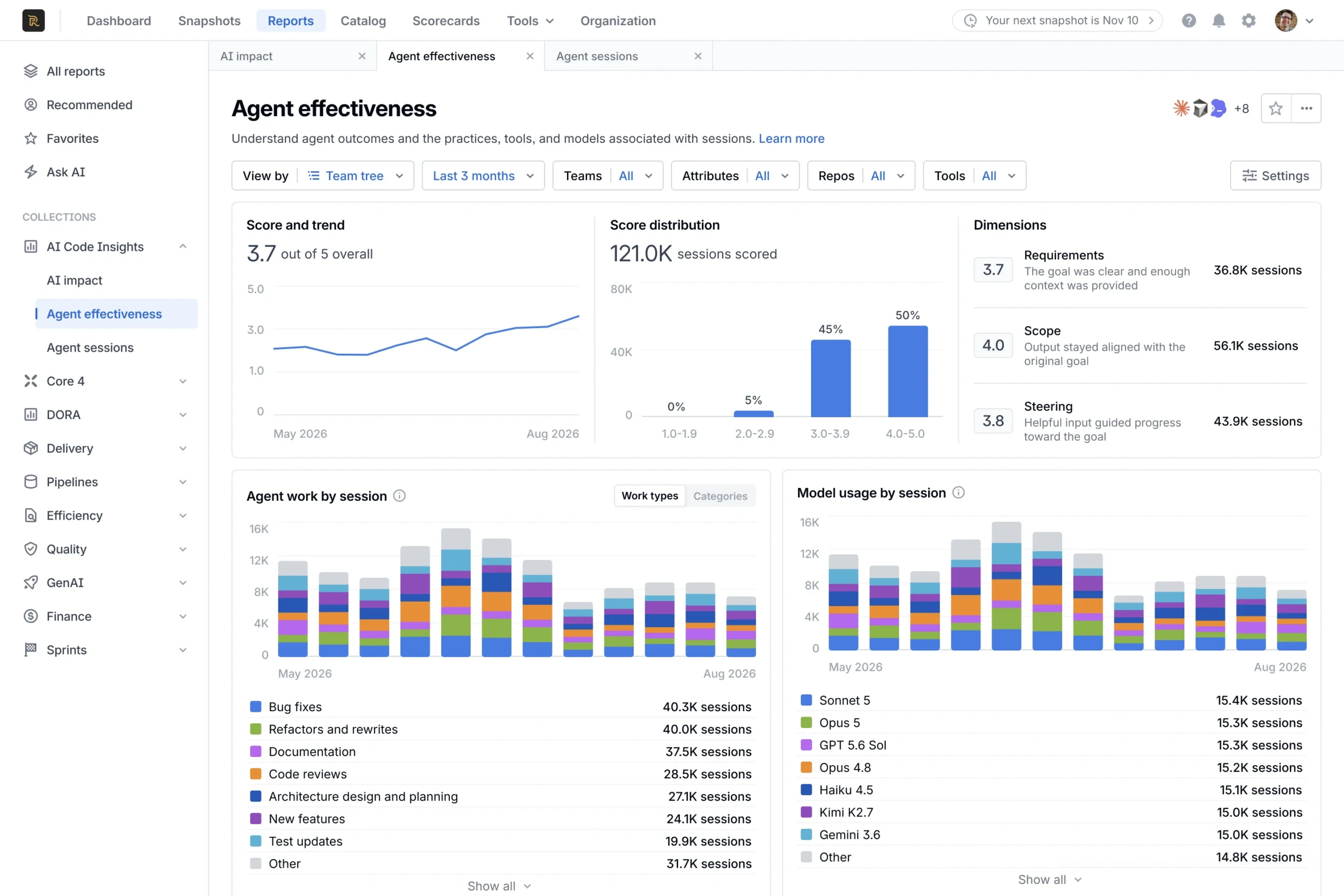
DX AI Measurement solution helps engineering leaders see whether AI coding tools are creating measurable value and where teams need support. It connects AI usage to delivery outcomes, benchmarks ROI against relevant peer groups, and turns individual agent sessions into practical coaching signals.
How it works
- Outcome measurement: DX AI Impact reports connects AI activity to engineering outcomes leaders care about, including throughput, quality, adoption, and friction.
- ROI benchmarking: Teams can compare their AI return on investment against anonymized peer groups by geography, company size, and industry.
- Agent session scoring: Agent Experience evaluates individual sessions across requirements clarity, human steering, scope, context quality, and model fit.
- Model-fit auditing: Leaders can see where expensive models handled low-complexity work and tune usage for better efficiency.
Build the operating model for AI-native delivery
AI-native SDLC isn’t just about the AI tools. It requires the adoption of a new operating model and mindset to change how teams plan, build, govern, and learn. The teams that pull ahead will pair governed agent execution with connected context, clear accountability, and continuous measurement, and they will keep adjusting when the first version is messier than the slide promised.
To learn more about how you can bring your team into the AI-native SDLC era, visit jira.dev.
Explore more at Team ’26 Europe
We announced these updates at Team ’26 Europe, our annual user conference, along with the rest of this year’s news. The sessions are available live and on demand if you want to go deeper.
Availability: Code Context is gradually rolling out to paid Atlassian customers through open beta. Record for Agent is available now in open beta. Planner, agent loops and AI Review are available in private early access. Agent Sessions and Interactive PR Reviews in Loom are in closed EAP. DX AI Measurement solution is now generally available.


