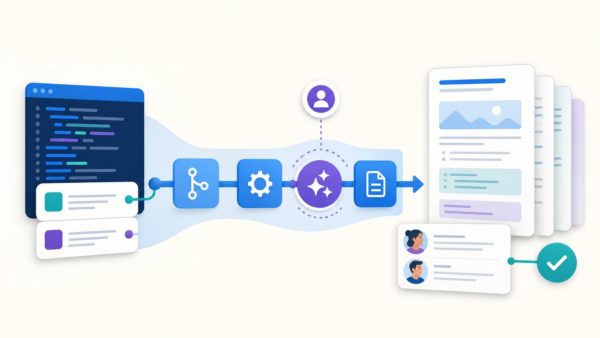
Bitbucket Pipelines has always been an engine for automating more than just CI/CD, but today, Pipelines takes a first step towards a full agentic automation platform for all the manual, tedious, repetitive work that happens before and after code creation.
You’ve probably seen the stat: Development teams spend 84% of their day doing things other than building features. A lot of this work is:
- Toilsome tasks: Constantly updating documentation to keep up with changes in code
- Tech debt repayment: Cleaning up feature flag code after a feature is released
- Troubleshooting automation issues: Reading through logs to understand why a build failed
This work matters, but it’s not very fun. It’s often high-effort but low-value; manual, repetitive, and easy to de-prioritize in the moment. Sometimes we skip doing it entirely, but it always turns into tech debt and you pay the price later.
Agentic Pipelines is a new way to delegate those tasks to AI, orchestrating a fleet of agents to automatically, and routinely, handle the repetitive chores so you can get back to solving the fun, cool problems.
Why Agentic Automation for this kind of work?
Many teams already rely on tools like Bitbucket Pipelines to automate CI/CD workflows, with Bitbucket acting as the central orchestration platform.
Agentic Pipelines takes that model and extends it beyond the core dev loop of “build, test, deploy.” Think about all the tasks you could continuously automate that are straightforward but time-consuming, easy to defer until later, and most importantly, painful when they pile up.
A concrete example is maintaining documentation. Keeping a repo’s README or knowledge base in sync with reality involves:
- Keeping the project description aligned with how the code actually works
- Updating installation and configuration instructions as the setup changes
- Refreshing examples or API docs (and suffering the compounding pain when they’re out of date)
- Maintaining contribution guidelines, ownership info, and code style references
- And all the other “I’ll fix this later” updates that never quite happen
You can try to script your way out of some of this, but bash and Python won’t get you very far for tasks like:
“Read these changes and update the docs appropriately.”
Scripts for such tasks are brittle, hard to maintain, and still don’t handle nuance well. The usual alternatives, such as rotating “docs duty” every sprint, or hoping people remember to manually paste diffs into an AI tool, aren’t great and don’t scale.
The new, agentic option: a pipeline to keep READMEs in sync
Instead of manually updating a repository’s README (whether by hand or with ad-hoc agentic prompts), you could use a pipeline that updates the README on every merged PR, or on a regular schedule (eg weekly).
How? Simply define an agentic step in your pipeline YAML that runs on a schedule (weekly, monthly) or is triggered by an event (on PR raise, when a PR is merged). This agent can then:
- Examine recent code and repo changes, running as part of a normal pipeline
- Raise a PR proposing README updates
- Explains what it checked, even when it decides no changes are needed
- Route those changes to the right reviewer/owner for approval before merge
Here’s what this looks like in bitbucket-pipelines.yml:
image: "atlassian/default-image:5"

definitions:
  agents:
    readme-docs-updater:
      prompt: |
        You are an AI assistant helping maintain documentation for this repository.

        Task:
        - Look at all code changes between $BITBUCKET_BRANCH and $BITBUCKET_PR_DESTINATION_BRANCH.
        - Identify any parts of README.md (and other top-level docs) that are now inaccurate,
          missing, or could be clarified based on those changes.
        - Update the relevant documentation files with concrete, minimal edits.
        - Commit the changes to a new branch.
        - Open a pull request back to $BITBUCKET_BRANCH with a summary of what changed.
        - Add $BITBUCKET_STEP_TRIGGERER_UUID as a reviewer.

        Constraints:
        - Preserve the existing structure and tone of the docs.
        - Only change sections that are clearly related to the code diff.
        - If no docs changes are needed, still create a PR with a short explanation
          of what you checked.

pipelines:
  custom:
    update-readme-docs:
      - step:
          name: Update README and docs with latest code changes
          auth:
            system:
              scopes:
                - write:repository:bitbucket        # push commits / create branches
                - read:pullrequest:bitbucket        # read existing PR context
                - write:pullrequest:bitbucket       # open/update PRs
          script:
            # (Optional) install any extra tooling you want the agent to use
            - apt-get update && apt-get install -y git

            # Fetch more history so the agent can see older commits if needed
            - git fetch origin --deepen=200

            # Run the agentic step
            - agent: readme-docs-updater

triggers:
  # Example: automatically run when a PR is updated against main/master
  pullrequest-push:
    - condition: BITBUCKET_PR_DESTINATION_BRANCH == "main" || BITBUCKET_PR_DESTINATION_BRANCH == "master"
      pipelines:
        - update-readme-docs
Examples you can try today (public repos included)
Agentic Pipelines opens up many possibilities by combining AI agents with centralized, scalable workflow automation. All you have to do is define an agent, embed it in the pipeline, and include the following:
- What the agent should do
- The constraints it must follow
- When it should run
- How results are surfaced (PRs, comments, Confluence pages, etc.)
Beyond updating the README, here are 5 more examples you can use today (links to public repos included):
You don’t need to be an existing user of Bitbucket Pipelines. All you need is a Bitbucket Cloud repo and a license of Atlassian’s Developer AI agent Rovo Dev.
Using Claude Code? Support for third-party CLIs like Claude Code is coming very soon! Stay tuned!
Automatically identify and fix security vulnerabilities
Raise the bar on “shift-left security” even further. For Java code and Maven dependencies, embed an agent in a CI/CD pipeline that reads a Snyk code insights report, triages any vulnerabilities, and raises a PR with suggested fixes.
Clean up feature flags
Have you ever “forgotten” to remove feature flags after releasing the feature to production? Don’t wait until they pile up and spend a week cleaning them up. Pay down that tech debt immediately and automate an agent that raises a PR to:
- Identify all feature flag references across the codebase
- Consolidate to GA behavior
- Remove legacy feature flag code
- Update tests to remove assertions for removed flags
- Verify that the code still runs correctly
Generate release notes as part of a CI/CD pipeline
Instead of trawling through git history and trying to remember what actually shipped, embed an agent to analyze code commits between version changes, automatically categorize them (as features, bug fixes, security fixes etc.), and then generate comprehensive release notes in markdown format
Generate a PR summary
Reviewers often struggle to understand large PRs quickly, and even quality PR summaries (which can take a long time to write) can still miss breaking changes, important context, or don’t always make it clear what exactly changed.
With Agentic Pipelines, you can embed an agent that runs automatically on every PR creation and update that:
- Analyzes the files changed in a pull request
- Categorizes changes by intent (features, refactoring, bug fixes, tests, config, docs)
- Calculates impact and risk levels
- Detects breaking changes and major modifications
- Generates a comprehensive markdown summary
- Posts the summary as a PR comment
Ensure quality test coverage
Many teams struggle to keep test coverage high and meaningful. Coverage reports get generated but rarely drive action, leaving critical paths—like controllers, services, and exception handling—untested. Writing good tests is slow, often de‑scoped, and there’s usually no clear framework or goals for improving coverage.
Automate test coverage and quality with an agent that identifies low-covered or untested areas of the code base and raises a PR that generates additional tests to close coverage gaps.
Try Agentic Pipelines, now in open beta
These are just a few of the ways you can use Agentic Pipelines, and we’re working on many more examples internally, including:
- Even more powerful pipeline troubleshooting. Currently, you can use Agentic Pipelines to troubleshoot failed pipelines and even automatically fix them (see how). Coming soon, you’ll be able to even check whether a pipeline test failed because of a code change, or because the test is historically unreliable (ie flaky)
- Routinely check for irrelevant code, such as feature flags post feature-release, or tests that are no longer applicable (perhaps due to a code refactor)
- Check PRs for code changes that could affect other downstream repositories
- and so much more
Agentic Pipelines is now in open beta, and you can learn about all the ins and outs in our documentation here.
Using Claude Code? Stay tuned; support for third-party CLIs like Claude Code is coming very soon!
We’re really excited to see the ways you’ll use Agentic Pipelines. We’ve given our developers a lot of hours back per week with just the above examples (and a few more we’ll discuss in the coming weeks), but we know that some of the best and most innovative use cases will come from you, and we can’t wait to see what you build.
See you in the open beta!