Problem
In Atlassian, we ship every new feature and code path behind a feature flag to stage rollouts safely and learn quickly about problems.
As products mature, feature flags accumulate. Each successful rollout leaves behind dead code paths, stale configuration, and follow‑up tickets to “clean up the flag later”. With company‑wide requirements for feature flag coverage, this work is important, but it’s also highly repetitive and easy to postpone.
One of my services has managed 160 feature flags since inception, with 40 created in the past 60 days which showcases how feature flags became daily feature work for developers. Especially in era of AI, this rate still increases.
Each Feature Flag has a Work Item for cleanup. Engineers must track these Work Items to remove dead code and unnecessary complexity that cause context switching and interrupt new feature development.
Given interruptions and Sprint planning, our cleanup rate lagged behind the introduction of new feature flags. Consequently, we sometimes in our Sprints, had to prioritized cleanup over tasks.
So, with our time allocated time for developer productivity, we have decided to do something with it, with help of Rovo Dev!
The first iteration
As with every new flow or experiment we wanted to start from the basic flow and improve it further in next iterations. So the first obvious one that already some of my Teammates were using, is to just use directly Rovo Dev CLI.
Why “generic AI prompts” weren’t enough
Most AI coding tools ship with a generic “feature flag cleanup” capability. In practice, that wasn’t good enough for us.
Our first experiments with default prompts had poor effectiveness: the AI often missed critical call paths, broke tests, or left configuration inconsistent. Developers quickly reached the point where fixing the AI’s output was more work than doing the cleanup manually. In other words, the tooling discouraged automation.
The main problem: the prompts didn’t understand our reality:
- Our specific feature flag framework and class names
- How flags are wired through our services
- Repository‑specific test patterns and conventions
- How to safely modify both implementation and tests together
So instead of giving up on AI, we decided to specialize it.
Step 1: A repo‑tailored cleanup command
We started by creating a dedicated saved prompts for our service. We did it based on one of the manual feature flag cleanup commits.
Pro tip! In order to create saved prompt in Rovo Dev CLI. Use /prompts → Create a new saved prompt within your current folder
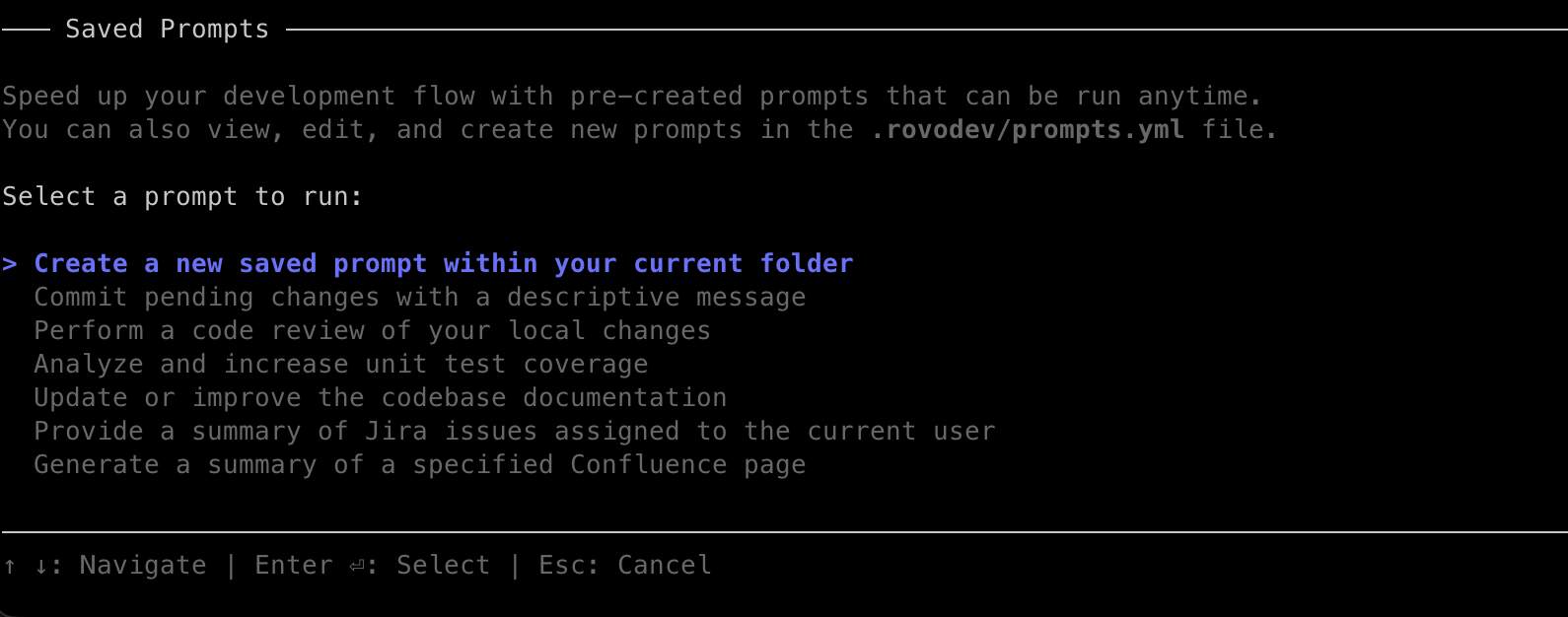
We created two commands: one for single flag cleanup on your current branch; and the other one, where Rovo Dev will create separate branches and changes for each of your specified feature flags and for each of those will re-use ‘singla flag cleanup prompt’. Here is example of such command created for Demo project:


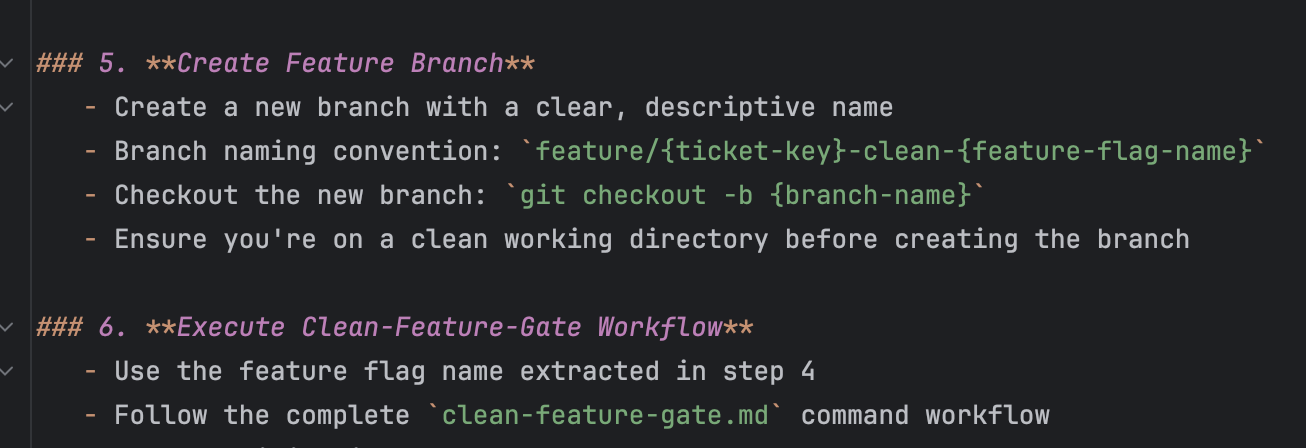
These commands encode how feature flags work in this codebase:
- Concrete class names and packages to look for
- Rules for how to simplify logic when a flag is permanently on or off
- How to update and, when appropriate, delete tests, as some tests are excplitly written to check behaviour before/after feature flag enablement
- Expectations around branches, commits, and PR creation
- Examples of code to lookup
Because they live in the repo, we can reuse them in multiple tools:
- Locally via Rovo Dev CLI
- In Jira Automation (by referencing the command path)
- In Rovo Dev in Jira itself
This aligns with our broader AI principle: reusability and a single source of truth for commands and context, stored alongside the code.
So, after all of it was done and we wanted to try it on few flags at the same time. We’ve used Rovo Dev in Jira (Work with Rovo Dev in Jira | Rovo | Atlassian Support) with our saved prompt.

Why was Rovo Dev in Jira valuable for us in this case? We could run multiple Rovo Dev sessions simultaneously and access them all directly through our browser.
This setup is especially useful for improving or creating saved prompts and AI flows, as it allows you to identify issues and fix them immediately with Rovo, right in the browser and at proper sale worthy of testing the flow.


Step 2: Measure, then self‑improve
We didn’t expect to get this right on the first try – and we didn’t.
On our initial run of the custom saved clean-feature-gate prompt, we got:
- 5 out of 9 PRs that required no manual code changes
That’s already far better than the generic prompt experience, but still not “trustworthy” for automation.
To close the gap, we aimed to improve it further, reflecting daily on enhancing our flows and knowledge. With Rovo, we entered a “self-improvement” phase.
We created the improve-command.md saved prompt.

Pro tip: You might not need your custom “self-improve” saved prompt. You can also use /memory reflect [file] directly from Rovo Dev!
For each unsuccessful cleanup PR, we followed the same loop:
- Review the AI’s changes in Rovo Dev session in Jira

2. Provide clear feedback (what it missed, where it over‑simplified logic, which cases were unsafe), for Rovo Dev to fix it.
3. Run improve-command.md against the previous command, using the session context and our feedback.
4. Allow Rovo Dev to update the command definition to prevent future failures and ensure success


This self‑improvement loop raised our effectiveness to:
- 8 out of 9 PRs requiring no input from engineer
The final “failure” wasn’t really an AI failure at all – the missed logic came from a gap in our test coverage. That result was a useful reminder: good automation depends on good, clean, well‑tested code.
Step 3: Jira Automation + Rovo Dev = hands‑off generation
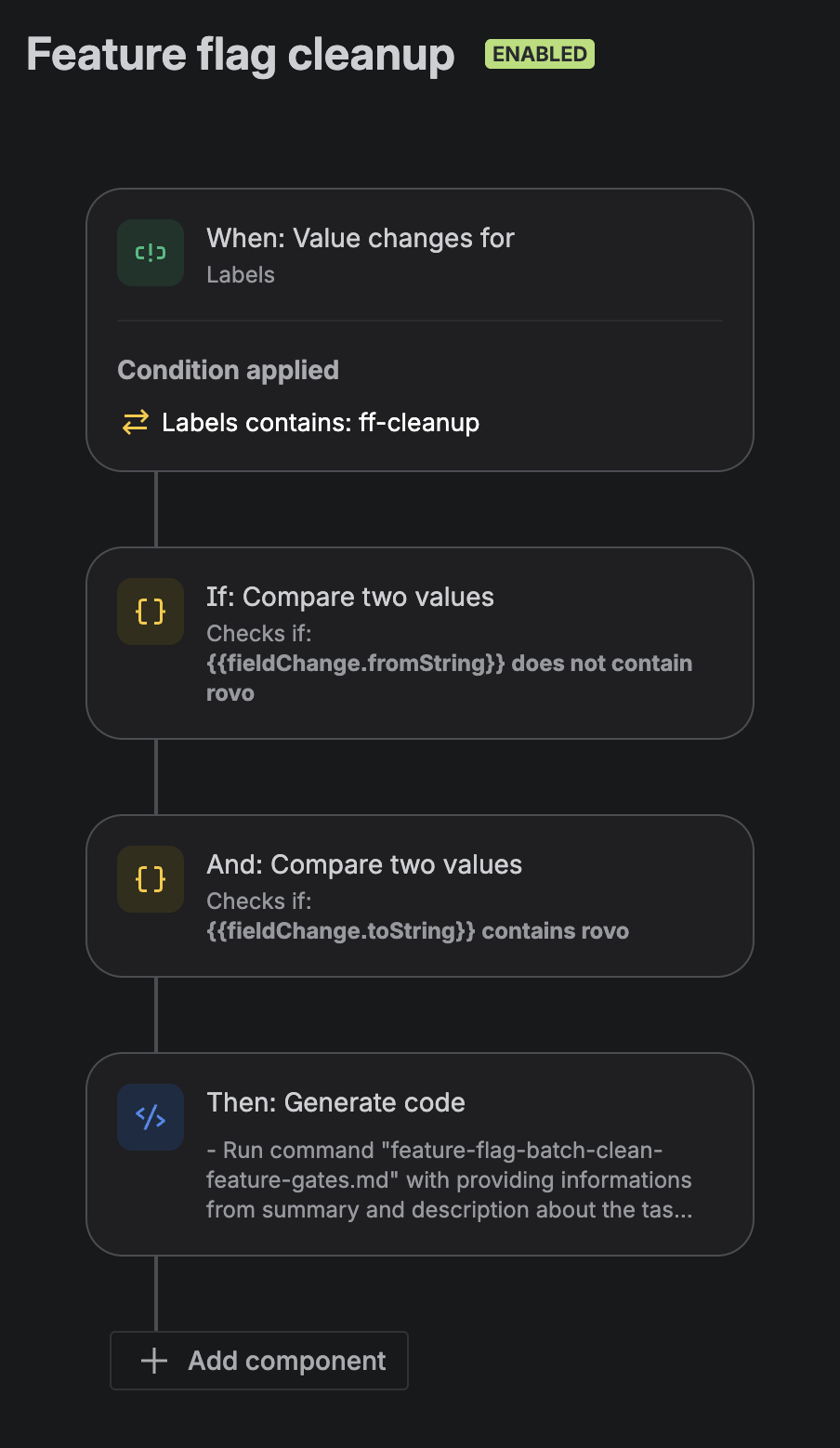
With a solid prompt in place, we wired it into Jira Automations.
We added a simple rule:
- When a feature flag cleanup Work Item with specified flag name and/or URL, gets a specific label (e.g.
rovo),
→ Jira Automation invokes Rovo Dev
→ Rovo Dev runsclean-feature-flag.mdwith the Work Item(s) as input
→ A PR is created automatically


We’re not reinventing anything here – we’re just:
- Use Jira as the orchestrator since all Work Items for feature flag cleanup are already automatically created
- Reusing the same repo‑based AI command
- Letting Rovo Dev do what it’s already good at
From the developer’s perspective, “turn this into a PR” becomes as simple as labelling a ticket.
Why we love this approach? Everything is in Jira, in case of any problems, we don’t have to leave our local code, we can just quickly sneak peak into Rovo Dev session.
Step 5: A queue to avoid merge conflicts
One practical issue we hit quickly: running cleanup for many flags at once increased the chance of merge conflicts, especially in high‑churn areas of the codebase. It also added unnecessary peaks of review times for engineers.
To solve that, we added another layer of automation: a Jira‑driven queue for feature flag cleanup.
Every hour, an automation runs:
- Check if there are any FF cleanup tasks currently IN_PROGRESS or IN_REVIEW.
- If yes → do nothing; the queue is “busy”.
- If the queue is empty:
- Find the oldest eligible feature flag cleanup task (oldest, marked as ready, or older than 30 days).
- Add the
rovolabel to that Work Item. - Transition it to IN_PROGRESS (so the queue is effectively locked).
- Add a comment.
- Send a Slack ping.

From there, the previously described automation takes over:
- The
rovolabel triggers Rovo Dev - Rovo Dev runs the batch cleanup command
- A PR is created
- Developers review and merge
- Once merged, the queue is free to pick the next Work Item
The important aspect is flow control: only one cleanup is in motion at a time, which dramatically reduces noise and merge conflicts while keeping the pipeline consistently moving.
What this gave us
By investing in a repo‑specific AI flow and treating commands as first‑class assets, we achieved:
- High success rate
Most cleanup PRs require only review, no coding. At the time of writing, we successfully cleaned 29 of 31 feature flags without intervention. For the other two, we used existing Rovo Dev session, provided additional information, and executedimprove-command.md, which further increased the success rate. - High thoughouput
In two days, we cleaned up 12 feature flags, boosting our velocity in that area by 85% - Better code hygiene with less drudgery
Flag cleanup is no longer a “side quest” developers dread. We connected our automations with external triggers, so engineers only need to focus on code review for feature flag cleanup - Reusable building blocks
The same commands work:- Locally Rovo Dev CLI
- In Jira Automation
- In Rovo Dev session
- A pattern we can replicate
The design-repo tailored commands, self-improvement (now applied into daily work with all saved prompts we are using), and queued automation can extend to other repetitive flows.
Lessons for other teams
If you want to build something similar for your own product, a few takeaways:
- Don’t expect generic prompts to understand your world.
Invest in repo‑specific commands that speak the language of your codebase. Invest in proper AGENTS.md contents for any generic instructions for Rovo Dev that it’s not on specified to given use-case - Store AI “brains” in the repo.
Commands, prompts, and agent context (AGENTS.md,review-agent.md, etc.) should live with the code so they can be versioned, reviewed, and improved like any other asset. - Automate the improvement of your automation.
A simple “improve this command based on what just happened” loop compounds quickly. - Add orchestration and queuing before going “fully automatic”.
A minimal queue (like our hourly Jira rule) can solve real‑world issues like merge conflicts without complex infrastructure. - Measure success in real outcomes, not just “AI usage”.
For us, that meant:- How many PRs needed no manual edits?
- How much developer time was actually saved?
- Did code quality and safety remain high?