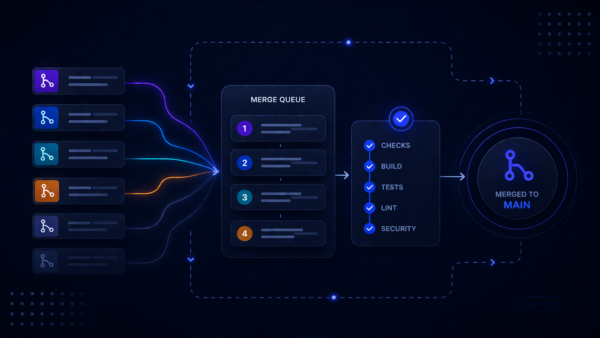
Earlier this year, we launched Merge Queues in open beta to help teams automate, sequence, and validate pull request merges. During the beta period, we incorporated feedback from hundreds of teams to improve reliability and simplify configuration. Today, we are excited to announce that Merge Queues is generally available for Standard and Premium plans on Bitbucket Cloud.
Merge Queues let teams handle the entire pull request merge workflow natively in Bitbucket — no extra scripts, plugins, or manual rebases required. Developers simply open a pull request, add it to the queue once checks pass, and Bitbucket takes care of sequencing, validation, and merging automatically. Because it’s built directly into the platform, there’s zero additional setup compared to external merge queue tools.
After eight months running Merge Queues internally at Atlassian across some of our busiest, most business-critical repositories, the results are clear: fewer broken builds and far less merge friction.
Benefits of using Merge Queues
- Keep your target branch green: Pull requests are validated against the latest target-branch state, plus the queued changes ahead of them, before they are merged.
- Reduce rework and firefighting: Merge Queues help catch semantic conflicts before they land, so teams spend less time reverting changes and more time building.
- Ship without waiting: Developers no longer need to coordinate merge windows, babysit rebases, or wait for a quiet moment to merge.
- Stay in the flow: Teams can use the same Bitbucket pull request experience they already know. Developers simply choose Add to merge queue, and Bitbucket does the rest.
How it works
- Queue: When checks and approvals pass, a developer adds the pull request to the merge queue for the target branch.
- Validate: Bitbucket creates a temporary branch, merges the changes ahead of the pull request according to the configured strategy, and runs the merge-queue pipeline against the combined state.
- Merge or eject: If the pipeline passes, the pull request is automatically merged. If it fails, the pull request is removed from the queue and left open with the results, while the rest of the queue can continue.
Pricing and availability
Merge Queues is available to all Standard and Premium workspaces on Bitbucket Cloud. To use it, make sure Bitbucket Pipelines is enabled. Merge Queues runs your configured pipelines to validate queued changes before they merge, using your existing Pipelines build minutes.
Getting started
- Ensure your repository is on a Standard or Premium plan with Pipelines enabled.
- In Repository settings → Workflow → Merge queues, create a queue and configure the target branch, merge strategy, and concurrency.
- Define a
merge-queuessection inbitbucket-pipelines.ymlfor your target branch. - Activate the queue once the pipeline configuration is in place.
- On pull requests targeting that branch, developers will see Add to merge queue.
For detailed setup instructions, see the Merge Queues documentation.
Share your feedback
Your feedback during beta helped shape this release. Join the Atlassian Community or use the feedback collector in the Merge Queues UI to share feedback, suggestions, or requests.