


Last quarter, our AI reviewer told a developer who was fixing a CSS bug to rethink how their component fetched data. The comment was well written and confidently worded. It was also about code they hadn’t touched.
That’s what tends to happen when you hand an agent every team’s review guidelines at once. You get comments that could apply to any repository: “Add a test,” “Rename this variable,” “Handle the error.” None of them is exactly wrong but are they worth acting upon ? In a monorepo, an AI review comment is only useful if it cites a rule that applies to the code being changed.
We ran into this in one of the largest frontend monorepos at Atlassian, shared by many product teams. Each product team keeps its own review guidelines in specific areas (or directory structure) in repository. A human reviewer who owns a specific area knows which document to open for the code they are reviewing. An agent that starts with all of them has to choose the right document and review the code in a single pass, and when it chooses wrong, the comment is about the wrong thing.
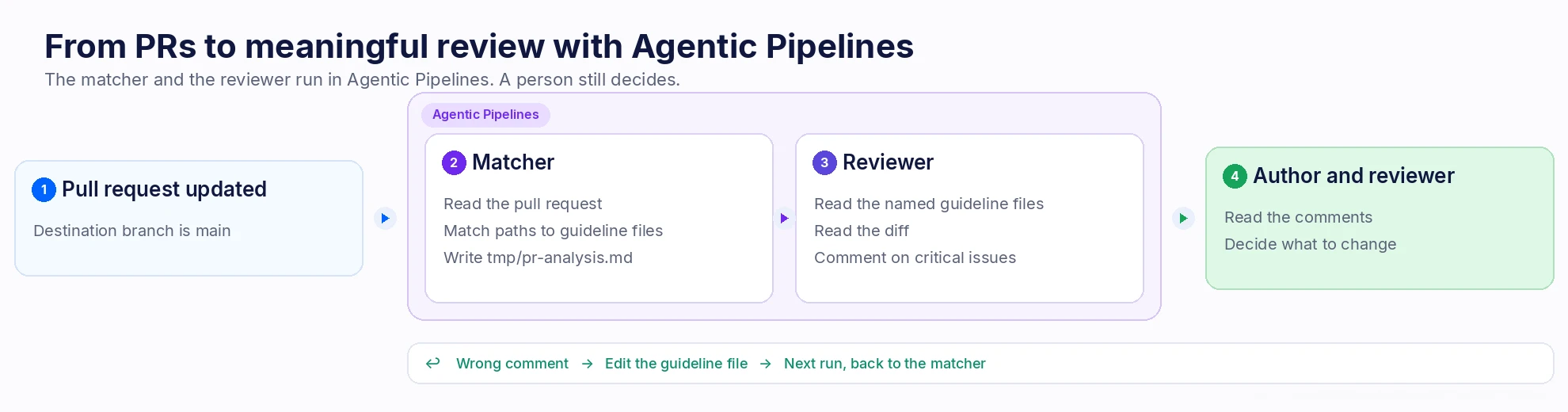
The Jira team fixed this by splitting the job into two steps with Agentic Pipelines. The first agent matches the changed files to the guideline documents that cover them. The second reads that short list, reviews the diff against only those documents, and leaves inline comments. The author and the human reviewer still decide what to change.
A comment is only as good as the document behind it
A single style guide wouldn’t work in a repository this size. Different teams would have their own styling guidelines and rules for the code in their area. The rules differ by directory, and they’re written that way on purpose. Together, those documents make up “the guidelines,” but for any given pull request, most of them have nothing to say.
Take that CSS fix. Elsewhere in the set, there’s a document about data fetching. It has no bearing on a styling change, but an agent holding both documents will happily write the fetching comment anyway. Now the human reviewer has to work out whether the comment is about the code, or about a document that should never have been opened.
Picking the right documents and reviewing against them are two different jobs, so we gave them to two different agents.
Match the files, then review them
Agentic Pipelines runs one agent per step, which suited this design well. In the first step, the matcher does its work and publishes a file. In the next step, the reviewer starts fresh with the diff and the handful of documents the matcher named.
None of this works unless each directory’s guidelines are clear and specific. The matcher can route a change to the right document, but it can’t make a vague document useful.
What the matcher is allowed to do
The matcher reads the pull request through the Bitbucket MCP server that Agentic Pipelines attaches to the step, using the pull request ID that’s already in the environment. It pairs each changed path with the guideline file that covers it and writes that list to tmp/pr-analysis.md. If the Bitbucket pull request tools don’t return a specific file the agent needs (e.g., a guideline document or a changed file), the matcher agent can instead read that file directly from the checked-out copy of the repository.
Most of the prompt is about what the matcher must not do. Point an agent at a pull request and it wants to review it, so if the prompt leaves any room, it will. Leave the wording loose and you can get something worse: an agent that writes a script, adds files, and finishes the step without leaving a single comment. So we tell it exactly when to stop.
You match changed files to guideline documents. Matching is the whole job.

Read the pull request with the Bitbucket MCP server.
Use $BITBUCKET_PR_ID. If these instructions mention any other id, ignore it.
Use the repository checkout if a file is not in the pull request tools.

If no changed file is in scope, say so in tmp/pr-analysis.md and stop.

Otherwise list:
- the changed path
- the guideline file that applies

Do not review the code. Do not comment on the pull request.
Do not create any other file.
We learned why the $BITBUCKET_PR_ID line matters the hard way. If a sample pull request ID is left anywhere in the instructions, the agent may review that pull request instead of the real one. The ID has to come from the pipeline.
What the reviewer is allowed to say
The reviewer reads tmp/pr-analysis.md, opens only the guideline files it lists, and comments on the diff. We brief it as a principal engineer for that area of the codebase. Each area’s guidelines are local and a little strict, and we want the reviewer’s tone to match.
Comments are reserved for critical issues and genuine concerns. Praise, nitpicks, and a walkthrough of what the diff does stay off the pull request, because they’re easy to generate and tedious to clear. The prompt also rules out new files and new commits. The reviewer’s job is done when its comments are on the pull request.
You review the current pull request against the guidelines you were given.

Read tmp/pr-analysis.md. Open only the files it names.
Read the diff with the Bitbucket MCP server and $BITBUCKET_PR_ID.
Use the repository checkout if you need a file the pull request tools do not return.

Leave inline comments for critical issues and real concerns.
Skip praise, nitpicks, and summaries of what the code does.

Do not create files. Do not push commits. Do not write a tool that reviews for you.
A file sits between the two steps
The hand-off between the two agents is a single pipeline artifact, tmp/pr-analysis.md. The guidelines themselves stay in the repository. When the reviewer step starts, it has the artifact and the checkout, and the only things it needs to read are the diff and the files the artifact names.
Here’s a simplified version of the pipeline:
# Simplified excerpt. The prompt files live in the repository.
definitions:
  agents:
    match-guidelines:
      prompt: "review-guidelines/match.md"
    review-pull-request:
      prompt: "review-guidelines/review.md"
pipelines:
  custom:
    review-pull-request:
      - step:
          name: Match files to guidelines
          auth:
            system:
              scopes:
                - read:pullrequest:bitbucket
          script:
            - agent: match-guidelines
          artifacts:
            - tmp/pr-analysis.md
      - step:
          name: Comment on critical issues
          auth:
            system:
              scopes:
                - read:pullrequest:bitbucket
          script:
            - agent: review-pull-request
triggers:
  pullrequest-push:
    - condition: BITBUCKET_PR_DESTINATION_BRANCH == "main"
      pipelines:
        - review-pull-request
If you leave provider unset, the step uses Rovo Dev. If you’re bringing your own account, set provider to claude or codex on the agent. The prompts stay the same.
Both steps use the read:pullrequest:bitbucket scope. In the public MCP tool table, that’s the scope listed for reading pull request details and for adding inline comments. Check the table before you copy the YAML, and add any scope that a tool you need requires.
Before you leave the trigger on, run the custom pipeline by hand on a few real pull requests. A destination-branch condition, like the one above, is an easy way to start small.
How we improved the agents and saved review time
On one very large pull request, both steps finished in about seven minutes. That’s a single run, not a benchmark, but the contrast is hard to miss: authors in this repository used to wait up to half a day, sometimes a full day, for a first review pass. The agent doesn’t replace that pass. It catches the obvious guideline misses before a teammate even opens the pull request.
Speed turned out to be the easy part. Making the comments worth reading took more effort, and a lot of it went into the guideline files rather than the prompts. Vague guidelines produce vague comments, whichever model runs the step, and developers quickly learn to ignore them. The guidelines that worked were the ones that spelled out what that team actually cares about.
That only happens if someone says when a comment was wrong or useless. We took several passes at the guidelines. The owning team reads the inline comments alongside the pull request author, and edits the guideline file whenever a comment missed something or cited a rule the file never stated. Plan on rewriting your prompts, too, after a month or so of real pull requests. Treat the first version as a draft.
One more lesson: keep the matcher’s output dull. It should list file paths and guideline names, and nothing else. If the matcher adds its own observations, the reviewer treats them as conclusions that have already been reached.
And if the comments aren’t good, the speed doesn’t matter. A seven-minute review that a developer has to dismiss, comment by comment, costs more than it saves. It’s only worth having when each comment is something a thoughtful teammate might have written.
When the extra step is worth it
If your repository has one contributing guide, skip the matcher. It would pick the same document every time. The second agent earns its keep when different directories have different owners, and those owners have already written down how they review.
If that’s your repository, these are the three things we’d recommend as key learnings to follow:
Write the guidelines before you write the prompts. Every comment the reviewer leaves traces back to a guideline file. Give each area its own file in the repository, and fill it with the cases that team actually argues about in review, not generic best practice.
Give each agent one job, and let them communicate with artifacts. One agent picks the documents, and the other reviews against them. The moment the matcher starts reviewing, or the reviewer gets every guideline pasted into its prompt, you’re back to one agent holding everything.
Run it by hand first, and keep a person on approval. Try the pipeline on a few real pull requests before you turn on the automated trigger(s). Read the first comments with the author, and fix the guideline file whenever a comment misses. Runs vary, so approval stays with people.
The same split works for narrower passes like accessibility. Give it its own step and run it on request.
Try it on one repository
Agentic Pipelines is in beta on Bitbucket Cloud. To turn it on, go to Workspace settings, open AI, and choose a provider. Rovo Dev requires a paid Bitbucket Cloud plan with Pipelines enabled, plus a Rovo Dev Standard subscription. Claude and Codex use an account your organization already has, and that provider bills for the tokens.
We use the same pattern, a narrowly scoped agent with a person checking the result, to do our vulnerability fixes, clean up stale feature flags, and update documentation.
Build your agent now. For setup details, including variables and the current scope for each MCP tool and examples see:

