
Moving to cloud doesn’t mean giving up visibility. Here’s how enterprise admins are taking site performance into their own hands.
Whether you’re a long-standing Atlassian Cloud customer scaling to tens of thousands of users, expanding into new products, or completing a migration from Data Center to Cloud, one question comes up consistently: how do I know my environment is healthy, fast, and reliable?
There’s a common assumption that moving to cloud means trading visibility for convenience, that you’re handing over control and hoping for the best. We built System Health to prove that wrong: to give admins direct visibility into how their environments are performing, what’s driving that performance, and the self-service tools to act on it independently.
Cloud health is a shared responsibility
We define this division of ownership through the Atlassian Shared Responsibility Model. Under this framework, both Atlassian and our customers play distinct, vital roles in keeping cloud environments fast, reliable, and secure.
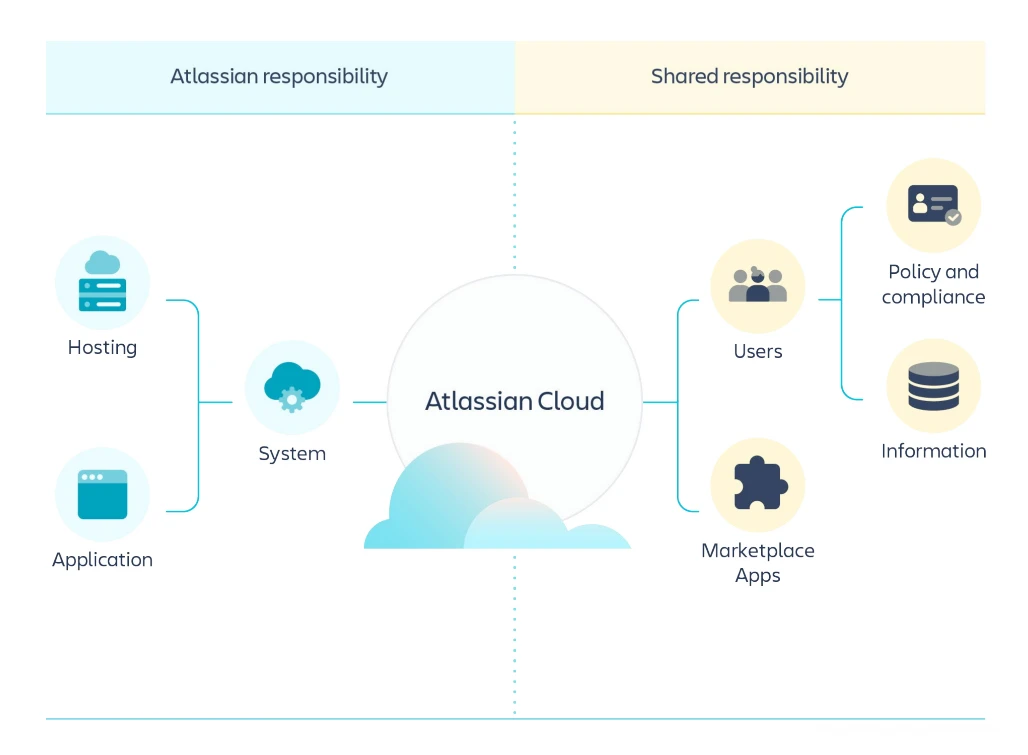
Atlassian’s responsibility: We ensure every customer instance is backed by the optimized infrastructure, compute, and platform resources required to run your most important workloads efficiently at scale. From automated scaling and high availability to underlying performance tuning, Atlassian manages the platform foundation, so your teams don’t have to.
Where shared responsibility and customer ownership come into play: Because Atlassian Cloud is deeply customizable for every organization’s unique workflows, site health is also shaped by day-to-day configurations under our customers’ control. This includes:
- Data shapes that grow quietly as work items accumulate
- Configurations, like fields and work types, that rarely get retired
- Filters & queries that scan an entire Jira site unnecessarily
- Network proxies that slow downloads or block HTTP upgrades
While Atlassian optimizes the infrastructure, only your team has the business context to know which custom fields are still relevant, which automations drive core business processes, or how user permissions should be structured.
When organizations have both a solid infrastructure foundation and clear visibility into their instance configurations, they are best positioned to keep their sites optimized. This is why we introduced System Health: to give admins clear visibility into their instance configurations and the tools to act on what they find.
Turning visibility into action
Raw data on another dashboard doesn’t help admins solve real problems. So we designed System Health for two things: showing customers what’s actually happening, and giving you the tools to fix it yourself.
Incident Insights came first. It gave admins a unified view of potential and active incidents for their entire Atlassian Cloud footprint, across every site for core apps*. Before this existed, admins had to assemble that picture themselves, manually testing their apps every time they saw an incident on Statuspage. They would often first learn about incidents from the people already affected by them.
Incident Insights changed that dynamic with site-specific alerts powered by underlying telemetry. When the rare incident does occur, admins are first to know and can proactively communicate status to their stakeholders. This is Atlassian delivering on our side of the shared responsibility model: making sure admins know the state of the platform before your users do.
Performance Insights, changes the troubleshooting dynamic entirely. Instead of filing a support ticket and waiting for a diagnosis, admins can now see end-user load times across key experiences and understand what’s contributing to slower performance, whether that’s data volume, configuration complexity, or client-side setup.
But visibility alone isn’t enough. Performance Insights connects each insight to specific cleanup recommendations and self-service data management tools. Admins can also use Rovo-powered diagnostics in Jira to automate monitoring and pinpoint the highest-impact optimizations. This is where your side of the model comes into focus. Performance Insights shows you exactly which configurations under your control are affecting load times, and gives you the tools to act.
What we hear most from enterprise admins is that the troubleshooting model has fundamentally changed. One admin put it simply: ‘We went from waiting 24 hours for an answer to fixing it ourselves in an hour.’
*Jira, Confluence, Jira Service Management, Bitbucket, and Rovo
Giving admins confidence in what they own
Across our largest customers, a common pattern emerges. It often starts with a simple realization: ‘we had no idea that was causing problems.’ That moment, when an admin connects a slow load time to a specific configuration choice, is where System Health delivers its greatest value.
Once teams begin using these capabilities, the value is immediate. Organizations with complex or growing environments can connect performance issues directly to specific cleanup opportunities. Admins get the data they need to coach teams on better data hygiene and justify optimization work to leadership. For teams migrating from Data Center, Performance Insights provides a baseline from day one, so you can validate that your cloud environment is performing as expected and identify any configuration adjustments needed post-migration.
How we define ‘good’: limits, bands, and benchmarks
So for the shared responsibility model to work, customers only need visibility into the data and tools to take action, right? Almost. They also need to know exactly what “good” looks like. That’s why, alongside our observability tools, we publish the benchmarks that ensure both sides of the shared responsibility model are working from the same definition of ‘healthy’:
- Limits and guardrails: No software scales infinitely without trade-offs. Rather than setting an arbitrary user cap and asking customers to trust that it will work, we publish specific data limits for Jira Cloud, documented, visible in admin dashboards, and paired with data management tools to help admins plan around them before they hit them in production.
- Performance bands: We share the same performance classification framework our engineers use internally. Every load event is categorized as Fast, Moderate, or Slow based on Time to Visually Complete (TTVC), the metric we use to measure responsiveness across Jira and Confluence. Instead of deciphering raw numbers, admins get a clear answer: is my site healthy or not?
- User setup guidelines: We publish what optimal client-side setup looks like: HTTP/3 protocol, network speeds above 10 Mbps, 8+ CPU cores. Performance Insights surfaces this data directly, so admins can see whether slower load times are caused by the environment or by end-user setup.
Limits, bands, and benchmarks, published openly, surfaced in your dashboards, and paired with the tools to act on them. This isn’t selective transparency. It’s the full picture.
What’s next?
We have made major progress in our cloud observability journey for Atlassian admins. System Health is the foundation. Next, we’re expanding app coverage and building deeper automated remediation through Rovo. System Health is one part of a broader investment in enterprise cloud trust, alongside data residency, compliance controls, and platform security.
For all Atlassian Cloud customers: Incident Insights is available now in Atlassian Administration. See the health of your environment across all sites for core apps.*
For Cloud Enterprise customers: Performance Insights is in open beta. Start identifying what’s driving your load times and take action directly.
Try them in Atlassian Administration. The more you use them, the sharper they get, and the better we can build our side of the shared responsibility model.
*Jira, Confluence, Jira Service Management, Bitbucket, and Rovo
Alok Jain is Head of Product for the Atlassian Platform, responsible for the infrastructure, performance, and observability capabilities that power Atlassian Cloud.