



During the 2025 F1 season, the Atlassian Workplace Events team ran a competition to win AWR signed swag or personalised AWR merchandise for each F1 race. Each competition involved one or more questions that would be posted a few days before the race. Atlassian staff would submit their answers in a Google form and the correct or closest guess would be announced a few days after the race.
The competitions have been very popular within Atlassian, with hundreds of users submitting entries per competition and several thousand unique staff members submitting at least one entry across the competition series.
As a regular participant of the competitions, I was aware that each competition took significant effort to setup and manage so I decided to investigate if a Forge app could be built to manage the competitions.
This post outlines my approach to designing the app.
Requirements
I started by reverse engineering what I believed to be the requirements of the system. These are illustrated by the following use case diagram:
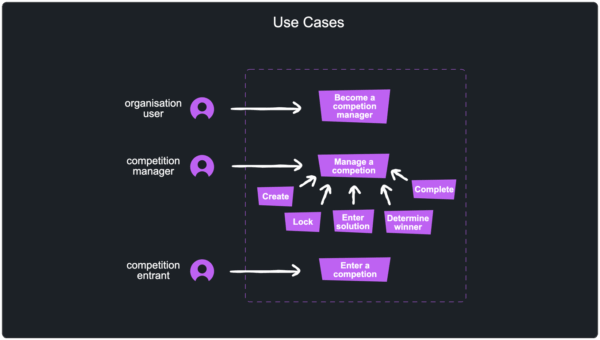
A clear understanding of the requirements is essential to ensure what we build truly aligns with user needs and the goals of the team using it.
Identifying the key abstractions
I knew that I would have to work with the Atlassian Workplace Events team to collaborate on the requirements and design of the app, so I spent some time defining the key abstractions that the app would be based on. Here are the main abstractions I landed on:
- Competition: A competition is an external event that occurs during a period of time and involving multiple participants. A typical competition might be a sports game or meeting.
- Competition challenge: A competition challenge is the organisation of a social challenge relating to a competition. A competition challenge references a competition, questions about the challenge and the correct answers once the outcome is known
- Competition challenge entry: A competition challenge entry is an entry by a user in a competition challenge.
- Competition entrant: A competition entrant someone who participates in a competition challenge by submitting an entry. Competition entrants are a type of organisation user.
- Competition manager: Competitions need to be managed by one or more users who have additional privileges such as initiating the creation of competitions, changing their states, entering solutions and confirming winners. Competition managers are a type of organisation user.
- Organisation user: A set of users that are members of an organisation of some kind.
The relationships between these abstractions are defined in the following diagram:

Entity scaling
It is important to know how many instances of each entity in the abstraction there would be in order to know how different aspects of the app would need to scale.
Based on past experience, each competition challenge can expect ~1,000 entries and 24 competitions and competition challenges were held during 2025.
Therefore, if the app needs to run for 10 years, it will need to store hundreds of competitions and approximately 10 * 24 * 1000 entries, without accounting for staff growth.
Platform bounds
It is also important to understand the bounds stipulated by the platforms the solution may be built on or with to ensure the app stays within certain bounds to the extent possible.
There three kinds of bounds to be mindful of are as follows:
- Constraints: Constraints are fundamental, non-negotiable rules built into a system. They usually relate to the technical capabilities of a system, such as the maximum number of Jira work item links from and to a single work item.
- Limits: Limits are short-term controls designed to protect a system from being overwhelmed by activity. Limits are often directly related to app runtime activity such as Forge function invocation limits and timeouts. In other cases, limits may be indirectly related to app activity where they can potentially impact a system’s performance. Limits are typically measured in small windows, like the number of requests allowed per second. If an app exceeds a limit, it is typically throttled and either the app must wait a period to try again, or alternatively the throttling mechanism may automatically delay operations.
- Quotas: Quotas are long-term usage allocations often tied to a business model or subscription tier. They govern the total volume of resources an app can consume in total or over a day, week, or month (e.g., 50,000 requests per month). Once a quota is exhausted, an app may not be able to make more calls until the related period expires or a plan is upgraded, however in other cases the app may continue to operate, but may be subject to additional charges.
When developing Forge apps, it is critical to be aware of the Forge limits and quotas.
Comparing potential app architectures
In order to determine a suitable architecture for the app, I find it useful to identify a few potential architectures and compare them against each other.
Traditional app architecture
A traditional architecture for this kind of app is depicted in the following diagram:

This architecture reflects the needs for two different roles;- the managers of competitions and the competition entrants. A single data store would be used to store all the entities and an access control service would be needed for authentication of users and authorization of operations.
A Forge app could be implemented with this architecture as follows:
- The user interfaces could be surfaced in full page modules (e.g. the Jira full page module).
- Competition entrants would be any user that has authenticated with Jira.
- Competition managers would also be Jira users, but there would need to be some way to define them. A simple approach that would work is to define the account IDs in the configuration of the app, but this would only work where the app is installed in a single site. To make the app usable in multiple sites, this architecture would need to introduce additional configuration UI or process that site administrators would need to follow in order to define the competition managers.
- The storage mechanism would be one of the Forge storage services such as Forge SQL.
- The backend services would be implemented as Forge resolvers.
Architecture that extends Jira abstractions
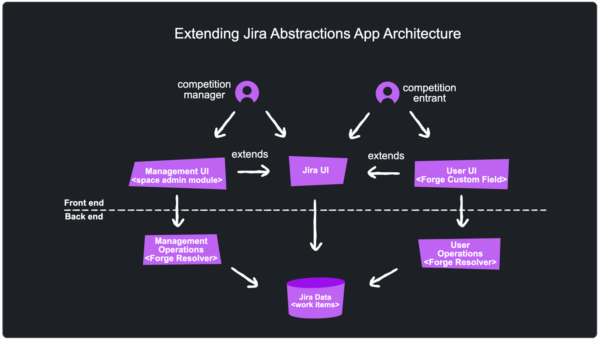
To reduce the amount of access control the app would need to manage, I thought of an alternate architecture that leveraged more of Jira’s abstractions:
- Team-managed Jira spaces would allow competition managers to be easily identified since they would correlate to space administrators. The ability for any Jira user to create team-managed spaces severs the dependence on Jira site administrators from having to configure the app.
- The Forge space administration module would be used to surface the competition administration UI.
- Work items and custom fields would be used to model and capture the data required by the app.
- Work items and custom fields would additionally be used to surface UI such as competition details and the form to submit competition entries.
- Work item hierarchies (e.g. epic/task or task/sub-task) or work item links would be used to capture relationships between entities.
Comparison of the two approaches
Each of the approaches have their pros and cons as detailed below.
Forge limits and Jira constraints
My main concern with the first approach related to whether Forge limits would impact the app.
Over time, the amount of storage needed by the app will continue to grow as more and more competitions are created. I didn’t do any modelling of the cost of this storage and the impact of query duration has not been modelled, but I probably should have.
Configuration
Since the second approach relies more on Jira’s features, it requires a significant amount of Jira configuration. For example, the app needs to know which Jira space(s) is is active in, the work item types for recording competitions and competition entries, the custom fields for persisting aspects about competitions, etc.
Authorization
The second approach whereby the Forge space administration module would be used to surface the competition administration UI has the benefit of leveraging Jira’s authorization module further. No only does Jira ensure only space administrators can access the UI exposed to manage competitions, standard Jira features can also be used to manage the administrators (e.g. UI and email notifications to add and remove administrators).
Further leveraging of Jira
Further to what has been previously cited, the second approach allows for more leveraging of Jira’s features. For example:
- Jira’s work item workflow capabilities can be used to manage the states of competition entities;
- Jira’s filtering features can be used to find competitions; and
- Jira’s dashboard features can be used for reporting on competitions.
UI complexity
The flip side of the previous point about leveraging Jira’s features is that the UI for the competitions functionality will be more convoluted. The first architecture surfaced a single UI for competition management and an additional UI to allow users to enter competitions. In the second architecture, the UI is surfaced in the context of Jira’s UI such as admin panels and custom fields.
Building the app utilising Jira abstractions
Even after weighing the pros and cons of the two app architectures, I was fairly undecided about which was the better approach. I ended up picking the architecture that utilises more of Jira’s features since it was likely to lead to the more interesting solution.
Detailed design
The following detailed design illustrates how Jira features and abstractions are used to implement the solution:

- The competition space is a team-managed space. It is based on the software development template to ensure access to certain work item types can be restricted.
- The space’s Epic work item type is renamed to Competition and is used to model competitions and associated challenges.
- The space’s Task work item type is renamed to Challenge entry and is used to capture entries in competitions.
- The user interface (UI) provided by the Competition challenge custom field is used to submit an entry in a competition, resulting in the creation of a Challenge entry work item which is a child of the relevant Competition work item. Although challenge entry work items are created as a result of users submitting responses via the challenge entry custom field, users don’t have privileges to see challenge entry work items since users should not be able to see other challenge entries.
- The competition admin panel provides functionality for competition managers to create and update competitions.
- App defined work item custom fields capture data and provide UI to view and/or edit the data.
- User defined work item custom fields capture additional data about competitions such as it’s name and scheduled start and end times.
- A global page, accessible to any user, is also provided by the app. This page provides documentation, links to competition spaces and controls to convert a space to a competition space.
Competition space setup
Whilst the Competition app was primarily being created to help the Atlassian Workplace Events team to run F1 competitions within Atlassian, there is no strict requirement to limit the app to only supporting one team managing competitions or supporting multiple competition series.
Introducing configuration features that enable multiple kinds of competitions series to be managed by any team within an organisation allows the app to be installed in different sites and resulted in improvements to the onboarding process.
The Forge Jira global page module is a UI extension point that enables Forge apps to expose a UI that is accessible to any logged in user via Jira’s global navigation. The app provides help documentation and features that bootstrap a Jira space to designate it as a competition space.
Designation of competition spaces
Any user in a site can create a team-managed space and then visit the app’s global page to designate it as a competition space. The designation process results in an entity property being set against the space. The app uses display conditions to ensure that its UI features only in spaces that have this entity property set, otherwise all Jira spaces would be polluted with the app’s UI.
Picking the right team-managed space template
An important requirement of the app is to ensure regular users can’t see the competition entries submitted by other users. This is achieved by ensure the Challenge entry work item type is configured so that it’s access is restricted to the Jira Administrators role. However, only some types of team-managed space allow work item type to have restricted access so the app’s setup instructions indicates the space should be set up using the Software development space template.
Summary of the design process
The following diagram illustrates the design process that I roughly followed:
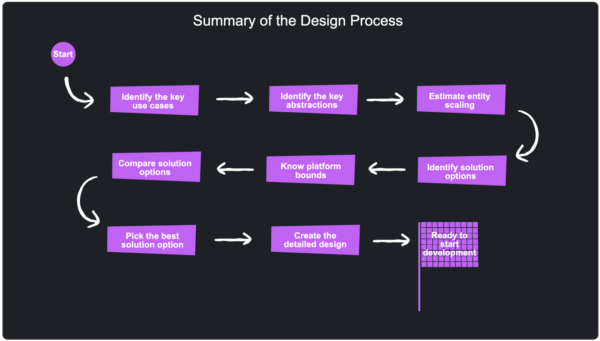
Although the process appears to be linear, in reality it is less orderly due to subsequent stages revealing details that need to be fed back into previous stages.
This design process works best when the requirements of the system are well known. In other cases, it can be useful to start building a prototype or spike a solution to help inform what is feasible and where the pain points are likely to be.
Wrapping up
Designing this Forge app started with a clear understanding of the requirements and then letting those shape the abstractions and architecture choices. I’ve used this approach for previous apps such as the bulk work item operations app I wrote about previously. You can also apply the same approach to your Forge apps;- begin with a deep understanding of the system you need to build, then compare and contrast possible solutions. Each solution will likely introduce bounds relating to the platforms they are based on which may influence their feasibility, especially knowing the how each of the entities in your design needs to scale.
In my case, I leveraged features of Jira to such as UI extension points and team-managed space access control to reduce the amount of code required to build the app. By treating Jira’s abstractions as building blocks rather than constraints, you may identify solutions that are both easier to build and maintain.


