You shouldn’t have to leave your PR list to know where your code is deployed. Yet, developers constantly lose time context-switching just to see if a change hit staging or production. To solve this, we are launching the Beta version of Deployment Status Tracking for your PRs. This feature surfaces live deployment statuses directly within your PR list view as code moves through your pipeline. By tracking environment data against the exact commit executed, the platform provides immediate, effortless visibility into exactly where your code lives.
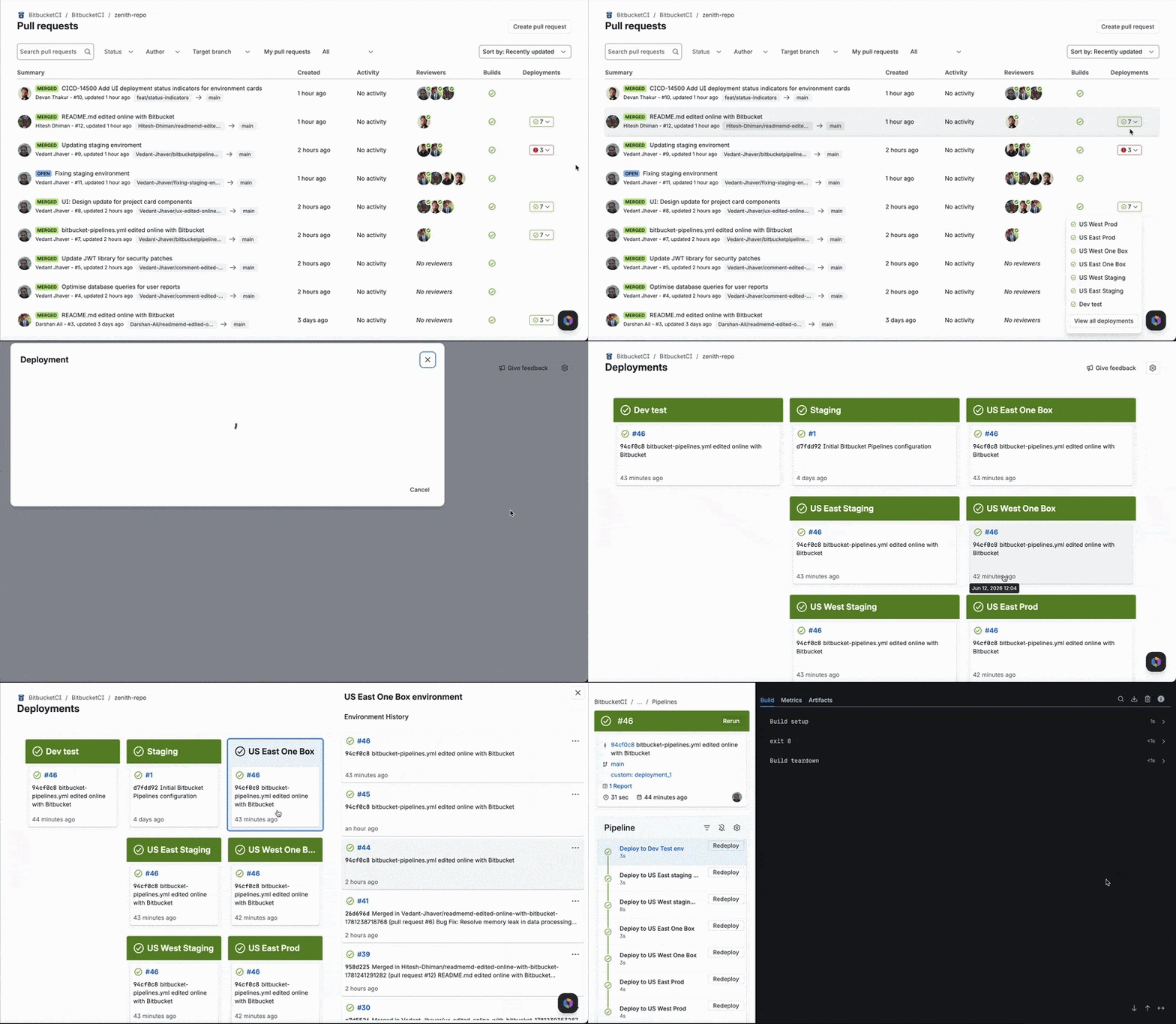
What this unblocks for your team?
Previously, developers had to dig through pipeline histories or log into external UIs just to check if a commit was live—making troubleshooting slow and opaque. Bringing native deployment visibility directly into the PR fixes this by:
- Eliminating manual tracking: No more hunting through pipeline run lists or logging into third-party tools to verify code status.
- Accelerating incident response: By linking live deployment statuses to exact commits, teams can instantly see what code is active in which environment during an outage.
Getting started with Deployments
If you already use Pipelines deployments, you’ll see the new column automatically. If you dont, here’s how you can start tracking deployments natively inside Bitbucket.
Here is a sample bitbucket-pipelines.yml configuration that triggers deployments against the relevant production environment:
image: atlassian/default-image:5

pipelines:
  branches:
    main:
      - step:
          name: Deploy to production
          deployment: production
          script:
            - echo "Deploying to production"
How it works?

Whenever a commit is deployed to an environment, Bitbucket tracks it in real time and maps the deployment status directly to that commit and its associated PR. This creates an automatic, unambiguous record of exactly what is live and where.
- Instant Deployment Tracking: A dedicated Deployment column on the PR list view displays the exact environments (such as dev, staging, or production) to which the latest PR commit has been deployed.
- Smart Environment Breakdowns: Clicking a status badge displays a breakdown of up to 10 environments. Critical deployment states automatically bubble to the top in order of urgency: Failed, Stopped, In Progress, and Successful.
- Dynamic Environment Renaming: If an environment is renamed, Bitbucket automatically updates the environment name across the PR Deployment column while maintaining historical associations.
Things to know
The initial rollout includes the following technical constraints:
- Deployment status is currently tracked and stored for only the head commit of a pull request. Status records for intermediate commits are not updated.
- The UI displays deployment statuses only for commits where the deployment started within the last 6 months.
- The UI displays a maximum of 10 environments per deployment status.
What’s Next
We’re exploring ways to expand deployment visibility further within Bitbucket. Some areas we’re considering include deeper commit-level tracking, broader integration across views beyond pull requests (such as Bitbucket Packages) and MCP support for deployment tracking.
Have questions or feedback?
We’d love your feedback, please share your feedback to help us prioritise what comes next for Deployments. Join the conversation on our Atlassian Community page, review our support docs or reach out to our support team.