People are using AI to design and code every day, but AI tools are only as good as the context they receive.
At Atlassian’s scale, information about our design language is spread across our systems: documentation sites, Confluence pages, Figma files, Looms, and hundreds of packages in code. Some sources are thorough, but others are missing key details, are out-of-date, heavy on images and visual information which can’t be read by code. Most are designed for people to view, not for machines to read effectively.
When AI tools try to generate Atlassian UI from this fragmented landscape, the results are unpredictable and cost more than they should. Agents find outdated patterns, miss accessibility requirements, or invent components that don’t exist in our system.
When we looked for solutions, we couldn’t see anything in the industry that had solved this at scale. So we set out to fix this by restructuring design system content into a coherent schema, providing the right level of context for AI tools to build Atlassian UI. We called this ‘structured content’.
What structured content looks like in our design system
Structured content, broadly, is content broken into consistent, machine-readable chunks instead of freeform prose.
For example, an icon’s description appears in multiple places across the design system website, code, and Figma libraries. Consistent metadata is reused across different tools and locations, rather than being duplicated and eventually drifting out of sync.
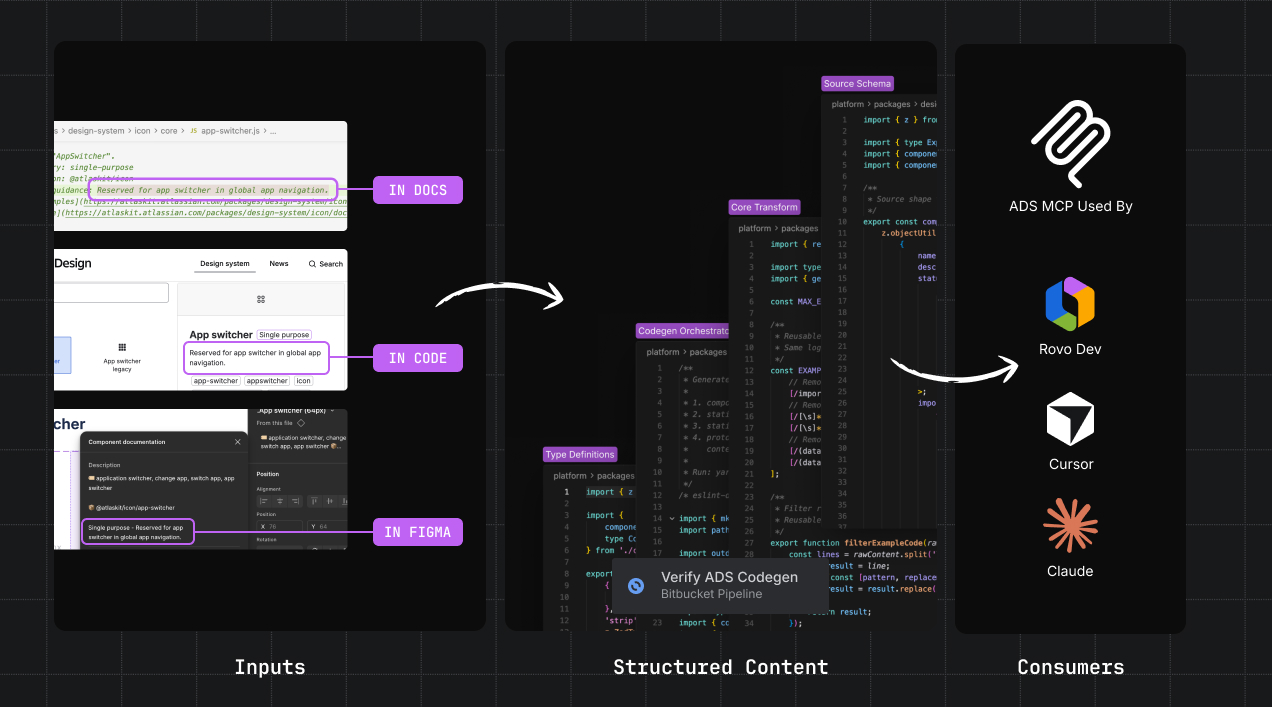
AI pushed us to take this approach further. Every component, token, and other element needs its details captured in a consistent, lightweight, and machine-readable format.
We developed new content schemas for Atlassian Design System components, icons, tokens, lint rules, and foundational guidelines. The schemas provide a consistent format that covers usage, code examples, props, content standards, and accessibility requirements.

Schemas live in TypeScript files alongside the code. From this source, we can generate everything agents need: content for the ADS MCP server, the design system skill, DESIGN.md files, and whatever other formats we need in the future.
Early results show more accurate and faster UI generation
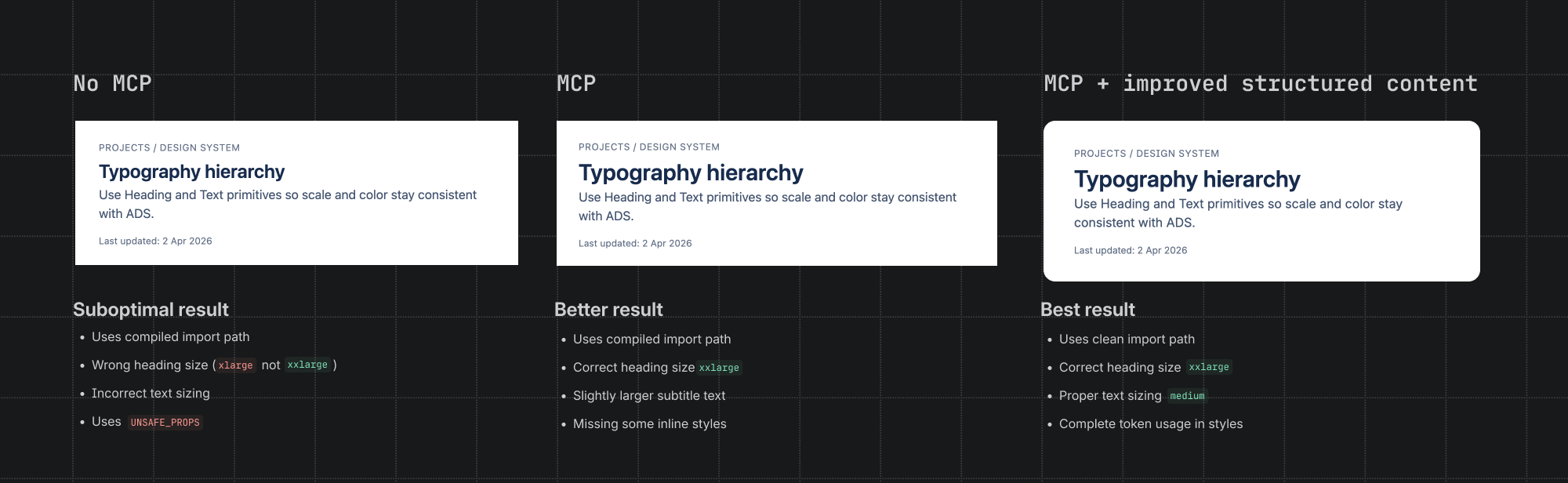
We measured the effectiveness of AI outputs before the MCP server existed (agents scanning the codebase and unstructured docs on their own), after introducing the MCP server, and with the MCP server backed by structured content.
Results of our MCP with structured content
52%
accuracy improvement on specific queries (up to)
34%
faster by average across all ADS-specific tasks for AI agents
26%
reduction in AI tool calls and 16% reduction in token usage
Compared to agents working without an MCP, using ADS MCP with structured content produced 4.9% more accurate code, generated 11% fewer errors, completed tasks 34% faster, consumed 16% fewer tokens, and made 26% fewer tool calls along the way. Better, faster, and cheaper.
With structured content, generated code had fewer lint errors, likely because AI agents got accurate context upfront, rather than having to scan our company-wide monorepo and unstructured, verbose documentation. Tasks were completed faster and for fewer tokens when the right context was surfaced immediately.
How structured content shows up in real workflows
Behind the numbers are moments where structured content shapes what people and agents build.
In one workflow, a product builder used the ADS MCP in Cursor to add a primary action to a card component. Given only a high-level prompt, the AI added the correct button variant in the card footer with no errors.
In another, the MCP was integrated into the design system’s help channel in Slack. When someone asked whether a button should be disabled in a form, the structured content surfaced the correct guidance (keep it enabled during validation).
These moments represent a shift in how design system knowledge is distributed. Instead of requiring people to discover, read, and interpret documentation before they start building, the AI agent meets them where they work with the right context.
Making the content self-healing
Documentation that drifts from the codebase is worse than no documentation at all, because it produces confidently wrong or hallucinated outputs.
That’s why we also introduced tooling to keep documentation up-to-date. When a team updates a component or adds new usage guidance, AI skills automatically update structured content and run evals and code health checks, ensuring people and agents always get the latest version of the truth.
Connecting our web of context
Too often, teams who try to create a single source of truth just end up creating another one. This work reduced redundant content sources and surfaced gaps in existing documentation, like missing accessibility guidance and outdated code examples.
From here, we’ll connect our structured content to more agents, databases, docs, and the Teamwork Graph to ensure the right information gets surfaced at the right moments.
The goal hasn’t changed: make Atlassian UI documentation high-quality, maintainable, and available inside the tools product builders are using. The audience for that content has expanded, and structuring content for AI has made us better at explaining our design language to everyone who uses it.