


Hi! Giuliana and Sam from Atlassian’s Security Testing team here. The Security Testing team oversees all penetration testing at Atlassian and, as an internal team, we almost exclusively perform white-box/code-assisted security engagements. This enables us to maximize our ability to find high-quality bugs and provide strong context-driven recommendations.
We’ve been exploring the capabilities of Rovo Dev to enrich our testing, and in this blog we’ll share some ready-to-go examples of how you, or your security team, can do the same!
Any good whitebox application security assessment approach will involve running static analysis tools against the codebase to build context about the system, extract routes, generate leads, and identify potential hotspots for further evaluation.
In this blog, we’ll demo how security teams can use Rovo Dev Skills to extend the capabilities of Rovo Dev to:
- Intelligently execute external static analysis tooling,
- Perform AI-assisted code auditing,
- Triage the results to reduce noise and false positives; and,
- Document a set of high-quality leads for human security engineers to validate.
The resource we’ll be demo’ing throughout this blog can be found here!
What are Rovo Dev Skills?
Skills are an open format that provides agents with instructions, scripts, and resources they can discover and use to perform tasks more accurately and efficiently. They are plain-text Markdown files containing instructions that inform the agent how to handle specific tasks or workflows.
We have found them to be among the most reliable and powerful ways to customise the agent so that it has the right context, domain expertise, and understanding of available tools to assist with security testing.
Getting started with Rovo Dev Skills for security testing
We have built a number of skills to get you started by integrating with common open source static analysis tools. This is just a starting set though! Consider your own testing workflow, the tools you use, and how agentic AI could assist you in executing them and reasoning about their results.
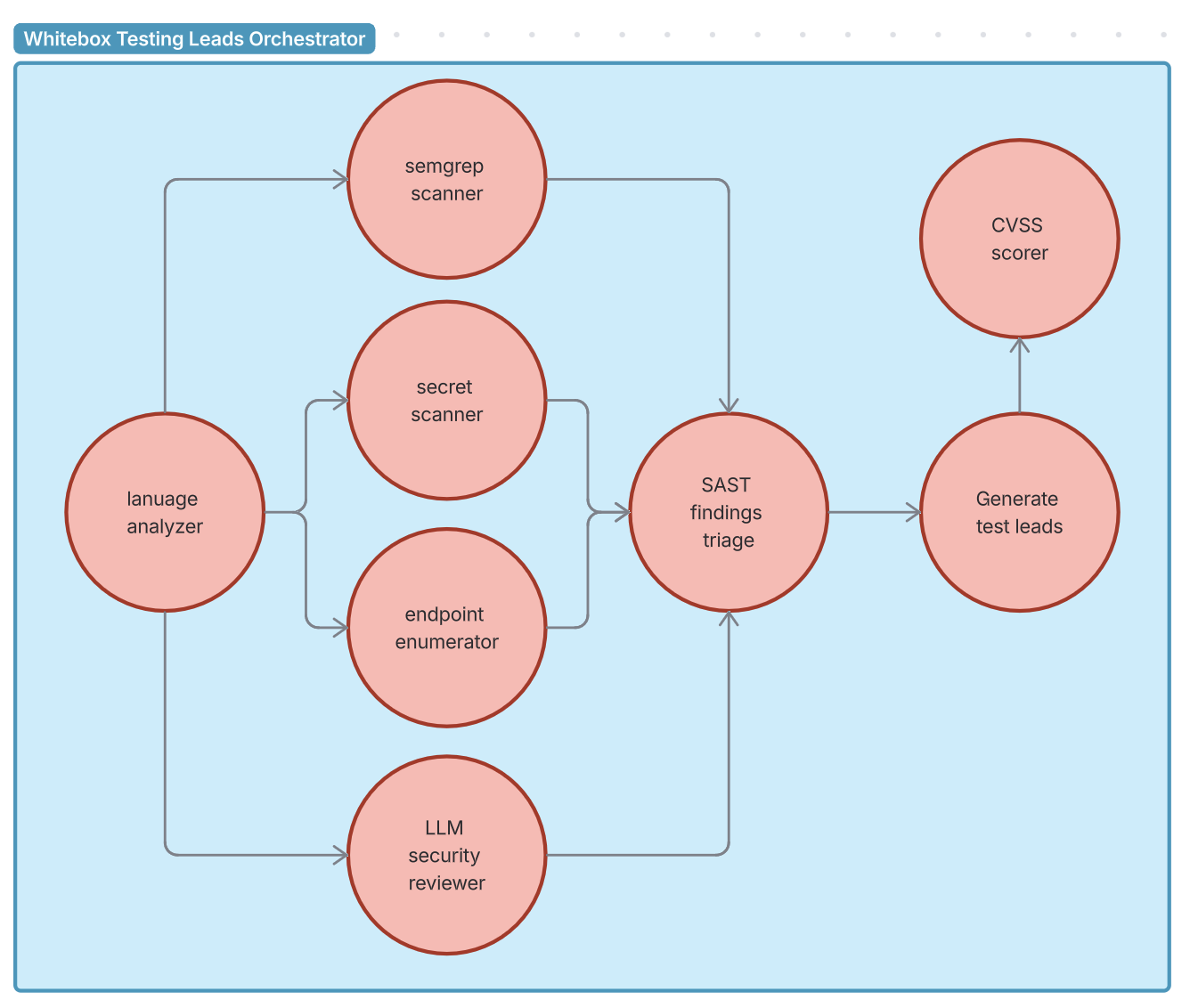
We have created an orchestrator prompt that calls the following skills in an optimised order. This orchestrator prompt could be combined with other agents to build a fully fledged agentic testing workflow.
| Skill | Purpose | Tool |
|---|---|---|
language-analyzer | Detect languages and code volume | cloc |
semgrep-scanner | SAST scanning with CWE/OWASP mappings | semgrep |
secret-scanner | Detect hardcoded secrets | trufflehog |
endpoint-enumerator | Find API route definitions | rg |
security-reviewer | AI-powered code auditing | find, grep |
cvss-scorer | LLM-determined CVSS vector, Python CVSS library used for accurate score generation | python CVSS library |
sast-investigator | Triage findings from the other tools as true/false positives | grep, built-in tools |
generate-test-leads | Prioritised test leads for human validation | Confluence MCP tools |
Rovo Dev Skills in action!
How do you write a skill?
Each skill is defined by a SKILL.md file with a YAML frontmatter containing the skill name, description, and optional additional fields, followed by the skill instructions in markdown.
You can create a skill by running /skills within the Rovo Dev CLIand following the prompts. Alternatively, you can create a Markdown file at either the project (.rovodev/skills) or user-scoped (~/.rovodev/skills) level to share skills across workspaces.
- Create a new directory within
.rovodev/skillswith the name of your new skill - Create a
SKILL.mdfile within this directory containing the following YAML fields and markdown instructions to align with the skills protocol, as seen in the example below
---
name: skill-name
description: A description of what this skill does and when to use it.
---
# Skill instructions - in any markdown format you wish

## Available Scripts
It is usually a good idea to specify any scripts/commands to be run

## Workflow
Then clear, step-by-step instructions on how to use scripts, when to use etc.
Tips
- Expect that the agent who calls your skill will only handle 10-30k content characters
- You may need to split skills further, or instruct an agent to use your skill multiple times on smaller chunks of data.
- You can also instruct the agent to report any truncation that may have occurred back to the user (as we have in our
whitebox-test-leadsprompt) to catch any unexpected behaviour.
- Ensure scripts you use in a skill have structured input and output, and display meaningful error messages when something goes wrong. Your agent will rely on this to correctly perform actions, resolve and report any issues.
- Avoid interactive scripts. Agents operate in non-interactive shells and may not be able to respond to TTY prompts/dialogues, potentially hanging indefinitely. Accept input via command-line flags or other alternatives.
What makes for a good skill?
Skills give agents access to procedural knowledge and company, team, and user-specific context that they can load on demand. In our case, they best serve as a pentesting assistant, where the skills teach the agent how to perform security scanning and triage. Internally, we have many more skills that support our workflow, including:
- Leveraging our own custom Semgrep rules & select quality rules from public repositories.
- Integrating with commercial and in-house developed security scanning & testing tools.
- Running more than 60 Rules containing highly specific details about vulnerability classes and how they manifest in Atlassian products, including code patterns that are known vulnerable and instructions on how to find similar variants. These were built from our internal whitebox security testing guides, but that’s a blog topic for another day!
There are nearly endless ways skills can supercharge your workflow, enabling human security folk to spend their time on more valuable work.
When should you use skills over building MCP integrations?
The Model Context Protocol (MCP) is widely regarded as the paved path to integrating external tools with AI agents as it provides a structured way for agents to interact with external tooling. The Atlassian MCP server for example, enables AI agents to seamlessly interact with Jira and Confluence.
It’s certainly possible to build MCP wrappers or use existing MCP servers for all the tools we demo’d in this blog, but in our experience, MCP is overkill for simple CLI tools. The agent can reliably reason with the markdown files to correctly execute the tool and comprehend its results.
We use MCP when there are other considerations at play like secrets management or a high chance that LLM reasoning (aka potential hallucinations) would significantly impact the agent, such as:
- Calls to external services that require API keys or other secrets,
- Complex tool innovations that are multi-step or require configurations to be loaded based on logic that can reliably be determined by code,
- To avoid requiring the LLM to perform pre- or post-processing on large amounts of data in a format that would be more reliable in code, such as XML or JSON.
But we’ll admit, it’s a rapidly changing field so we might change our mind on this too!
Until then, we hope this blog has got you thinking about how Rovo Dev Skills can empower your security teams to cut through noise, increase coverage, and find better bugs quicker.
Your friends in Security Testing,
Giuliana & Sam.


