



The de facto standard for interacting with AI is in chat-style user interfaces, however, this isn’t optimal for many cases. Software practitioners need to reimagine user experiences for the AI era. There are numerous user experience scenarios that can leverage AI seamlessly, overcoming some of the pitfalls of relying too heavily on chat, such as user context switching, copy/pasting, and prompt crafting.
Recently, I developed a Forge app for Atlassian’s Workplace Events team. The app contains an administration user interface wherein the Workplace Events team can set up competitions. Each competition has a number of fields, such as a title, description and start and end dates/times. Naturally this information is collected in a form.
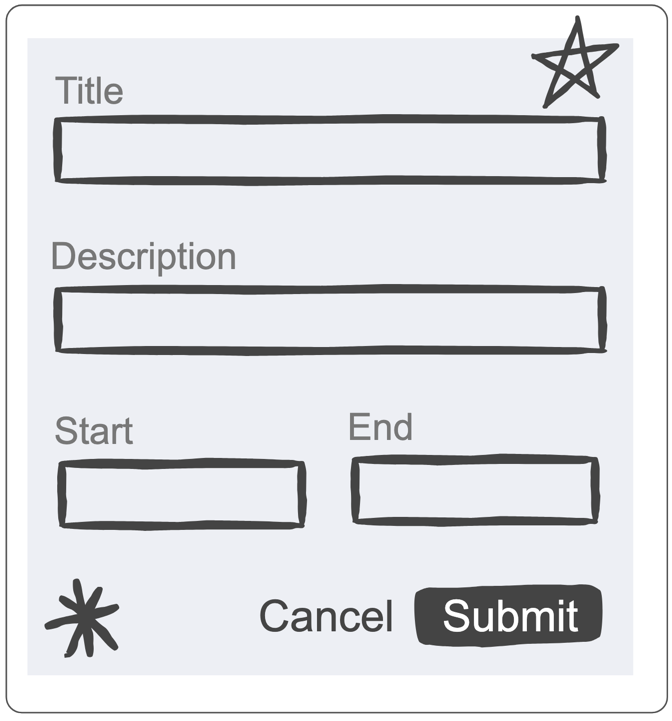
The actual form in the app has many more fields and takes quite a while to complete, so I added a feature to let AI help complete the form. The top of the form now has a toggle enabling the user to show the AI form-filling controls. These controls allow the user to specify some basic parameters to guide the AI in how to complete the form, and they are much quicker to complete than the main form.
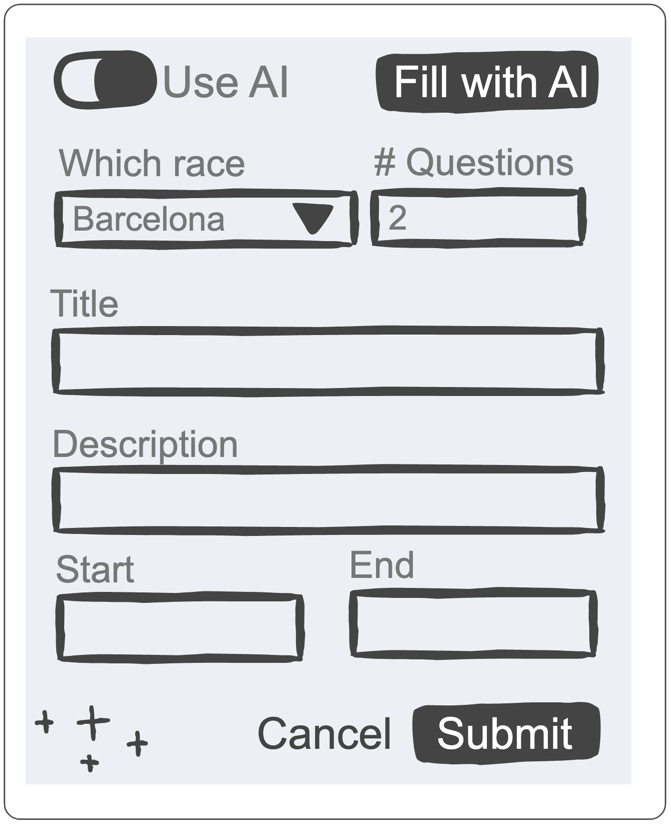
When the user clicks the “Fill with AI” button, a query is sent to the LLM using the Forge LLM API. The query includes any existing form data, as well as data from the AI instruction widgets. In many cases, the query will also include additional context to explain the purpose of the form. The query asks for the LLM to respond with a JSON object where each field corresponds to a field in the form. This makes it easy for the code to update the form with the returned form values.
Here’s an example of it in action:

The AI form filling approach is in line with our responsible technology principles since it’s completely transparent about AI usage and allows the user to review and edit the AI response before submitting the form.
While form‑filling is common, we need to identify other kinds of user experiences that can leverage AI. Outlined below are four patterns that leverage AI to provide improved user experiences, starting with the form‑filling pattern:
AI Form Filling
- Overview: Form filling can be a tedious task. This pattern helps automate form filling using AI.
- The Pattern: A form is presented to the user. They can either fill out the form manually or click the “Fill form with AI” option.. The current form data is sent to the LLM along with some context to explain the form and help the LLM complete the fields. The prompt passed to the LLM requests that the completed form values be returned in JSON form where each component is identified by the form component’s unique ID, thus allowing the UI to easily update the values. The UI can optionally include widgets such as text fields and toggles to allow the user to provide additional guidance to the LLM. The amount of context available will govern the extent to which additional manual context (additional AI guidance widgets and/or partial form filling) is required before AI will be able to fill the form adequately. Where there is significant context, it may be feasible to automatically fill out the form and let the user edit it rather than making it an optional step.
- UX Impact: Speeds up form completion while still allowing for it to be reviewed before submission.
- Example usage: When committing a set of code changes, the commit message needs to summarise the changes. It’s also often standard practice to ensure the commit message is prefixed with a Jira work item key. Incorporating this pattern would involve drafting the commit message using AI.
Ghost Text Completion
- Overview: Utilise the ability of LLMs to complete sentences and paragraphs as the text is being editing.
- The Pattern: AI‑enabled IDEs generate code near where the developer is editing, allowing them to press the Tab key to accept the suggested code. The same pattern can be applied to the Atlassian editor. Google Docs and Gmail already have this – they call it Smart Compose.
- UX Impact: This is a powerful UX pattern because it allows for “low-friction” interaction – the AI anticipates your next move, and you can either adopt it instantly or keep typing to ignore it or provide additional context with your next edits.
- Example usage: When commenting on a work item, the editor is provided context that includes details about the work item and previous comments. When the user starts creating a new comment, the AI uses the context to anticipate what the user may like to say, suggesting it in ghost text form.
Proactive Anticipatory Triggers
- Overview: Instead of waiting for a user to type a prompt, the system uses the LLM to analyse user behaviour and surface help before it’s requested.
- The Pattern: The LLM monitors low-signal actions and triggers non-intrusive suggestions to help the user absorb information and take action.
- UX Impact: It transforms the AI from a reactive tool into a proactive partner, reducing the blank canvas anxiety and cognitive load of figuring out how to use a feature.
- Example usage: A user hovers over a complex chart, causing the AI to be triggered and resulting in a non-intrusive suggestion: “I noticed you’re trying to interpret this data; would you like me to summarise it?”
Memory Modularity & Workspace Context
- Overview: A pattern to overcome the problem wherein LLMs often ‘forget’ preferences or rules established in previous sessions.
- The Pattern: The UI allows users to manage persistent memory through a hierarchical scheme of rules and skills, where lower levels inherit the rules and skills from higher levels. Rules serve as passive guardrails to enforce consistency, whilst skills are modular capabilities granting AI agents permission to execute specific scripts and tools. These rules and skills are fed into the context of all AI queries relating to the hierarchy of artifacts.
- UX Impact: It creates a personalised experience that feels like working with a long-term colleague who understands your shorthand, style, and history, rather than a stranger who needs a fresh explanation every time.
- Example usage: A Jira space, epic, feature/bug/task and subtask hierarchy can be augmented with rules and skills at each level. A space-level rule may define team rituals such as sprints being two weeks long. Epic-level rules may define key milestones for a project whilst epic level skills may facilitate the creation of periodic retrospectives.
These patterns still need validation and refinement, but I hope they stimulate your imagination about how user experiences can be redesigned to leverage AI.


