The Problem We Faced
It started with a blocked Jira ticket when two of our service teams tried to onboard their services onto our Google Cloud Platform-based system.
Both teams use my team provisioned self-hosted OpenSearch clusters. The cluster provisioned fine, but services hit mysterious 404 errors: same calls always worked from my laptop; our canary with identical setup was fine. We suspected network, Service Proxy, Istio, or the services’ code.
We had 5 engineers total spend three full days with very little progress; we blamed the Service Proxy (pulled John in) and searched everywhere.
Errors observed: intermittent “default backend – 404” and messages like “backend NotFound, service rules for the path non-existent”. Where with John’s firm believe their component is not problem and think Ingress is the issue (which turned to be part of the root cause).
In contrast, the Rovo Dev CLI led me to the root cause and a fix in about one hour with almost zero knowledge on how GCP work (I am more an AWS guy).
The Rovo Dev CLI Diagnostic Workflow – How I Found the Root Cause in 1 Hour
I granted read-only access for GCP to the gcloud CLI and read-write access to the staging Kubernetes cluster for kubectl to function.
On production you should be very careful on providing similar access or should not.
I started by pointing Rovo Dev directly to the Jira ticket that contained all the historical context, logs, and prior debugging attempts. From there, I asked it to scan Confluence for pages describing my system architecture and the details of our OpenSearch clusters, so it could ground every hypothesis and command in how our actual environment is wired rather than generic GCP or Kubernetes advice.
Based on the Service Proxy team’s hint — and with zero GCP knowledge and some Kubernetes under my belt — I treated Rovo Dev CLI like a partner and just started talking to it. I told it what I saw, what I didn’t understand, and where I might be wrong.
“Could ingress explain these default‑backend 404s?” It didn’t overpromise; it noted the symptoms and Johns reasoning made ingress a likely cause, prompting me to compare host rules and backends across the jinx and jira‑orchestration ingresses. That was enough to shift my view: assume ingress until proven otherwise.
“Okay, then show me the load‑balancer logs.” Silence. Rovo Dev pointed out the obvious-in-hindsight: there were no logs because logging wasn’t enabled on the GCP LB path for that ingress. In another world, I’d go read GCP docs for an hour. Here, I simply asked it to enable logging, and a few minutes later we were tailing entries in real time.
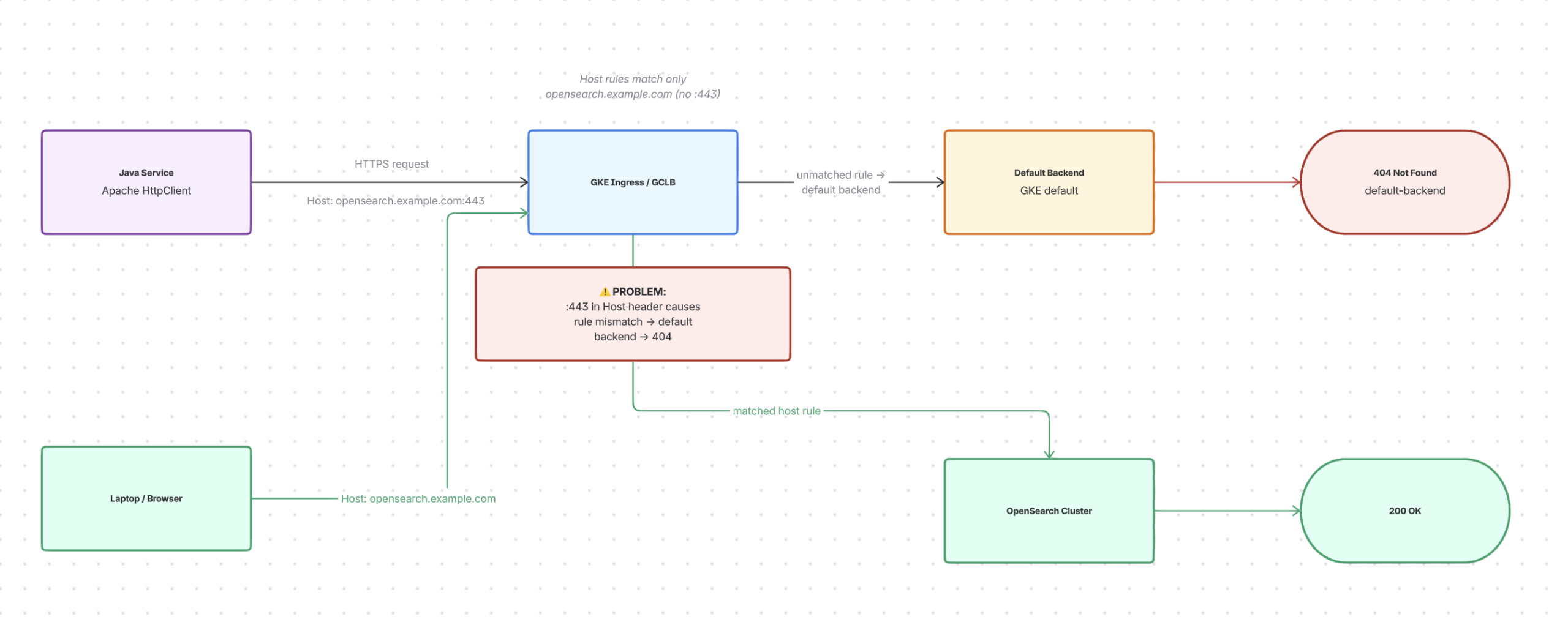
At first, it was confusing: the same endpoint gave 200s from my laptop but many 404s from the Java service. I asked Rovo Dev to compare precisely, not guess. Paths and methods matched, TLS was fine. Then we saw the difference: Apache HttpClient sent “:443” in the Host header; my laptop/browser did not.
Rovo Dev found our ingress rules matched only the bare host (no port). That tiny mismatch caused three days of confusion. Service calls bypassed our named rules and hit the default backend, returning 404, while my laptop matched a rule and reached OpenSearch. It wasn’t Service Proxy (sorry John for blaming ), Istio, or OpenSearch failing, but an Ingress host-rule mismatch due to subtle client behaviour.
I held back from pasting YAML and asked Rovo Dev to test first. It made a small, parameterized Java program to reproduce the issue and toggle headers/hosts to see changes. With this safety net, I requested the simplest fix: set a default OpenSearch backend and mark the ingress so unmatched host requests go to the correct service.
We patched one namespace first. While it rolled out, Rovo Dev monitored the test client and GCLB logs. Failing paths turned green; logs showed unmatched Host-header requests routing to OpenSearch, not 404. One hour ago I couldn’t diagram GCP ingress from memory; now I had a verified fix and a repeatable test.
Before finishing, I asked: “Is this the best way to handle these issues?” Rovo Dev searched the web (using my scrappy web search MCP server where it convert HTML to markdown to save token usage) and found that this pattern is widely recommended for safe handling of unmatched rules and port‑suffixed Host headers in GKE ingress.
Confident in the approach, I had Rovo Dev create a brief summary and rollout plan in Confluence using its integrated Confluence tool. I shared it with the team along with the small client, so anyone could replicate the failure and see the fix. The key wasn’t the fix itself, but the conversation—my clear constraints and observations, plus a tool to quickly turn them into experiments, logs, and evidence.
See the diagram (Done with Rovo + Whiteboard AI, my favorite tool and I strongly think you should check it out, it works like magic)
The Fix (aka “The Boring Part”)
The fix itself is simple — almost annoyingly simple:
spec:
  defaultBackend:
    service:
      name: opensearch
      port:
        number: 8443
  annotations:
    ingress.gke.io/default-backend: "opensearch:8443"
What GKE does: If a request doesn’t match any ingress rule (bad Host header, wrong path, Apache HTTP Client quirks), it falls back to a default backend. Without explicit configuration, that backend returns 404.
Our fix: Tell GKE explicitly to route those unmatched requests to OpenSearch instead.
Why Rovo Dev CLI vs. Doing This Manually?
Much Faster: 9 Engineer‑Days vs ~1 Hour
Before Rovo Dev CLI, five engineers (including me) spent about 9 engineer‑days (not every of us work full time on the problem) chasing logs, blaming Service Proxy, and tweaking configs with little progress.
Using Rovo Dev CLI, the main tasks—enabling logs, spotting the Host‑header :443 mismatch, designing and testing the ingress fix—took about one focused hour. Same setup, vastly faster understanding.
Repeatable, Not a One‑Off Hero Move
If done manually, most steps stay in shell history and memory. With Rovo Dev CLI, the debug flow is:
- Captured as a conversation (questions, commands, log queries, patches)
- Easy to replay for other namespaces or clusters
- Easy to adapt for similar 404/ingress issues
Instead of “that weird thing Huy once did on GCP”, it’s a repeatable recipe to run and improve.
Knowledge Sharing, Collaboration, and Validation
The Rovo Dev workflow created artifacts the whole team can use:
- A small test program anyone can run
- A clear ingress patch ready for code review
- A written summary for Slack/Confluence
That helps to:- Share the root cause and fix with other teams
- Collaborate on whether this fits our GKE/Apollo conventions
- Validate the approach with GCP and ingress experts
The knowledge isn’t stuck in my head; it’s visible, reviewable, and reusable.
Compensating for My Lack of GCP Knowledge
I know AWS much more than GCP (zero). Before Rovo Dev, GCP LB and GKE ingress were unclear to me. Rovo Dev CLI helped by:
- Turning vague doubts (“maybe ingress?”) into clear GCP/K8s actions (enable logging, read logs, check rules)
- Highlighting key details (Host header behavior, default backend routing)
- Allowing me to ask like “Is this the best fix?” backed by public guidance
It didn’t make me a GCP expert, but it for my gaps, letting me debug and fix a production issue confidently.
Connecting Back to the Series 
Post 1 (Cursor + Atlassian MCP): The plumbing — how to wire tools to Atlassian data
Post 2 (Context & Grounding): The mindset — AI output quality depends on input quality
Post 3 (From Cool Demos to Real Leverage): The menu of options — where AI actually buys you time/money/sleep
Post 4 (This one): The proof of concept — here’s a real production problem solved faster and better with Rovo Dev CLI
The through-line: AI isn’t magic. It’s a workflow partner that makes you 2-10x faster at problems you already know how to solve.
You still need to:
- Understand the problem domain (GKE ingress)
- Know what correct looks like (the fix)
- Ask the right questions (is this known? how many teams?)
But once you’ve done that once, Rovo Dev helps you scale it to many without the tedium.
Questions for Readers
If you’re using Rovo Dev CLI in your workflows, I’d love to hear:
- What kinds of repetitive issues have you automated away?
- Where have you found it doesn’t work well?
- What would make it even more useful for your team?
Drop comments below or ping me — this is about learning together.
What’s Next?
In the next posts, I want to explore: How do we prevent these issues from happening in the first place? Can Rovo Dev help with proactive checks, policy enforcement, or automated alerts?
Stay tuned.