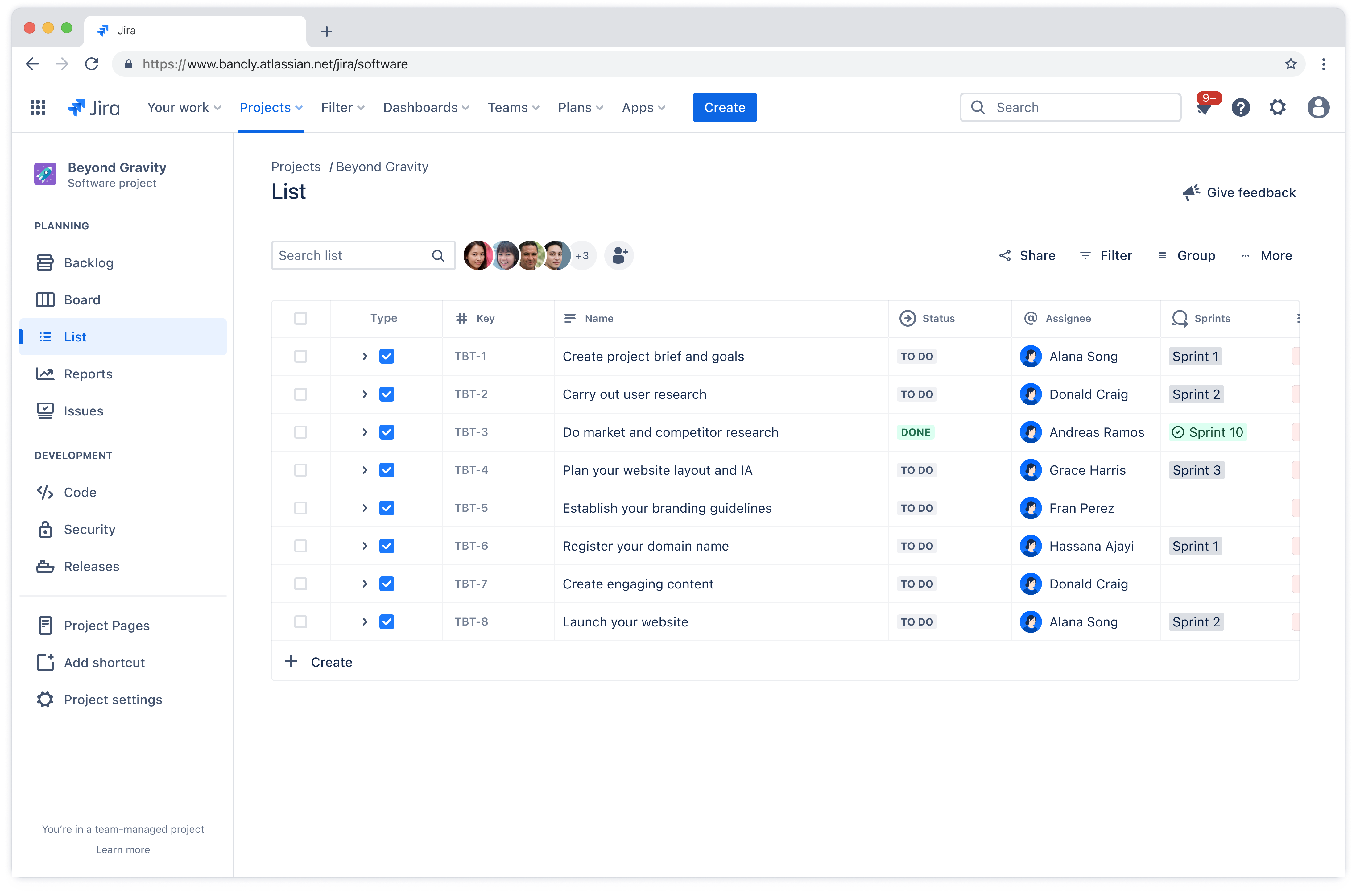
Project list template
Organize tasks, track deadlines, and assign responsibilities in one place. A project list template helps teams manage complex work, reduce miscommunications, and ensure alignment toward project goals.
Ideal para
Gestión de proyectos
FUNCIONES CLAVE
Gestión de proyectos
Gestión ágil de proyectos
Planificación de proyectos
What is a project list template?
A project list template is a framework that helps teams document and manage all the work required to complete a project. It ensures everyone on the team understands what needs to be done, who's responsible, and when things are due.
Using a project list template keeps your projects organized, reducing the risk of missing important tasks or letting deadlines slip through the cracks. A well-organized list makes it simple to monitor progress at a glance.
Team leads can quickly identify what's on track, what's behind schedule, and where bottlenecks are forming. This real-time visibility supports better project fast tracking and decision-making, helping teams adjust before small issues become bigger problems.
Benefits of using a project list template
A project list template delivers concrete advantages that make work smoother from day one:
No more reinventing the wheel: Stop building a new task tracking system every time you start a project. The template is ready to go, so you can jump straight into the actual planning process instead of spending hours setting up spreadsheets or debating which tool to use.
New team members get up to speed faster: When someone joins your project halfway through, they don't need a 90-minute walkthrough to understand what's happening. The standardized format means they can look at the list and immediately see what's done, what's in progress, and what's coming next.
One place for everything: No more confusion around where important documentation is stored. Everyone looks at the same list, which means fewer miscommunications and better project collaboration across the board.
Fewer "what's the status?" interruptions: Stakeholders can check progress themselves instead of pulling team members into meetings or firing off Slack messages. Your team spends less time giving updates and more time actually doing the work.
Decisions happen faster: When information is organized and visible, you don't need to wait for someone to compile a status report before making decisions. You can see what's working and what's not, then act on it.
Who should use a project list template?
Project task list templates work for anyone managing work that involves multiple tasks, deadlines, and people. The structure adapts to different team sizes and industries, making it valuable across various contexts.
Project managers: These professionals coordinate multiple workstreams and need a central place to track everything. Templates help them keep stakeholders informed without constant status meetings.
Marketing teams: Campaigns involve many moving parts across different channels. A project list keeps all the pieces organized from planning through execution.
Software development teams: These teams use templates to track features, bug fixes, and technical debt. The structure helps prioritize what to build next and keeps sprints organized.
Operations teams: Templates help standardize processes across different initiatives. This consistency makes it easier to onboard new team members and maintain quality.
The template scales to fit projects of any size, from a two-week sprint to a year-long initiative.
Types of project list templates
Different teams work in different ways, so various project list template styles have emerged to match those preferences. These include:
Simple to-do lists: These basic templates center on tasks and completion status. They work well for straightforward projects where the main goal is making sure nothing gets forgotten.
Detailed checklists: These include additional fields like priority levels, task dependencies, and notes. Teams that need more context around each task appreciate the extra detail.
Sprint backlogs: These templates organize work into sprints and stories, making them ideal for development teams using iterative approaches. They emphasize flexibility and regular reprioritization, which is essential for agile project management.
Milestone trackers: These focus on deliverables and milestones rather than individual tasks. They're useful for keeping projects aligned with original goals and preventing project scope creep.
Phase-based templates: These break larger initiatives into phases with clear owners and timelines. They work well when you need to show how different workstreams connect, functioning as an action plan that guides execution.
Each template type fits different team needs and workflows. Some teams prefer minimal templates they can customize, while others want comprehensive structures with built-in time management features.
¿Qué incluye la plantilla de lista de proyecto?

Flujos de trabajo personalizables
Los flujos de trabajo se pueden adaptar a la forma de trabajo de cada equipo. Ya sigas un proceso lineal o necesites más flexibilidad, la plantilla de lista de proyecto se ajusta a tu flujo de trabajo en lugar de obligarte a adoptar una estructura rígida.
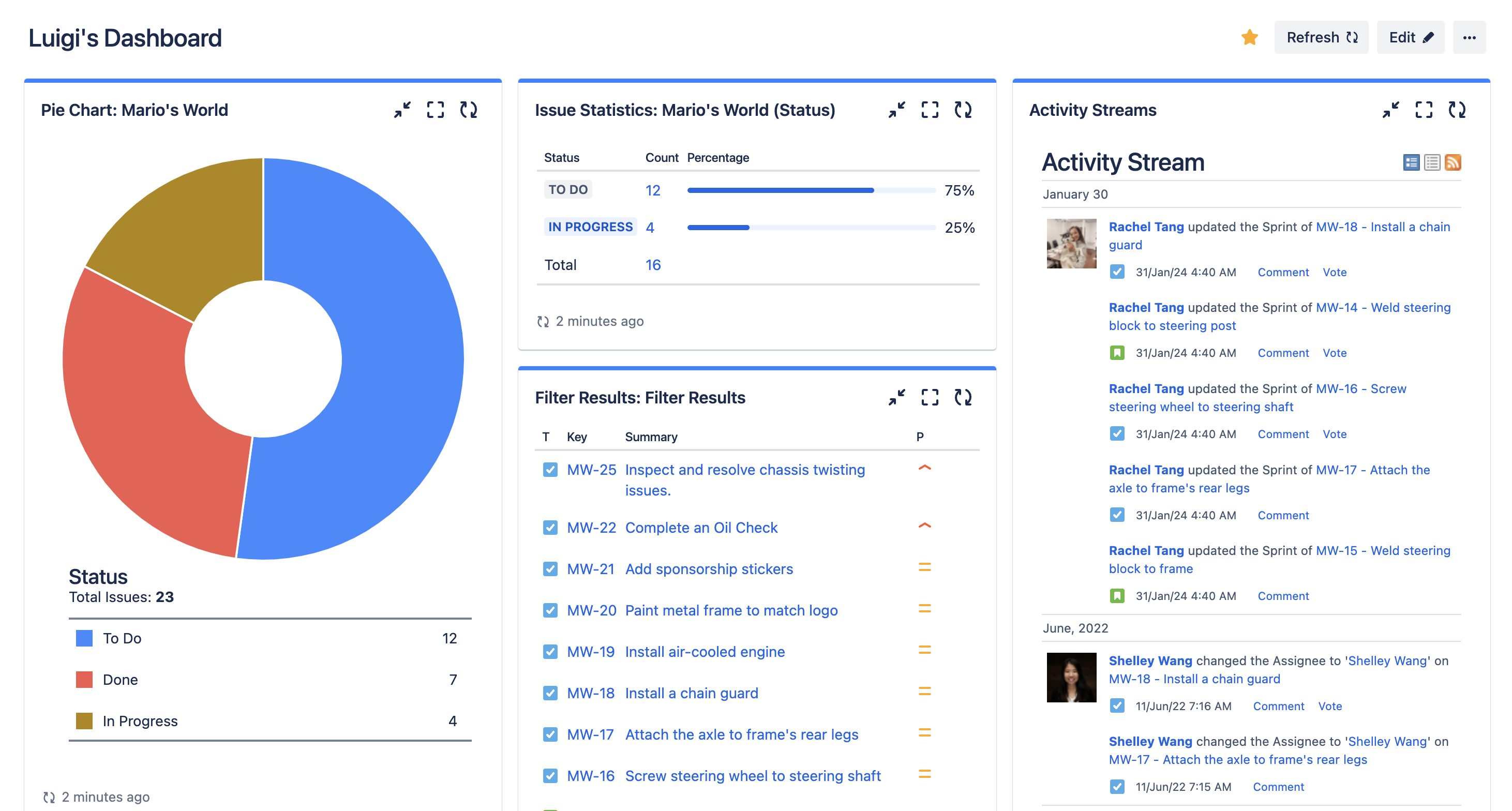
Paneles
Los paneles proporcionan una perspectiva de alto nivel del progreso de todos los proyectos. Los líderes y las partes interesadas pueden conocer rápidamente el estado, identificar los riesgos y ver a qué se destinan los recursos. En lugar de solicitar actualizaciones a cada miembro del equipo, todo el mundo puede consultar el panel y acceder a la información más reciente al instante.

Backlog
El backlog es el lugar donde permanecen las próximas tareas hasta que puedan abordarse. Ayuda a los equipos a recopilar ideas y solicitudes sin saturar la lista de proyectos activos. Cuando llega el momento de planificar la siguiente fase, el backlog facilita la revisión de las opciones y la priorización de lo que debe sacarse adelante en función de las metas y la capacidad actuales.
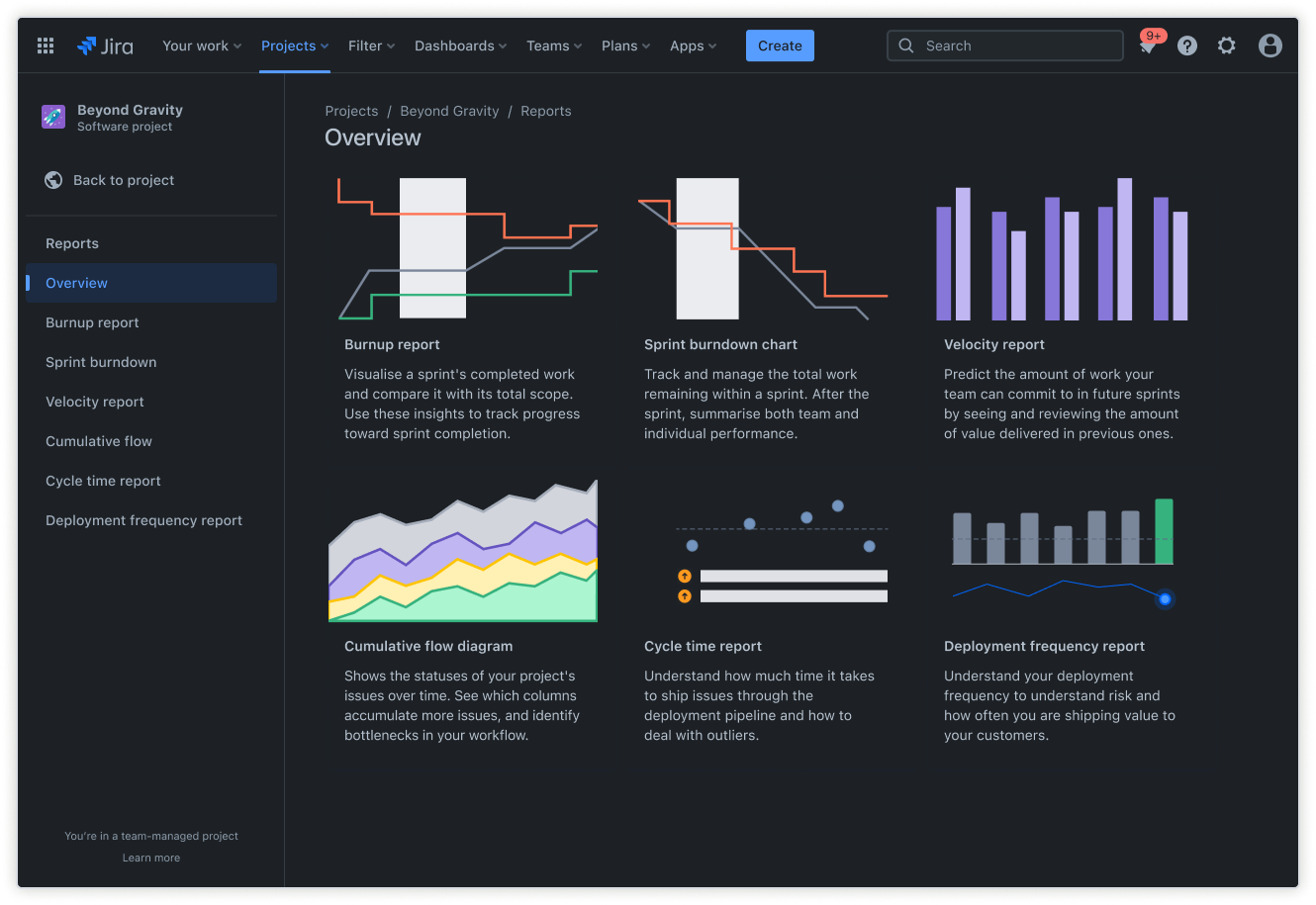
Informes
Los informes ofrecen datos sobre el rendimiento, los plazos y los obstáculos al progreso. Te ayudan a detectar patrones, como las tareas que suelen llevar más tiempo del esperado o los miembros del equipo que pueden estar sobrecargados. Estos datos favorecen una mejor planificación y estimaciones más realistas del cronograma del proyecto de cara al trabajo que habrá que sacar adelante próximamente.
Instrucciones para empezar a utilizar la plantilla de lista de proyecto
- 1
Define el nombre del proyecto, los aspectos clave y la persona responsable
Ponerle un nombre al proyecto y designar a una persona responsable deja claras la propiedad y la finalidad. Al documentar los detalles clave de antemano, se garantiza que el equipo conozca la meta, el alcance y los criterios de éxito.
- 2
Configura las categorías de tareas y planifica las fases del flujo de trabajo
Divide el trabajo en categorías lógicas que tengan sentido para el funcionamiento de tu equipo en la plantilla de lista de tareas pendientes del proyecto. Define fases del flujo de trabajo que reflejen la trayectoria que siguen las tareas desde el principio hasta su finalización. Según el proceso, puede ser algo tan simple como "Por hacer", "En curso" y "Completado", o bien incluir etapas adicionales como "Revisar" o "Bloqueado".
- 3
Asigna cada tarea a un miembro del equipo y establece fechas de vencimiento
La asignación de propietarios claros para cada tarea garantiza que todos conozcan sus responsabilidades. Las fechas de vencimiento crean urgencia y ayudan a secuenciar el trabajo correctamente. Cuando las tareas tienen un propietario y una fecha límite, la responsabilidad aumenta y la actividad se mueve de manera más predecible a lo largo del flujo de trabajo.
- 4
Organiza la lista con etiquetas, prioridades y campos personalizados
Usa etiquetas para clasificar las tareas por tema, cliente o cualquier otro factor que ayude a filtrar y generar informes. Los indicadores de prioridad ayudan a los miembros del equipo a centrarse en lo más importante cuando deben atender varias cuestiones a la vez. Los campos personalizados permiten realizar un seguimiento de la información específica del proyecto, como el presupuesto, el nombre del cliente o las dependencias técnicas.
- 5
Haz un seguimiento del progreso y comparte actualizaciones para mantener a las partes interesadas coordinadas
Supervisa el progreso con regularidad mediante paneles o informes para detectar los problemas con antelación. Comparte las actualizaciones de forma proactiva para que las partes interesadas no tengan que preguntar por el estado. Esta transparencia genera confianza y garantiza que todos se mantengan coordinados a medida que el proyecto evoluciona. La comunicación regular a través de tu software de gestión de proyectos gratuito o de pago mantiene la actividad visible y reduce la necesidad de reuniones de seguimiento.
¿Quieres usar esta plantilla gratuita?
Explora más plantillas para potenciar el trabajo en equipo
Capacita a todo el mundo, sea del equipo que sea. Genera, conecta y presenta grandes ideas sin problemas en todas las aplicaciones de Atlassian mediante nuestra completa colección de flujos de trabajo listos para usar.