


LLMs are good at individual, well‑specified tasks. But they struggle when we ask them to do too many things at once. When a single prompt mixes several goals (e.g. “refactor this component, add three new features, fix tests, and update docs”), a few common failure modes appear:
- Loss of focus: the model fixes one part of the request but quietly drops others.
- Tangents and overreach: it “helpfully” rewrites unrelated code or invents new abstractions nobody asked for.
- Wild decisions: it changes APIs, folder structures, or patterns in ways that don’t match your codebase norms.
- Brittle diffs: the resulting patch is large and hard to review; subtle mistakes hide inside sweeping changes.
This isn’t because LLMs are “bad at coding”; it’s because they’re being asked to juggle multiple, loosely‑defined problems simultaneously. The more we compress into one prompt, the more we force the model to guess about intent and priorities.
Why break work into incremental prompts?
A more reliable pattern is to treat the LLM like a collaborator you pair program with: you decompose the work into small, explicit steps, and use one or two focused prompts per step. This has a few advantages:
- Clear intent: each prompt has one primary goal (e.g. “refactor component A for dynamic dropdown items”), so the model doesn’t have to choose what to prioritize.
- Reviewable changes: each stage produces a tight, self‑contained diff that’s easy for humans to understand and approve.
- Course correction: if something’s off, you can adjust the next prompt instead of unpicking a giant, monolithic change.
- Stack‑agnostic: this works whether you’re refactoring React, updating backend services, or changing infrastructure code.
Even if you’re not familiar with the specific tech stack, you can still follow the workflow: define a small change, apply it, validate it, then move to the next one.
I discovered that using one-off commands with different LLM models was not achieving the results that I wanted. So I developed a system using incremental prompts with Rovo Dev to tackle complex multi-stage tasks, breaking down each change into a single action to improve focus for the model.
A concrete example: refactor using multiple-stage Prompts
The rest of this page walks through a real example using Rovo Dev to apply this incremental approach.
You don’t need to be a React expert to follow along. At a high level, here’s what’s happening:
- Component A is a small UI component that renders a dropdown menu of action links (e.g. “Link 1”, “Link 2”, “Link 3”).
- Component B is a table where each row includes one instance of Component A in its last column.
Which you can visualise into this table below:
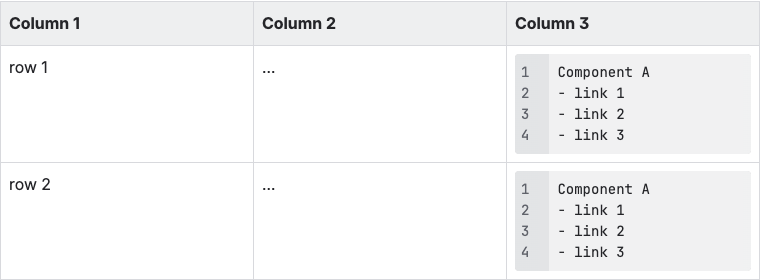
We guide Rovo Dev through the work in four incremental stages rather than one big “do everything” prompt:
- Stage 1 – Refactor Component A so it can render dynamic dropdown items from data instead of hard‑coding links.
- Stage 2 – Integrate with Component B by replacing the old menu with the newly‑refactored Component A and wiring up the correct props.
- Stage 3 – Adapt to a requirement change by simplifying how identifiers are passed and extending link utilities for dynamic entities.
- Stage 4 – Fix mock data so tests use realistic identifier patterns and remain stable.
Each stage has a narrowly‑scoped prompt, a concrete change, and a quick validation step (via Storybook or tests). Together, they show how incremental prompting keeps the LLM focused, produces cleaner diffs, and makes it easier for reviewers to trust and adopt AI‑generated code changes.
The sections below document the exact prompts and outcomes for each stage in this workflow.
Stage 1 – Refactor component A
Refactor a React component A, located at <path_to_component_A>.
The goal is to make the A component dynamically generate multiple DropdownItem components from provided data rather than relying on fixed entries.

The component will receive input as an array of objects where each object contains:
1. linkName: string (button title)
2. url: string (used to set the href property of each DropdownItem)

The current fixed entries should get refactored into a function X that returns an array of three links to reduce code duplication.

Then update the Storybook test of the A component, located at <path_to_storybook_test_component_A>, to reflect the refactor.
Result
Change implemented and validated via Storybook; component now accepts arbitrary link sets and renders correctly.
Stage 2 – Replace menu in Component B Table
In the last column row item of the React component B, located at <path_to_component_B>, replace the DropdownItem component with component A using props below:

1. cloudId is a UUID extracted from entity.ari of the record. Implement a helper getIdFromARI(ari) for reuse.
2. products is an array of link data, for example:

```json
[
  {
    "linkName": "Link 1",
    "url": url1(getIdFromARI(entity.ari))
  },
  {
    "linkName": "Link 2",
    "url": url2(getIdFromARI(entity.ari))
  },
  {
    "linkName": "Link 3",
    "url": url2(getIdFromARI(entity.ari))
  }
]
```

Update the Storybook test at <path_to_storybook_test_component_2> accordingly.
Result
B Table actions unified via A; tests updated for dynamic link generation.

Stage 3 – Requirement change
We no longer need to extract the UUID from entity.ari. Use the value directly and remove getIdFromARI.
DynamicEntitiesTable changes:
1. Remove getIdFromARI and replace its usage with entity.ari.
2. Support dynamic entity type by enhancing explorer links in <path_to_function>. Add a link entry "dynamicEntityRecord" with pattern `${baseUrls[env]}/<path>?s=${encode(cloudId)}`.

Component A props should be:
1. cloudId is entity.ari of the record
2. products is an array, e.g.:
```json
[
  {
    "linkName": "Link 1",
    "url": url1(entity.ari)
  },
  {
    "linkName": "Link 2",
    "url": url2(entity.ari)
  },
  {
    "linkName": "Link 3",
    "url": entity.link
  }
]
```

Update the Storybook test at <path_to_storybook_test_component_2> to reflect these changes.
Result
Simplified props; direct identifier usage; link utility extended for dynamic entities.
Stage 4 – Update mock data for testing
Study ARI/ATI patterns in the development documentation; correct mock data defined in mock data object D at <path_to_mock_constant>.
Use the prefix: <requirement_ARI_prefix>
Result
Mocks aligned to expected ARI/ATI formats; tests stable against corrected identifiers.
Key takeaways
Provide Rovo Dev prompts incrementally to drive clear, reviewable progress. Break the work into small, spec-aligned steps and ship a focused commit for each step.
Benefits of providing prompt instructions incrementally
- More accurate outcomes
- Less tasks got ignored by the agent
- Less assumptions
- Easier for human reviewers to review code changes part per commit for each stage
- Engineers have more control of fine-tuning specific steps of code implementation
