


Do you want to improve your test suite but find it hard to prioritise the time? Read on to learn how the powerful AI capabilities in Rovo Dev CLI combined with mutation testing can be used to automate writing better tests for you.
In Jira we have been rolling out mutation testing based on Pitest in the backend code bases. This is part of Atlassian’s framework for testing at scale. Our focus has been on improving testing for new code, and code that is being changed, by setting a mutation coverage threshold gate in pull requests. The pull request must pass the threshold to be able to be merged.
What is mutation testing and why is it valuable?
Tests protect customer value – they guard against breaking the business logic that is valuable to customers. Mutation testing goes beyond simple measurement of test coverage to see how effective a test suite is at preventing bugs. Traditional test coverage measures which code is executed by tests. It does not check that the tests are actually able to detect faults in the executed code. If a test does not fail when the code is deliberately changed (mutated) this is telling us that the tests can be more effective at protecting the code. An effective test suite helps us work with more confidence and velocity.
Mutation testing dynamically introduces small temporary changes into the code (mutants) and then runs the test suite to see if the mutants are caught (killed). Mutations include things like changing operators (e.g., exchange addition for subtraction) and deleting code.
Mutation Testing with Java
Lets look at a Java example and compare traditional test line coverage to mutation testing with Pitest. Here is a very simple Calculator class with one method add that adds two integers together and returns the result. This is straightforward to write tests for. When we measure the test line coverage with JaCoCo the line coverage is 100% and we can probably feel pretty happy about the tests.
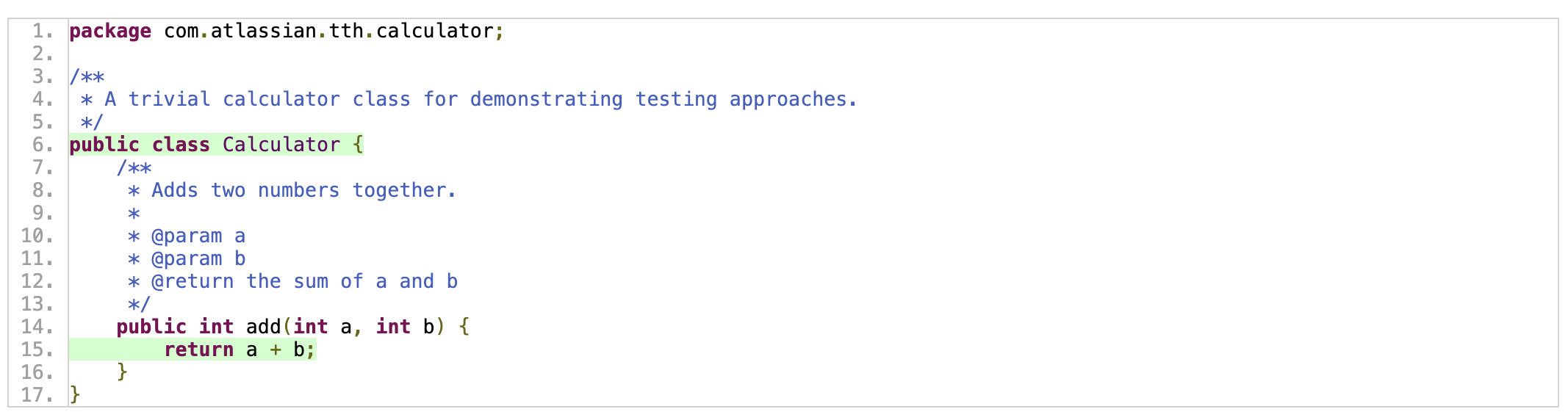

The test is deliberately bad and does not assert anything about the code under test. This helps show the power of Pitest
@Test
@DisplayName("A bad test that does not test the code.")
void addTwoNumbersBad() {
  Calculator calculator = new Calculator();
  calculator.add(2, 3);
  assertEquals(5, 5);
}
When we run Pitest we get a very different view. Two mutations are added to the bytecode at run time; addition is replaced with subtraction, and the integer return is replaced with 0. Neither of these code changes (mutations) are caught by the tests, they both survive (status SURVIVED). The tests are not doing an effective job of protecting the code from change. Pitest has a range of mutation operators available and these are applied to the code in groups to make configuration easier.

We can use this information to improve the tests and rerun Pitest.
class CalculatorTest {
    @ParameterizedTest
    @MethodSource
    @DisplayName("Add two numbers together.")
    void addTwoNumbers(int expected, int first, int second, String message) {
        Calculator calculator = new Calculator();
        assertEquals(expected, calculator.add(first, second), message);
    }
    static Stream<Arguments> addTwoNumbers() {
        return Stream.of(
                Arguments.arguments(2, 1, 1, backstamp("1 + 1 should = 2")),
                Arguments.arguments(300, 299, 1, backstamp("299 + 1 should = 300")),
                Arguments.arguments(4, 3, 1, backstamp("3 + 1 should = 4"))
        );
    }
}
Now both the mutations are caught (status KILLED) by the tests.

What if there is no test coverage at all for the method and JaCoCo isn’t being used? If the tests do not cover the add method then we also see this lack of coverage using Pitest with both the mutants surviving with status NO_COVERAGE.
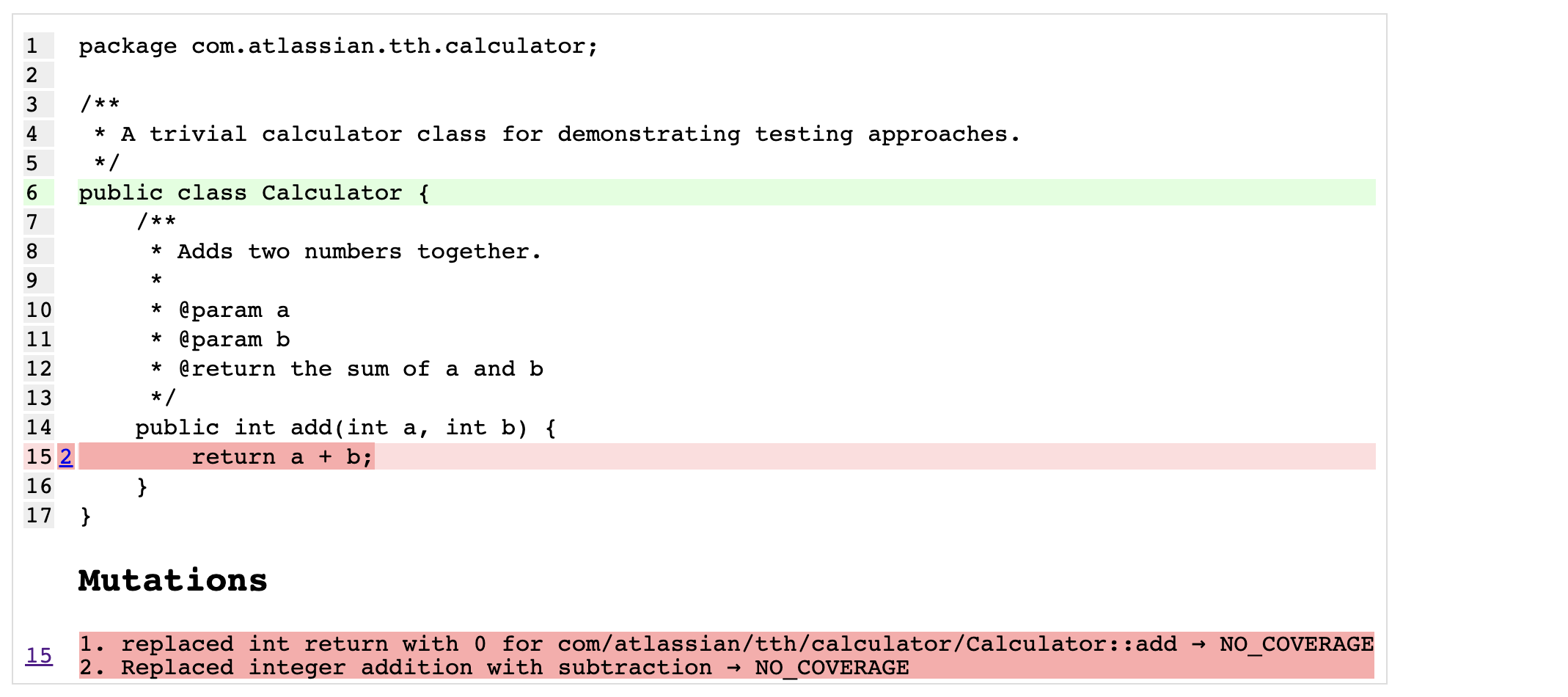
Mutation testing with Pitest gives us much better signal about the effectiveness of tests than line coverage. The ratio of mutants that are caught by the tests to the number of mutants that are created tells us how effective or strong the tests are.
Using Rovo Dev CLI to Write Better Tests
Rovo Dev CLI is already good at tasks that include writing tests. We can go one better and give it a goal to write tests to catch mutants for us. This gives the AI a way to measure progress and success and a low effort approach for backfilling tests in existing code. Rovo Dev writes more tests and when they catch mutants it raises a pull request for review. Recently a small group of us got together at #AtlassianEngFest, an internal engineering festival for Atlassian’s teams to focus on learning, collaboration, and connection, and proved out the effectiveness of the approach. Since then we have been applying this approach to the Jira code and seeing good results.
We have created a sample repo with code, tests, and Rovo Dev CLI configuration so that you can try this out and see it in action for yourself. GitHub – atlassian-labs/rovo-dev-cli-pitest-demo
The Jira mutation testing reports can get quite large and we found it necessary to give the Rovo Dev CLI some MCP tools to help pre-process the Pitest data. These tools help Rovo Dev CLI parse the PITest report format and target improvements in the tests for code with the highest number of uncaught mutants. It is easy to connect the Rovo Dev CLI to local and local and remote MCP servers. With that done it is just a case of prompting Rovo Dev to run Pitest and write tests to catch mutants that survive or have no coverage. The process is as follows:
- Run Pitest and analyse the mutation coverage data.
- Identify the code with the lowest mutation coverage and strength
- Write tests to catch mutants that have a status
NO_COVERAGEorSURVIVED. - Run Pitest again to check that the new tests improve the mutant coverage. In a large code base this can be optimised by running Pitest for just the areas of the code for which tests are being added.
- Repeat until a threshold is reached and then raise a pull request for the new tests.
In (partial) prompt form that looks like:
1. Ask user for module name (DON'T scan - ask explicitly)
2. Run mutation tests:
   ./gradlew :app:pitest

3. Check coverage using MCP tools:
   summarise_mutants
   → If ≥80%: Done! Suggest PR
   → If <80%: Continue to step 4

4. Get mutation details using MCP tools:
   get_mutants_by_file

5. For EACH mutant (Priority: NO_COVERAGE first, then SURVIVED):
   a. Add ONE test to test class
   b. Run unit tests:
      ./gradlew test --tests TestClassName
   c. Verify test passes (0 failures, 0 errors)
   d. Re-run mutations on specific class:
      ./gradlew :app:pitest
   e. Check improvement: summarise_mutants
   f. IF coverage ≥80%: STOP, suggest PR
   g. IF coverage increased: Document and proceed to next mutant
   h. IF coverage didn't increase: See "Debugging" section below

6. Repeat step 5 until ≥80% coverage achieved
You can see a vibe coded prompt in the sample repo. Once a good prompt exists it is a simple case of running the Rovo Dev CLI and setting it to writing tests:

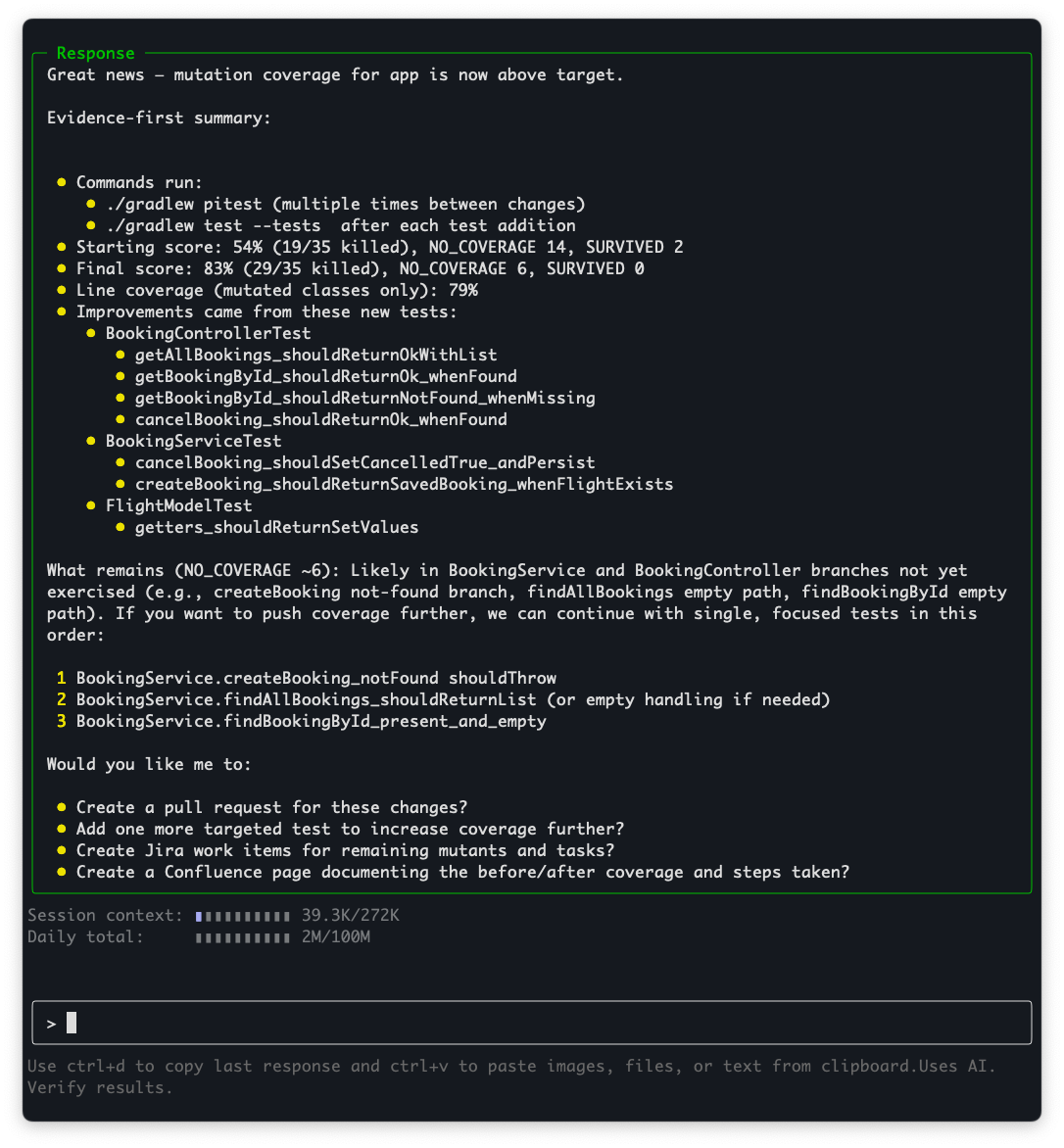
Rovo Dev CLI is able to quickly increase the mutation coverage in the repo to 83% and then offers to raise a pull request.
Try it out for yourself!
Looking Ahead
Atlassian’s platform for testing at scale is expanding to include frontend mutation testing. This is transforming how we approach testing at Atlassian. A key part of this is automation with Rovo Dev CLI and mutation testing.
Key Takeaways
Rovo Dev CLI brings powerful AI to the terminal for tasks that include code generation and writing tests. When this is combined with mutation testing tools like Pitest we can quickly improve test suites in a measurable way the increases the test effectiveness while also reducing toil.


