


If you’re like most developers, you know that writing code isn’t the bottleneck anymore. AI has made it faster than ever, and chances are you’re already using it. Yet, delivering software is still complex because of everything else you have to manage: fixing vulnerabilities, reducing tech debt, cleaning up feature flags, ensuring test coverage, writing documentation, and the list goes on.
That’s why we built Rovo Dev, a context-aware AI agent for developers. Rovo Dev works with Jira and Bitbucket to help you accelerate every stage of the software development lifecycle, from planning to deployment.
So what does this actually look like in your day-to-day workflow? With Jira, Bitbucket, and Rovo Dev working together, you get more than just another set of tools – you get a smarter, more connected development experience. Whether you’re reviewing code, troubleshooting builds, or deploying to production, Rovo Dev’s agentic workflows remove friction at every step.
Let’s dive into some use cases and see how AI can streamline your workflow so you can focus on what you do best: building great software.
The future of software delivery is about removing friction, not just coding faster. With agentic AI in Bitbucket, teams can move from idea to production with precision and speed.
Chris Clarke
Head of Product, Bitbucket Cloud
How Rovo Dev Accelerates Your Workflow
1. Fix routine tasks by generating code right from Jira
Kick off your next project without leaving Jira. Rovo Dev creates a detailed code plan based on your issue details, generates code, and can automatically open a Bitbucket PR without requiring copy-pasting or manual pushes. If the generated code isn’t quite right, you can jump into your IDE or terminal and continue to use Rovo Dev to refine it.
2. Faster, smarter pull requests
When you’re deep into a complex code change, it’s easy to lose track of every file you’ve touched or detail you’ve updated. So when it’s time to open a pull request, instead of stressing over the perfect PR description or trying to recall every change, AI scans your commits and automatically generates a clear, context-rich summary, giving reviewers all the information they need.
Next, before your team even starts their review, Rovo Dev can run an AI-powered code review, catching issues like missing tests or potential bugs early, so your reviewers can focus on what matters most.
3. Stop toggling between apps and get context right where you need it
Stuck on a code review or build? Need to find a design file, onboard to a new repo, or see who last touched a module? Instead of digging through Confluence or Slack, you can simply ask Rovo Chat within Bitbucket to find the context you need. Need help in your terminal or IDE? Rovo is there too, ready to surface documentation, references, or answer any questions on the spot.
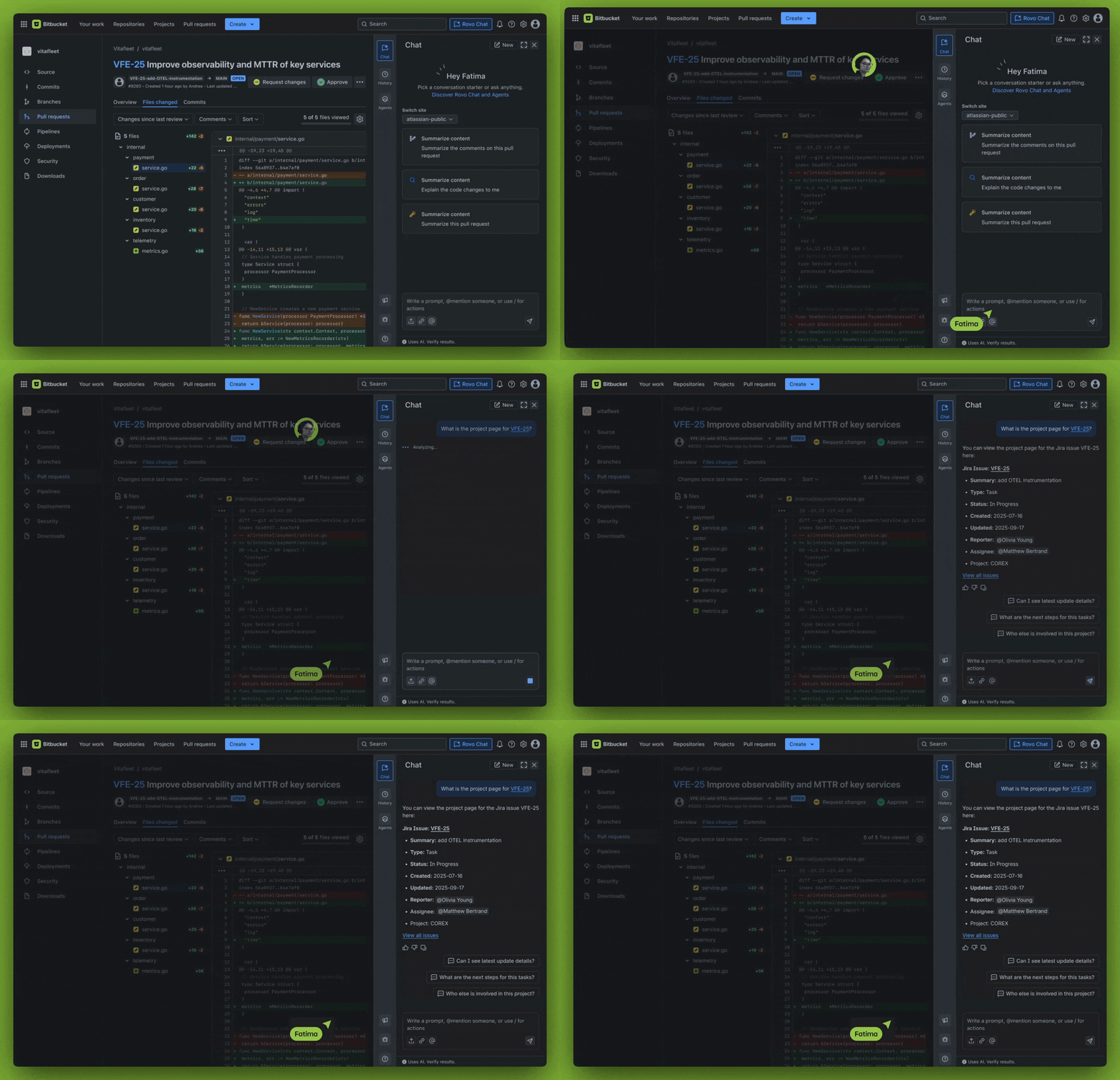
4. Troubleshoot builds without sifting through logs
Build failures are another time-consuming activity that can eat up hours as you sift through endless streams of logs. But now, when a build fails, Rovo Dev can diagnose the issue and suggest a fix—no more scouring logs line-by-line. Coming Soon: you’ll even be able to generate the code to fix the build and update the PR automatically, turning what used to be a long process into a quick, guided workflow.
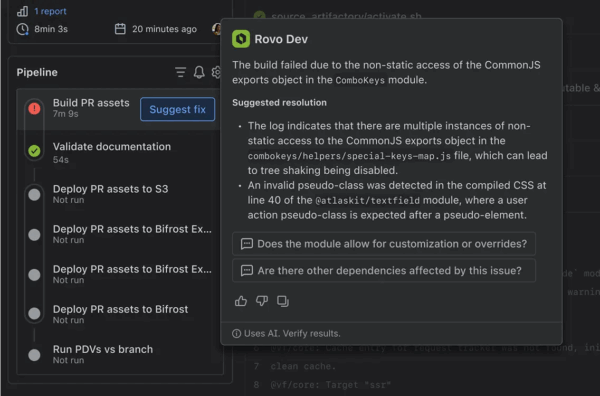
5. Generate documentation
When your changes are finally merged and deployed, you don’t have to spend extra time writing release notes or deployment summaries. Rovo Dev can generate a summary of what’s shipped in each deployment. You can add this to your release notes and to the Jira ticket so everyone stays in the loop.
Coming in Q1 2026: Agentic CI/CD in Bitbucket Pipelines
Imagine a world where you could use natural-language to automate repetitive, low-value tasks that eat up your time and pull you away from actually writing code. That’s exactly what we’re building with Agentic CI/CD, a new concept that brings automation based on natural language with AI into Bitbucket Cloud.
Agentic CI/CD unlocks a new era of automation, where your pipelines aren’t limited by static scripts, but augmented by natural language and AI.
Edmund Munday
Principal Product Manager, Bitbucket Pipelines
New triggers that unlock automation
Today, Bitbucket Pipelines is great for standard CI/CD use-cases, but doesn’t lend itself to creating workflows beyond those standard triggers such as commits or pull requests. To enable you to build more powerful and flexible automation workflows, we are building a new triggers such as packages being published, deployments completing, or if a test is identified as being flaky.
Agentic steps give you superpowers
Traditional CI/CD steps use scripts to execute pre-defined tasks within a pipeline. This mechanism is highly customizable, enabling you to design your workflow exactly the way the you need it. However, the downside is that it’s time consuming to setup and maintain complex workflows, especially if those workflows involve logic that is nuanced or require integration with external systems.
Agentic steps give you the power and flexibility to define nuanced workflows with natural language, quickly building out powerful capabilities without all the complexity of defining them in scripts.
Here is an example:
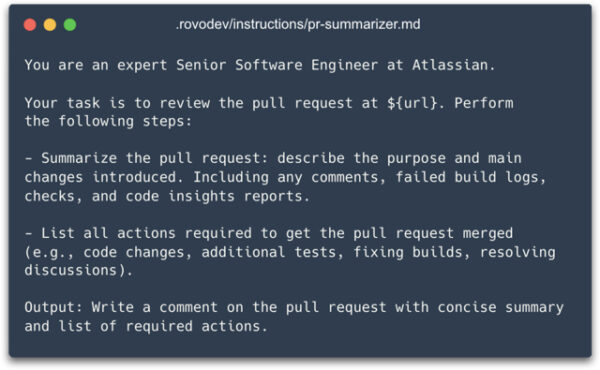
Agentic steps work just like regular Pipelines steps, but instead of running scripts, you’ll be able to execute AI agents based on natural language instructions, powered by Rovo Dev. These agents can complete coding tasks against the code in the repo, just like using Rovo Dev CLI locally on your machine.
More importantly though, these agents can also interact directly with Bitbucket Cloud via a custom MCP server injected into the Pipelines environment. This functionality allows you to define custom agents that are able to complete complex tasks like raising or updating a pull request, creating comments or code suggestions, or reading logs from a Pipeline.
Here is how it will work. The markdown file in the instructions parameter below will house the prompt we see above, but the prompts can also be written inline in your Pipelines .yaml file.

Custom agents can also be executed within the same steps as regular scripts, giving you the ability to maintain the deterministic nature of traditional steps, whilst also gaining the flexibility of custom agents.
With agentic CI/CD, you get the best of both worlds: the reliability of traditional automation and the intelligence and flexibility of AI-driven workflows, all within your existing Pipelines setup.
Example Scenario:
Let’s explore one example: Fixing flaky tests, which are a notorious source of frustration in software development, due to:
- Passing or failing unpredictably
- Slowing down releases
- Bogging down developers in troubleshooting
To address this challenge, you can use an agentic step to automatically fix these flaky tests, using AI to analyze the issue, generate a summary of the problem, generate code to fix it, and open a pull request.
Sidebar: In this video, you’ll also see a new Test Management feature that is in development, enabling you to monitor your tests within Bitbucket without relying on third-party tools.
Other examples of agentic steps include:
- Autonomously resolving merge conflicts
- Creating internal documentation
- Cleaning up feature flags
- Generating automated tests
Get started
- If you’re using Bitbucket Cloud already, start your free trial of Rovo Dev to enable these (and upcoming) agentic capabilities.
- If you’re using Bitbucket Data Center, connect with your admin and sign up for a free migration trial of Bitbucket Cloud Premium before signing up for Rovo Dev.
Note that Rovo Chat is a native part of Jira, Bitbucket, and other Atlassian tools and does not require a separate subscription. Code generation, code review, debugging, and other capabilities require a Rovo Dev subscription.


