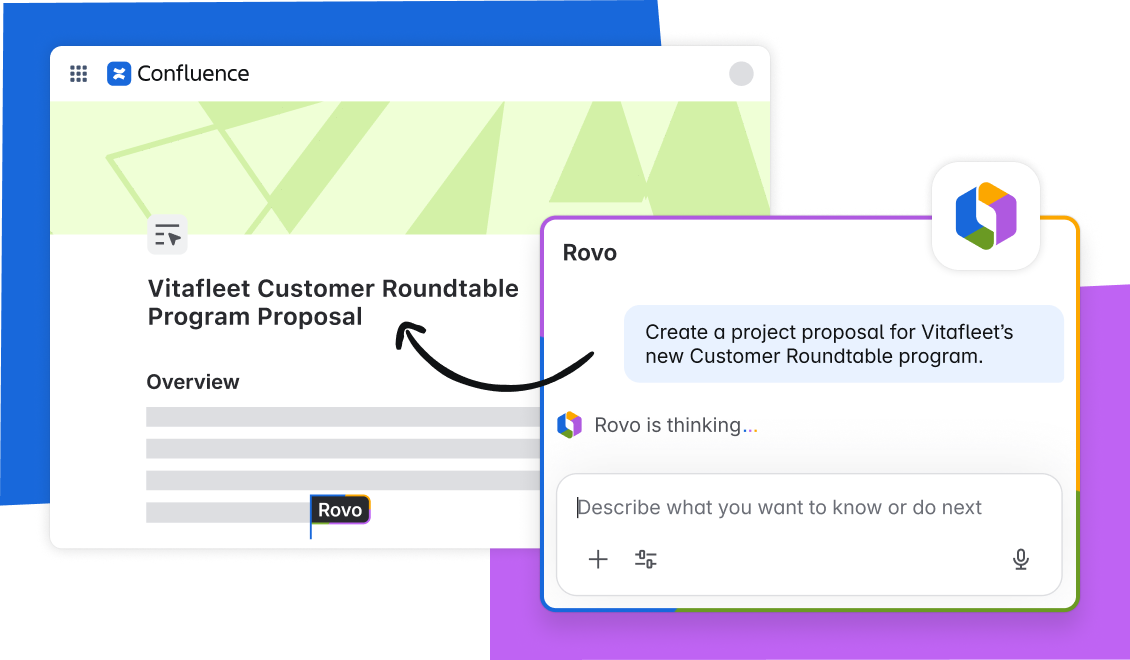
Say bye to the blank page with AI-powered content creation and editing
Creating and managing content is core to how teams plan, share knowledge, and move work forward. But in practice, the process is often slow and fragmented. Teams struggle with creating content from scratch, reformatting documents, and hunting for context across tools, all before real collaboration even begins.
Confluence already serves as the place where teams create, collaborate, and share knowledge. Now, they can use AI to move from idea to published content faster than ever by pairing it with Atlassian Rovo. Let’s dive into the new, modern way teams can now create and edit content in Confluence.
Challenges teams face today
Most teams don’t struggle with ideas — they struggle with turning those ideas into clear, impactful content they can then share with their teams.
These pain points include:
- Struggling from blank page anxiety and trying to figure out how to get started from scratch
- Manually copying and pasting information, and then having to tailor that information for different purposes or audiences
- Searching across tools to find the right context or latest updates to bring in
- Spending time rewriting, reformatting, and editing content manually
These slowdowns add friction at every stage of work, from early planning to creation to editing.
Say hello to the new way of creating and editing in Confluence
By using Rovo, teams can overcome that manual, time-consuming process of creating and editing and focus more time on where it matters. Rovo partners with you to quickly take your ideas to draft to published content in Confluence – whether it’s a page, live doc, whiteboard, or database. Simply describe what you want to create or refine and AI does the rest, pulling in data sources across Atlassian and 3rd party apps to to create context-rich, high-quality content in Confluence.
The end result? You’ll get a beautifully formatted, structured draft that’s grounded in your team’s existing work – in seconds.
How to use Rovo to create and edit content
Teams can now tap in Rovo to do the heavy lifting for them, removing the friction of creating a new page that ties back to existing work, or polishing content so it lands well with stakeholders. It helps them get started faster, keep work grounded in real context, and refine content as ideas evolve, all without breaking their flow.
Here’s how it works.
Skip the blank page and get to real work faster
Starting from scratch creates unnecessary drag. Teams often lose momentum before work even begins, spending time deciding how to structure content, what format to use, or where information should live. Instead of focusing on the ideas, decisions, or problems they’re trying to solve, they’re stuck setting up pages, outlining sections, and second-guessing whether they’re starting in the “right” place.
With AI-powered creation in Confluence, teams can move forward immediately:
- Just describe what you need — use natural language to say what you want to create, whether its a page, live doc, whiteboard, or database, and get a structured draft in seconds
- Get started fast with role-based prompts to ideate on common use cases, from creating a retro whiteboard to a product requirements database
- Take advantage of predictive prompt suggestions that adapt as you type, helping you ideate on new ways to create with Rovo without overthinking
This frees teams up to shape ideas, align on decisions, and move work forward while momentum is high.
Build content that stays connected to real work
Good content reflects what’s actually happening across the team – staying accurate, relevant, and grounded in real work. When context is spread across separate tools or buried in disconnected pages, content quickly falls out of sync with real work. Details get missed, assumptions creep in, and teams end up relying on documentation that no longer reflects current priorities, decisions, or ownership.
Rovo removes those pain points by creating context-rich content:
- Grounds the content with existing team knowledge by pulling context across Atlassian apps like Confluence and Jira, as well as connected 3rd party tools like Slack and Google Drive
- The Atlassian Teamwork Graph surfaces relevant projects, roles, and relationships, so content reflects what work actually got done
- Teams can add links, files, or references to better guide Rovo on what information to include and what should be emphasized
Teams don’t just need documentation, they need shared understanding. When content reflects real projects and real ownership, it’s easier for stakeholders to trust it, update it, and use it to move work forward instead of second-guessing what’s current.
Refine and improve content without slowing down
Editing and refining content is where many teams lose the most time. Long after work has started, they are still rewriting sections, adjusting tone, or reorganizing information to make it usable for others. These manual editing passes slow collaboration, introduce delays in reviews and approvals, and often discourage teams from keeping content updated as projects evolve.
Rovo makes it easier than ever to polish and edit content:
- Simply describe what edits you’d like to see and see the changes happen in real-time, whether it’s adding a new section, asking Rovo to think of new ways to phrase a statement, or even request formatting changes
- Use quick AI editing tools to add or reduce copy, adjust tone, and in just a few clicks
- Work in a private preview area to experiment and iterate content, so the changes you make aren’t visible until you’re ready to share
Teams can keep content clear and polished as work changes, making updates feel easy instead of triggering extra review cycles or slowing down collaboration.
Example prompts to get started
Here are a few ideas on how your teams can start using Rovo today to create context-rich content. Feel free to copy and paste them here to get started!
Marketing: Learn from past work
Marketers often need to reflect what worked well / didn’t work well for a specific campaign. Rovo can help create a retrospective whiteboard to facilitate that discussion across multiple teams.
Example prompt:
“Create a whiteboard for a retrospective session for this marketing campaign. Add sections for what went well and what could be improved.
From there, the marketing team can use Rovo to summarize the retro whiteboard into a Confluence page to share out amongst stakeholders.
Product: Define clarity around requirements
Product teams frequently juggle various requirements and evolving specs. Rovo can help turn high-level inputs into a structured databases with fields for priority, status, and ownership.
Example prompt:
“Turn these feature ideas into a product requirements database with fields for priority, status, owner, and target release.”
This creates a shared source of truth that’s easy for cross-functional partners to understand and update.
HR: Standardize onboarding
HR teams manage complex processes that benefit from consistency and clarity. By describing an onboarding flow, teams can quickly generate flowcharts or checklists that are easy to follow, share, and keep up to date, improving the new hire experience.
Example prompt:
“Create a new-hire onboarding checklist for a remote employee, including IT setup, HR paperwork, and first-week milestones.”
Across teams, the outcome is the same: less setup, clearer structure, and more time focused on the work that matters.
Move from blank page to published content faster in Confluence
AI-powered creation and editing in Confluence helps teams move faster from idea to execution. By removing blank-page friction, keeping context connected, and simplifying editing, teams spend less time on setup and rework — and more time aligning, deciding, and delivering results.
Whether you’re planning a campaign, defining product requirements, or documenting critical processes, this approach helps turn knowledge into action — all in the place where your team already works.
If you’re already a Confluence user, create with Rovo now. Not yet using Confluence? Try it for free and discover how you can create and share knowledge across teams.