
I’ll start by sharing Martin Fowler’s post on semantic diffusion (bliki: Semantic Diffusion) as I feel it is strongly at play here with the term Spec Driven Development, which this blog will discuss the benefits of using. The definition of Spec Driven Development (SDD) keeps shifting, it’s something that exists in a rapidly changing environment. To be clear this blog reflects my current understanding of Spec Driven Development, which may differ from yours.
My aim is to help you get better results from your interactions with your coding agents by setting clearer guardrails and contexts for them to operate within. Perhaps you’ve heard of SDD perhaps not but either way I hope this blog will help you understand why its more effective then vibe coding.
🙁 Why vibe coding doesn’t cut it
AI coding tools can speed up work but often due to missing context and guardrails they can cause issues and build technical debt. Context changes between repos and often relies on institutional knowledge rather than documentation.
When developers throw a one-shot prompt like “implement user permissions” into an AI tool, the agent often guesses a plausible solution that looks production-ready but misses the real need. For example it may not ask about time-bound permissions, integration with existing identity providers, or your security posture unless you specify them upfront. The result is polished code that solves the wrong problem and leads to costly rework.
Vibe coding breaks down as complexity rises, because agents forget context and contradict earlier decisions. By nature, vibe coding represents ad hoc, transient, stateless workflows.
😊 What is Spec-Driven Development?
SDD is a process where you plan, review, iterate on the plan, and then execute. This catches agent assumptions before they become committed code. Like waterfall development, the faster or higher up you stop errors from cascading, the better the outcome.
SDD makes specifications the durable source of truth, using them to drive planning, task breakdown, and validation. You shift from ad hoc prompting to structured, collaboration between humans and agents. In SDD, the spec is a living, actionable source of truth for the plan of action. The next section offers a concrete example.
A contrived example of SDD
Imagine being asked to build a structure without understanding anything about what it will be used for and what the requirements are, other than the one vague instruction you initially received. You might end up constructing a house when someone wanted a hospital, or a hospital when the request was for a Lego model of the International Space Station. From the perspective of an AI agent, this is “vibe coding” in a nutshell. A one shot prompt that relies on all of context being present at the start with out checkpoints or intervention along the way. We rely on the agent making assumptions.
Example prompt:
BUILD ME A BUILDING!
This spontaneous approach might work for small projects or one-off changes, but larger, complex systems demand a more structured method. SDD emphasizes detailed, upfront specifications that serve as a blueprint for the entire process. For AI systems, SDD ensures alignment with user needs and organizational goals by defining clear requirements, designs, and tasks, offering a shared reference point for all stakeholders.
However, creating these specifications isn’t just about listing requirements. It involves setting up guardrails, standard practices and guidelines that ensure the AI operates within defined parameters. Typically, engineers spend considerable time crafting hyper-specialized prompts to guide AI behavior, but doing this repeatedly can be inefficient and redundant.
Example prompt:
BUILD ME A BUILDING!
With my guidelines ...
Instead, a common set of instructions, encapsulating best practices and standards, should be established. These prompts act as a unified source of truth, allowing the AI agent to understand the expectations and constraints of the system it is working within. This approach not only saves time but also reinforces consistency across projects. Consider this to be things like national engineering guidelines or material spec sheets for our building analogy. Files like .agents.md fill this role (AGENTS.md).
Example prompt:
BUILD ME A BUILDING!
With these shared guidelines ...
Moreover, SDD involves an iterative back-and-forth process with the AI agent to arrive at a comprehensive plan. By providing the agent with a background that includes these best practices and standards, you ensure that every interaction is informed and productive. The agent can then generate solutions that are not only innovative but also aligned with the established norms and expectations of the project. Consider this similar to working with an architect and planning a project with a project manager who all have the rules and knowledge they need.
Example prompt:
Document a plan to build me a BUILDING!
The plan should be in small steps
Use these shared guidelines
Ask me any questions if you are unsure

I will review these plans before you proceed on each step
SDD bridges the gap between human intent and AI execution by combining structured planning with smart prompt management. This approach boosts AI efficiency and ensures it meaningfully supports project goals by maintaining quality and eliminating assumptions.
Too many words. What does this mean.
In short when vibe coding you interact once and your prompt must be perfect otherwise you won’t get the result you want.


With SDD we:
- Setup firm standardised guide rails.
- We have multiple opportunities to course correct and intervene.
- We make changes in small logical steps that can be reviewed in isolation.

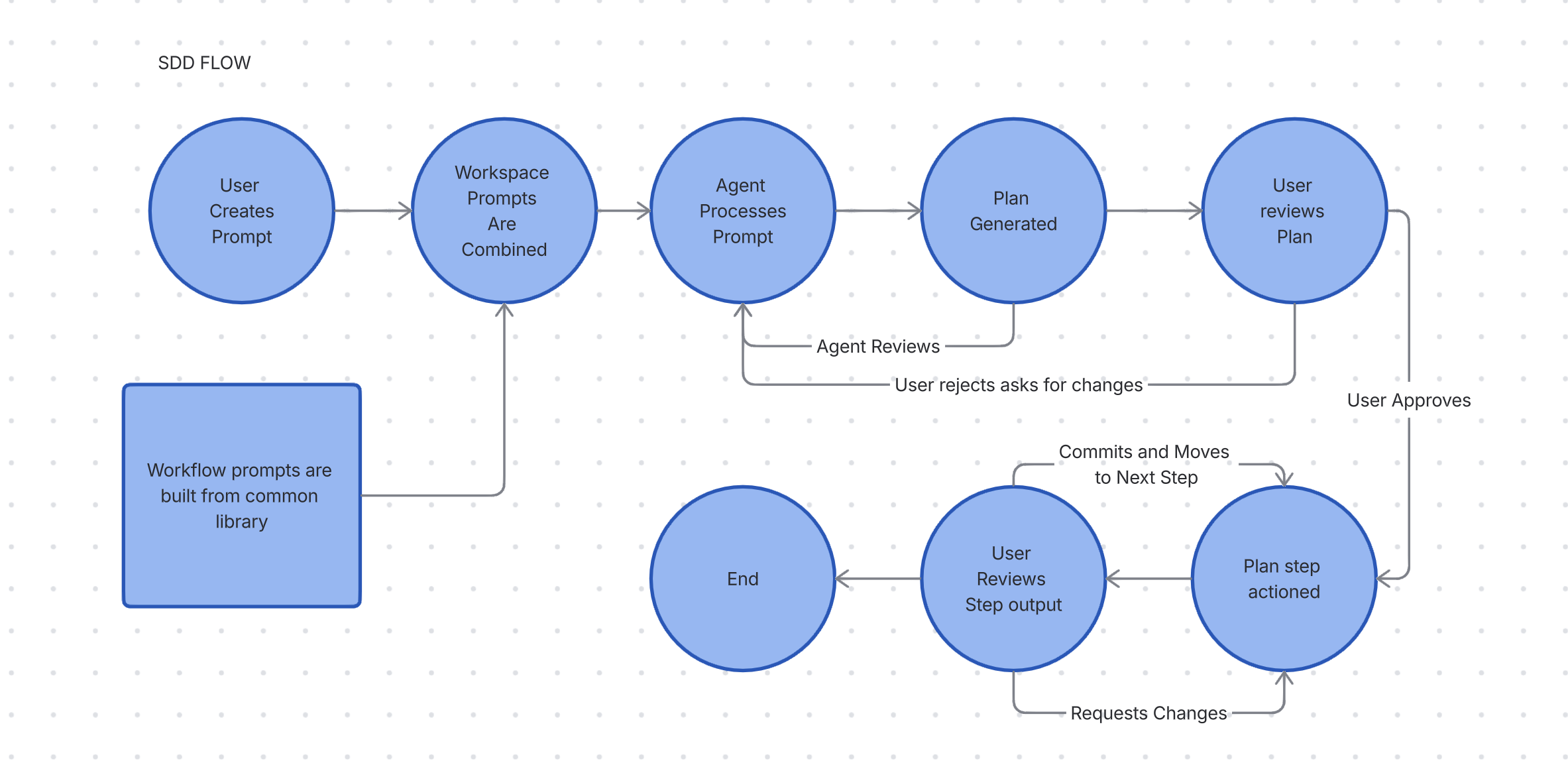
What do the prompts look like?
This is one example of an SDD instruction prompt. Add this to your .agents.md or equivalent or even just preface your prompt with this and you will get a version of SDD. Take it and make it your own. Note the key elements of plans and asking to review and continue.
Spec Driven Development — Rule set

- Break large requests into small, verifiable steps and present a plan.
- Document the plan in folder .plan/ (temporary working directory, not committed to git)
- Each step of the plan should have its own file with detailed specifications including:
  - One line summary of the step
  - Specific files to be created/modified
  - Key implementation details and requirements
  - Expected outcomes and deliverables
  - Dependencies on other steps
- Consider a plan step to be no bigger than one reasonably sized PR
- Always plan never jump straight into changes.
- After completing a step, summarize results and ask me to review and if you should continue.
- Track assumptions and ask clarifying questions when requirements are incomplete.
- When performing multi-step changes (e.g., code edits), run a quick verification step and report results.
- Planning documents are working artifacts and should not be committed to version control.
What does a plan look like in action
Using the above in RovoDev I asked Please review all the scripts for benchmarking and consolidate them some of them are stale. this is the generated outputs:
.
├── 00-overview.md
├── 01-delete-gc-isolated-benchmark-v2.sh.md
├── 02-delete-gc-isolated-benchmark-4config.sh.md
├── 03-delete-gc-isolated-benchmark-multiheap.sh.md
├── 04-delete-benchmark-native-g1gc-docker.sh.md
├── 05-delete-docker-benchmark-docker-g1gc.sh.md
├── 06-delete-comprehensive-benchmark.sh.md
├── 07-delete-generate-report.sh.md
├── 08-delete-generate-report-multiheap.sh.md
└── 09-create-benchmark-readme.md
overview.md
# Benchmark Script Consolidation - Overview

## Objective
Consolidate and clean up the benchmark scripts directory by removing stale/empty placeholder files and documenting the remaining canonical benchmarking tool.

## Current State
- **Active/Functional:** 1 script (`gc-isolated-benchmark.sh` - 16 KB)
- **Stale/Empty:** 8 scripts (all 0 bytes, abandoned features)
- **Supporting Files:** 1 JMeter config (`healthcheck-test.jmx`)

## Consolidation Steps

### Phase 1: Removal (Steps 1-8)
Remove all stale, empty placeholder scripts that represent abandoned feature branches.

| Step | File | Purpose |
|------|------|---------|
| 1 | 01-delete-gc-isolated-benchmark-v2.sh | Remove v2 variant placeholder |
| 2 | 02-delete-gc-isolated-benchmark-4config.sh | Remove 4-config variant placeholder |
| 3 | 03-delete-gc-isolated-benchmark-multiheap.sh | Remove multiheap variant placeholder |
| 4 | 04-delete-benchmark-native-g1gc-docker.sh | Remove Docker variant placeholder |
| 5 | 05-delete-docker-benchmark-docker-g1gc.sh | Remove secondary Docker variant |
| 6 | 06-delete-comprehensive-benchmark.sh | Remove comprehensive suite placeholder |
| 7 | 07-delete-generate-report.sh | Remove report generation placeholder |
| 8 | 08-delete-generate-report-multiheap.sh | Remove multiheap report placeholder |

### Phase 2: Documentation (Step 9)
Create README documenting the canonical benchmarking tool and its usage.

| Step | File | Purpose |
|------|------|---------|
| 9 | 09-create-benchmark-readme.md | Document benchmarking setup and tool |

## Success Criteria
✓ All 8 stale scripts removed
✓ No external references to deleted scripts
✓ Benchmark directory contains only: `gc-isolated-benchmark.sh`, `healthcheck-test.jmx`, and new `README.md`
✓ Documentation clearly identifies the canonical benchmarking approach

## Estimated Effort
- **Deletion steps (1-8):** ~1 minute total
- **Documentation step (9):** ~10 minutes
- **Total:** ~15 minutes

## Risk Assessment
**Risk Level:** Very Low
- Deleted files are empty placeholders with zero functionality
- No references in CI/CD, documentation, or code
- Improves code clarity and reduces maintenance burden
gc-isolated-benchmark-v2.sh
# Step 1: Delete gc-isolated-benchmark-v2.sh

## Summary
Remove the empty v2 variant placeholder script.

## Details
- **File to Delete:** `benchmark/gc-isolated-benchmark-v2.sh`
- **Current State:** Empty (0 bytes)
- **Purpose:** This was a planned v2 variant that was never implemented
- **Dependencies:** None - this file is not referenced anywhere

## Implementation
1. Verify file is empty and not referenced
2. Delete the file using `delete_file` function
3. Confirm deletion with git status

## Expected Outcome
- File removed from `benchmark/` directory
- No broken references or dependencies
- Cleaner benchmark directory structure

## Verification
```bash
ls -l benchmark/gc-isolated-benchmark-v2.sh  # Should fail (file not found)
git status                                    # Should show deletion
```
The initial plan was flawed; it assumed something I caught and fixed. It aimed to delete a file that needed to be kept. Using a normal prompt, it would have proceeded with that deletion. Remember, the key step is reviewing and refining the plan through back-and-forth with the agent, for example:
We should not delete delete-comprehensive-benchmark.sh its a WIP and is being worked on.
Once I was happy with the plan I then asked the agent to execute. It then followed the plan step by step, letting me review and adjust as we went.
This example shows the feedback loop we create by adding pre-planned process steps. We understand the agent’s intent and planned process before it starts, so we can fix incorrect assumptions. This is powerful, it lets us see the justification for why agents plan to do something actions and it allows us to break changes into smaller, clearer tasks.
Conclusion
For me SDD is more than a methodology, it’s a mindset shift. By starting with clear specs, leveraging automation, and embracing iterative refinement, teams and engineers achieve better outcomes.
SDD focuses on clarifying the intent, the what and why, so humans and agents align. SDD helps to remove assumptions and ambiguity improving quality of outcomes.


Give it a try 😀 !