
In a previous post, Designing a Forge app, I outlined my approach to defining the architecture of a Forge app that provides functionality for running competitions within an organisation. After spending some time building the app, I realised that many of my Forge apps include certain patterns that may be worth sharing. This post shares some of those patterns.
Patterns
Code sharing
TLDR: This pattern provides a simple approach to synchronising code that needs to be shared between different code areas of an app (e.g. Custom UI code and backend code).
It’s common for apps to contain multiple areas in which source code is organised. For example, Forge apps that employ Custom UI will have one source code area in which the Custom UI code is contained and another source code area where the code that runs in Forge functions or UI Kit frames.
It’s also common for these separate source code areas to share code between them such as utility code and types if the app is written in TypeScript.
There are some clever solutions to solve this, but I’ve been happy enough with a simple solution that’s based on a shell script that I run whenever I create or change code that needs to be shared. This relies on shared code being located in well known locations. In my case, the typical paths to the two areas of code are /src and /static/spa/src and the shared code is located within sub-directories with relative paths /types and /util:

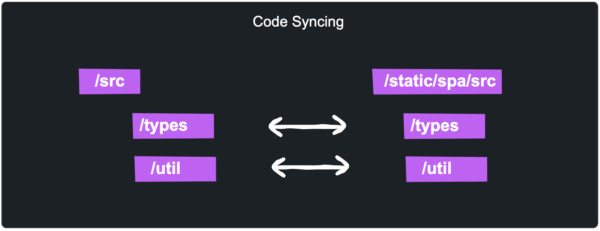
Whenever I create or edit shared code in any of the four directories I run the script /scripts/sync-shared-code.sh. Since I have limited shell scripting capabilities, I used AI to create the script so it should be easy to create your own version the same way.
Configuration distribution
TLDR: At the start of each activity performed by the app, load configuration information and then use it where necessary for the remainder of the activity’s processing.
The app needs to use the Jira REST API to manage competition related data and API calls typically require passing the identifiers of Jira entities such as work item type IDs. To ensure the app implementation is both simple and efficient, each activity that the app performs starts with the creation of a configuration object by making several API calls and then this configuration object is used so that the IDs of all relevant configuration entities are known and can be immediately used in the subsequent API calls required by the activity.

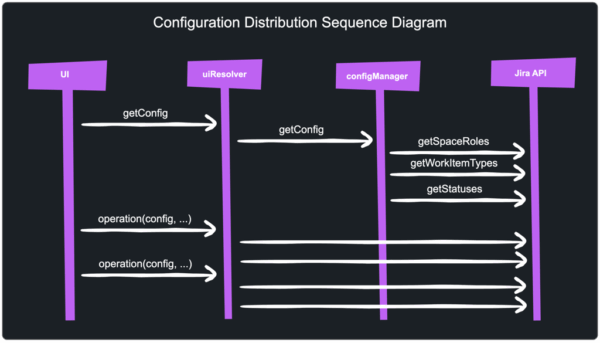
Whilst this app doesn’t depend on environment variables, the same pattern could be used for apps that do since the configuration object is built in the back end (a Forge function invocation) which is where environment variables are accessible, and subsequently passed to the app front end where environment variables are otherwise not accessible.
Since the configuration data is passed to the front end and then back to the backend, it also contains a tamperCheckHash field which is a one way hash using a salt that it stored in an environment variable. Each time the backend receives a request containing the configuration object, it is validated using this has to ensure it has not been tampered with.
AI form helper pattern
In order for a competition manager to create a new competition, a reasonably lengthy form must be filled out to provide details such as:
- Competition name
- Start and end dates and times
- Preamble text
- Prize details
- One or more challenge questions
To alleviate the effort required to complete the form, the app uses the Forge LLM API to fill out the form with a single button click. This is achieved by the UI making a request to backend (i.e. invoking a resolver) and the backend invoking the Forge LLM API with instructions to generate form values with the results returned to the UI and applied to the form.
In addition, a toggle button allows AI generation options to be specified by the competition manager. Here’s a demo of it working:

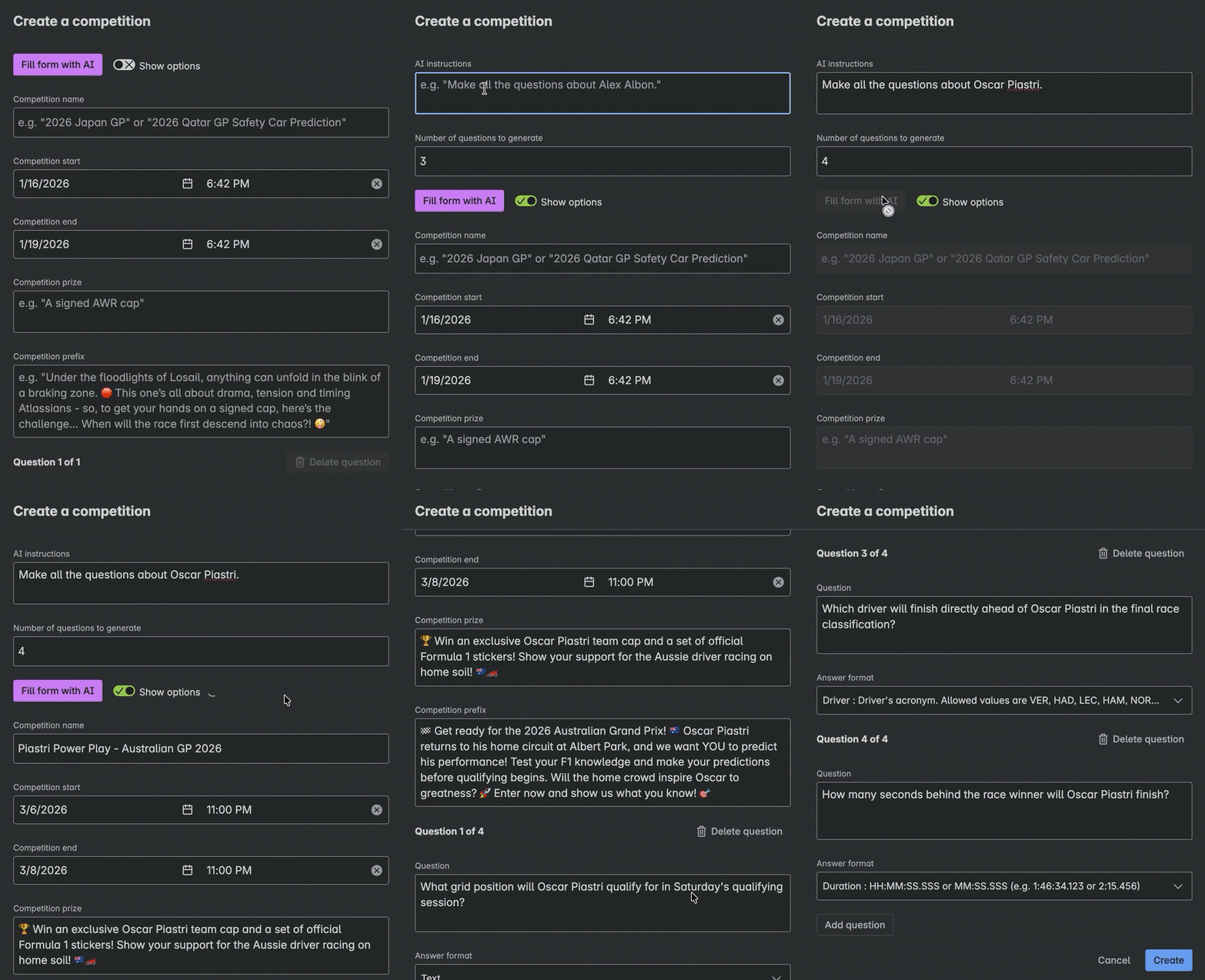
Note this still follows the responsible AI guidelines since the user can review and edit the AI completed form before submitting it.
Long running UI operations
TLDR: Perform long running backend tasks in chunks with support for providing progress status to the UIs.
Each competition may have thousands of entries so the evaluation of competition winners must iterate over the numerous work items that represent the entries. When the evaluation is initiated in the app’s competition management UI, a sequence of asynchronous tasks is performed to fetch competition entries and analyse them. State is passed from one asynchronous task to the next and is also stored in the competition entry work item after each batch of entries is analysed. While the asynchronous tasks are running, the app’s UI periodically retrieves the state from the competition entry work item so that it can display progress information to the competition manager that initiated the evaluation. This is illustrated by the following sequence diagram:


Passing state between asynchronous tasks using the queue parameter is efficient and avoids eventual consistency issues that may arise if using an alternate storage medium such as Jira entity properties.
The UI doesn’t have to poll to check for the completion of the process since the result is pushed to the front end using Forge’s realtime API.
Resolver function keys
TLDR: Ensure Forge resolvers are correctly referenced by creating a TypeScript type identifying the resolver identifiers.
Each Forge resolver has a string identifier that must be correctly referenced by the invoking activity. Resolver identifiers are strings which have to be duplicated where the resolver is defined and where it is invoked. If using TypeScript and a means of code sharing as outlined above, resolver identifiers can be defined in a single TyperScript type to singularise the point of maintenance. For example:
export type ResolverFunctionKey =
  | 'getConfig'
  | 'createCompetition'
  etc
With this type created, defineResolver and invokeResolver utility functions can be defined as follows:
const defineResolver = (functionKey: ResolverFunctionKey, fn: ResolverFunction) => {
  return resolver.define(functionKey, fn);
}
export const invokeResolver = async <T>(functionKey: ResolverFunctionKey, payload?: InvokePayload): Promise<T> => {
  return await invoke(functionKey, payload);
}
Resolvers can then be defined as follows:
defineResolver('getConfig', async (request): Promise<ProjectReference[]> => {
  // etc
});
Resolvers can be invoked by the frontend as follows:
const config = await invokeResolver<Config>('getConfig');Wrapping up
Building Forge apps using patterns such as these has greatly improved my productivity and reduced bugs. Hopefully you will also get some value out of them.
If you haven’t yet created a Forge app, it only takes a few minutes to get started.