
Learn how Atlassian engineers used Rovo Dev and AI-driven workflows to safely refactor a large frontend monorepo, removing feature flags and dead code at scale.


Objectives
Provide a repeatable, safe, and scalable workflow to use AI for large-scale codebase refactoring: Removing all Nav4 FGs and mocks with quality and speed. In general, the technical goals are:

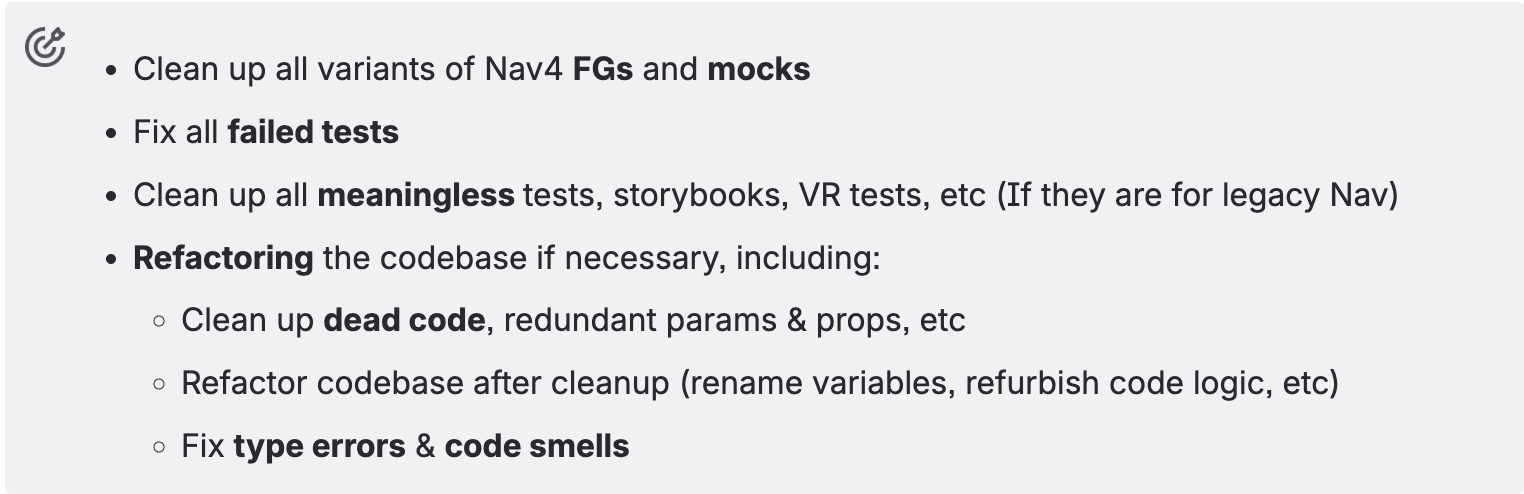
Challenge: Cleaning up at scale
Nav4 rollout code (FGs & mocks) accumulated across the Atlassian frontend mono-repository. The goal was to consistently, safely, and efficiently remove all these artifacts across a vast surface area with heterogeneous package configurations and tooling constraints.


Approach Overview
- Make AI a good coder: Establish a durable AI context using a
memoryfile to guide Rovo Dev in code generation, edit interpretation, and workflow assistance during each session. - Locate at all targets: Create and use a discovery prompt to enumerate all Nav4 FG and mock patterns.
- Define a package-level cleanup method: Using AI to perform targeted, high-quality transformations that can be reused across multiple packages, then use it to drive the code changes.
- Conduct multiple threads to make code changes with DevBox
What’s implemented so far
1) Persistent AI Context & instructions, for each AI session
Rovo Dev’s memory file provides system-level instructions to the AI agent. They are persistent context, preferences, or workflows for each AI session. It matters because they precisely define where the AI should make changes or generate code, reducing ambiguity and preventing unintended edits.
Based on my tests, a good AI context can largely alleviate some common issues from AI, such as AI Hallucination, Code Quality and Maintainability, and Dependence on Input Quality.
2) Let AI identify all Nav4 FGs within AFM
A structured prompt instructs Rovo Dev to scan code, generate a catalogue of Nav4 FGs to overview all FGs and start the clean-up in batches.
The Rovo Dev had done quite well in this job and figured out that all packages has Nav4 FGs implementation.
3) Package-Level Cleanup & refactoring
AI → Bash scripts → clean-up
This is the first approach we tried. We used Rovo Dev to generate scripts for an automated end-to-end workflow. However, evidence showed that our developers had to thoroughly review and manually refactor the generated code due to quality issues, increasing our workload.


Rovo Dev Strengths Observed
- Iterative Problem Solving: Rovo Dev excelled at:
- Applying code patterns when making changes to guarantee the code quality
- Analysing failed transformations and proposing targeted fixes
- Building incrementally from simple to sophisticated solutions
- Multi-domain fluency: effective across Bash, Python, API interactions, and Git workflows to orchestrate repository-wide changes.
- Real-world debugging: capable of diagnosing test failures and proposing targeted fixes.
- Achieve 2x productivity: Combine Rovo Dev and Dev Box to enable simultaneous code changes in multiple locations.
Outcomes
The Rovo Dev process reduced weeks of manual, error-prone work into a robust automation pipeline. The final prompt performed complex transformations safely at scale, maintained code quality, and included clear safety nets for review and rollback.
Asking two developers to manually clean all 15 syntax variants for Nav4 FGs and mocks across 1,400 files, remove dead code, and refactor the codebase to ensure quality seems impossible, but “We made it, with the power of AI.”
Key Takeaways
- AI can think, not just a script generator.
UsingRovo Dev with promptsoutperforms a pureAI → scripts → cleanupapproach by preserving human judgment: identifying dead code, proposing refactors, and making decisions that scripts can’t. - Codified context acts as a force multiplier.A well-designed AI context file (
memory) minimises hallucinations, aligns with AFM standards, and ensures consistent edits across over 100 packages and 1,000 files. - Batching + tight feedback loops keep large changes safe
Work in small, package-level batches; run tests and CI early and often; refine prompts and patterns each iteration before scaling. - Discovery prompts turn ambiguity into a concrete plan
Start by mapping all Nav4 FG and mock usage with team + package metadata to convert a repo-wide hunt into a structured backlog. - Quality comes from guardrails, not blind trust
Retain human code review, type-checking, and verification of integration behaviour; use AI as an accelerator inside a robust engineering process.
Next Steps
Is it possible to create an automated E2E workflow + leveraging AI to modify code?
Therefore, an ideal implementation of FGs cleanup after rolling out the next navigation should be:
- Make sure our AI has a well-defined context
- Discover all FGs and mocks across the codebase, store them in a file
- Ask AI to generate scripts to achieve an automated E2E workflow
- Create a prompt to ask AI to run those scripts and do the cleanup
- Review the AI-created PR -> get approval → ship it!
- Repeat the above steps simultaneously in multiple DevBoxes