
Rovo Dev, Atlassian’s context-aware AI agent for software teams, is now directly available inside Jira so simpler, repetitive work can move from task item to merge-ready PR in the background while your team stays focused on the hard problems.
Completing Jira work without breaking focus
Most development work already begins in Jira as a task, a bug, an idea. But the actual coding? That happens somewhere else.
Developers instinctively reach for an IDE or CLI for every task. They bounce between tools when taking an idea through to deployment, searching for context and manually tracking work across tools, branches, pipelines, and PRs. With every tab switch, important context is lost and time is spent regaining focus.
Not every task needs this much overhead. Some work is strategic and demands deep design and engineering time. But others, like resolving security vulnerabilities, cleaning up stale feature flags, and fixing minor bugs, are repetitive and well understood.
What if developers could delegate those routine tasks to an AI agent that understands their work?
We’re meeting development teams where they already plan and track work by making Rovo Dev available directly inside Jira. And because Jira holds the requirements and context behind what teams intend to get done, Rovo Dev can autonomously handle tasks along the software development lifecycle. Developers stay in the driver’s seat, choosing what to delegate versus tackle themselves, reviewing plans and progress, and approving changes before anything ships.
The result is more merge-ready PRs with less boilerplate and context‑switching, and an AI teammate that helps your whole team move faster on real Jira work.

Rovo Dev takes on the work that slows you down
Rovo Dev in Jira turns your Jira work items into an AI-powered execution surface.
You can spin up and orchestrate multiple Rovo Dev sessions in the cloud from any Jira work item. Rovo Dev gathers the right context, proposes a concrete plan you can review and refine, then executes code changes, runs tests, and creates merge-ready PRs in a safe, configurable sandbox. All of this happens in the cloud, so your local editor stays free for complex, strategic work.
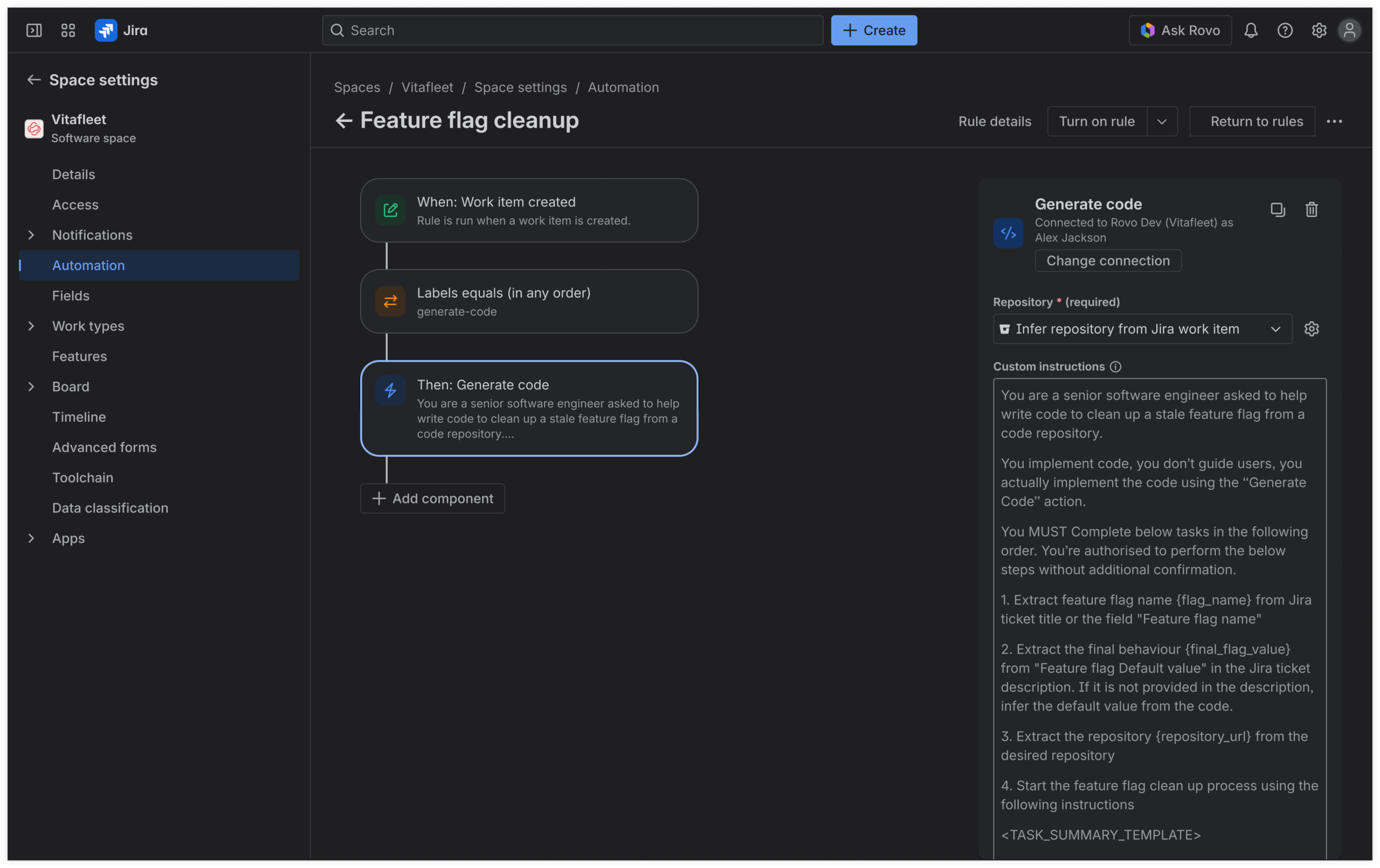
This cloud-based orchestration makes it easy to scale repeatable work across your team. When a workflow proves successful, Jira Automation can turn it into a rule that triggers Rovo Dev automatically, so teams can multiply proven execution patterns instead of recreating them by hand each time.

With Rovo Dev in Jira, entire categories of time-consuming, well-defined work can be started and completed directly from Jira. Teams are already using it for features and enhancements, security and reliability fixes, quality and coverage improvements, migrations and refactors, and docs and hygiene.
But what does this look like in practice?
A common, unglamorous job development teams face is cleaning up stale feature flags that have already been rolled out. Left behind, these flags quietly pile up tech debt, slow down our products, and make it harder for engineers to understand what is in production. Cleaning them up is repetitive and manual, requiring you to verify that the flag is safe to remove, hunt down references across services, update tests, and create a cleanup PR.
We faced this issue at Atlassian, and turned this into a guided, mostly automated workflow using Rovo Dev in Jira.
In our workflow, every feature flag gets a work item for cleanup. When a feature flag meets our stale-flag criteria, that work item includes details about the flag, its intended state, and where it still appears in code. Instead of cloning repos and cleaning up each flag by hand, teams kick off Rovo Dev sessions directly from the Jira work item. Rovo Dev pulls in context from the ticket, the relevant code across repositories, and repo-specific cleanup commands stored alongside the code.
From there, Rovo Dev can:
- Propose a clear cleanup plan for the flag, including which files and repos it will touch and what tests or checks it will run.
- Execute that plan in an isolated environment, removing the gated code, updating any related tests, and running builds and tests where it can.
- Prepare ready-to-review pull requests in your existing repositories, linked back to the Jira work items that kicked everything off.
You stay in the driver’s seat throughout the workflow, seeing the plan and progress in Jira, reviewing the code and tests before merging, and deciding how quickly those cleanup PRs land.
Once a pattern works well, teams can codify it into Jira Automations by labeling a cleanup work item to automatically trigger Rovo Dev with the repo-specific cleanup command, or using a simple Jira-driven queue to pace how many flags are cleaned up at a time.
This impact has been substantial at Atlassian: we cleaned up 12 feature flags in two days, boosting cleanup velocity by around 85%, and, at the time of writing, created 29 of 31 cleanup PRs that required no manual code changes.
Feature flag cleanup is no longer a side quest developers dread. We’ve turned it into a mostly hands-off, self-improving AI-powered workflow that helps developers stay productive and focused on shipping the next feature.
Get started with Rovo Dev in Jira
Rovo Dev in Jira is part of a bigger shift in how teams build software with AI. It brings execution closer to the Jira work items where requirements and context already live, and to the places where real teams, not just one developer, work together.
Because this work is tied back to Jira work items, PMs, designers, and other collaborators can stay close to the outcomes through the same issues, comments, and reviews they already use today.

We’re rolling out Rovo Dev in Jira to eligible Jira Software sites already using Rovo Dev. For some customers, it may already be visible in Jira. For others, an organization admin may need to enable it. And soon, teams will be able to choose from leading AI models as they move from plan to code with Rovo Dev in Jira.
To use Rovo Dev in Jira, make sure:
- Rovo Dev is added to your site, and you have available Rovo Dev credits
- Rovo Dev in Jira is enabled at the organization and site level
- Bitbucket Cloud or GitHub Cloud is connected to your Jira site
If you’re new to Atlassian, create a Jira Software site, add Rovo Dev, and complete the setup above.
When Rovo Dev in Jira is enabled, a Rovo Dev section will appear on your work items. From there, you can start a Rovo Dev session directly from your work item.
Read more: