
Software architecture patterns define standardised, battle-tested solutions to recurring problems. The adoption of architectural patterns often improves robustness, performance, and/or usability. They also create a shared technical vocabulary that makes your codebase easier for teams to maintain and scale over time.
This post outlines various patterns relating the architecture of Forge apps. I’ve grouped them into various sets to help relate them to each other and to make them easier to understand.
Methods for Extending Atlassian Apps
A core value proposition of Forge is the ability to extend Atlassian apps. Forge apps can add or tailor Atlassian app user experiences. They can integrate Atlassian apps with third party systems and they can automate tasks and processes. This set includes the following four architectural patterns:
- Surface Information and Controls to Users: Atlassian apps such as Jira and Confluence have numerous UI extension points that allow Forge apps to surface panels and other kinds of widgets in which they can display information and controls (e.g. forms, buttons, …) to users.
- Update Atlassian App State and Data: Forges apps can update the state and data in Atlassian apps. Typically this is done by the Forge app invoking Atlassian app REST or GraphQL APIs.
- React to Atlassian App State and Data Changes: Forges apps can register to receive various kinds of events that are produced by Atlassian apps and then subsequently perform various kinds of operations. Events allow Forge apps to stay in sync with Atlassian apps in order to provide consistent experiences and information.
- Define Atlassian App Capabilities: Forge apps can also define certain kinds of capabilities such as actions, field types and Rovo Agents that users of Atlassian apps can utilise.


Automation
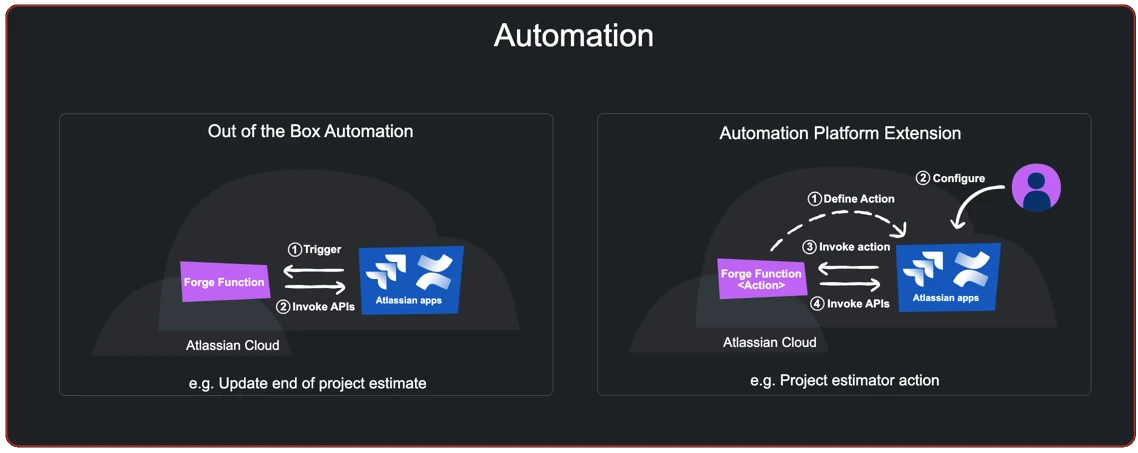
One form of extending Atlassian apps is the implementation of automation capabilities. The automation set of patterns include:
- Out of the Box Automation: Since an Atlassian app can subscribe to events and subsequently perform other actions such as invoking Atlassian app APIs, it is quite straight forward for Forge apps to fully automate certain kinds of tasks. For example, a Forge app could automatically add a comment to a page whenever a new page is created that matches certain conditions. This pattern is called out of the box automation because the app fully encapsulates the implementation of the automation.
- Automation Platform Extension: In contrast to out of the box automations, apps can also define automation actions that users can incorporate into automation rules they build using the automation platform that Jira and Confluence both leverage.

Integration Without Forge Remotes
There are many Forge apps that integrate Atlassian apps with third party systems. These apps typically employ one or more of a number of the following patterns:
- Send Data from External Systems to Atlassian Apps (Auth as App): The Forge web trigger and API route modules provide the ability for a Forge app to define entry points to an app. This can be leveraged to allow an external system to invoke the app in some way, typically send data or commands to the app. The app can take action by invoking an Atlassian app. In this pattern, there is no Atlassian user in the context in which the web trigger or API route function is invoked, so the app invokes the Atlassian app API using the credentials of the app.
- Send Data from External Systems to Atlassian Apps (Auth as User): This pattern is identical to the previous pattern, however, instead of the Forge app invoking the Atlassian app using the app’s credentials, it invokes it using a particular Atlassian user’s credentials. To do this, the app will need to have some way of know which Atlassian user to impersonate – this can be achieved by either the external system passing an Atlassian account ID or another identifier which is used to look up the appropriate Atlassian account ID to use for the API call.
- Send Data to External System – Atlassian App Initiated: Forge apps can also send data from an Atlassian app to a third party system. Typically this is done in response to an Atlassian app event that the Forge app subscribes to. The Atlassian app event may carry the data to be sent or the app may need to retrieve it.
- Send Data to External System – Forge App User Initiated: This pattern is similar to the previous pattern except that the trigger to the egressing of data is initiated by a user action. In this pattern, the Forge app will most likely need to make one or more API calls to retrieve the data to be sent externally.
- Cross-App Integration: Forge apps can be installed in multiple Atlassian apps to allow them to interact with each of them. These interactions may involve a combination of Atlassian app event subscriptions and/or API invocations.


Integration Using Forge Remote
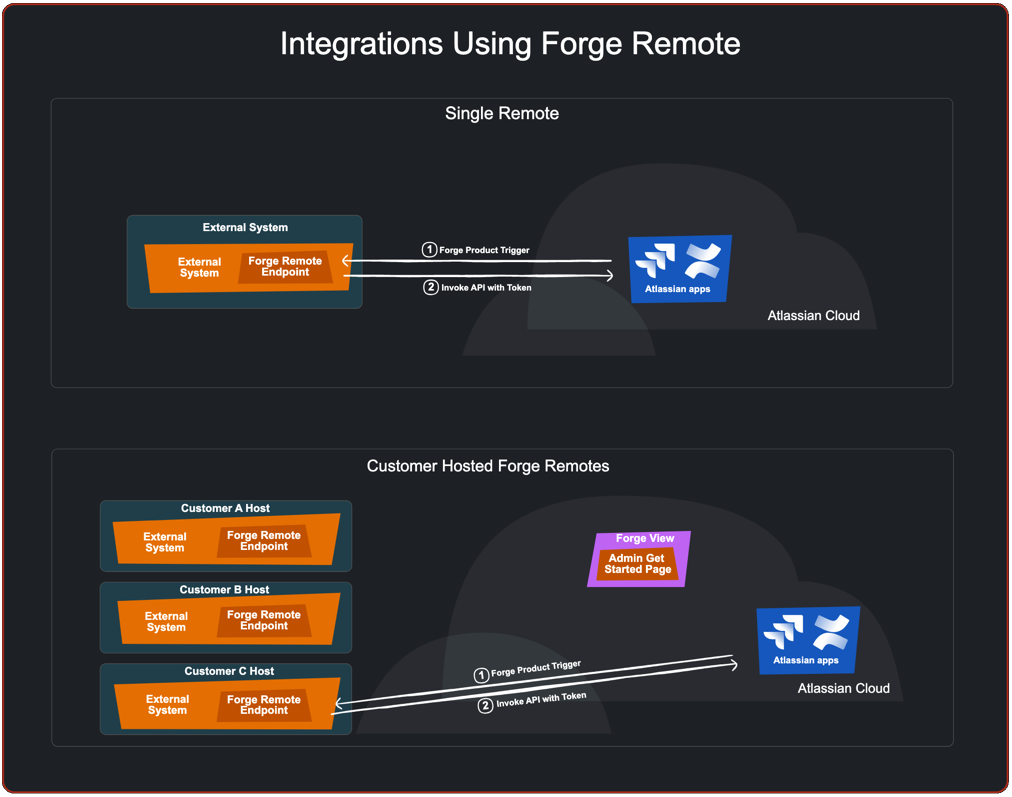
Forge remote allows you to integrate a Forge app with external systems where aspects of the app are deployed to in order to receive and respond to events from Atlassian apps or the Atlassian hosted aspects of the Forge app.
- Single Remote: In this pattern, a Forge app comprises a single deployment of the remote aspects of the app. A typical interaction scenario involves the invocation of the remote in response to an Atlassian app event. The app may respond by making API calls using a token previously passed to the remote.
- Customer Hosted Forge Remotes: Some Forge apps may require a component to be hosted by a customer. User-defined Remotes allows customers to configure the app such as to specify the remote hosting details, allowing the app to integrate the remotely hosted component with the hosted components and Atlassian apps.

Jira Workflow Conditions, Validators and Post Functions
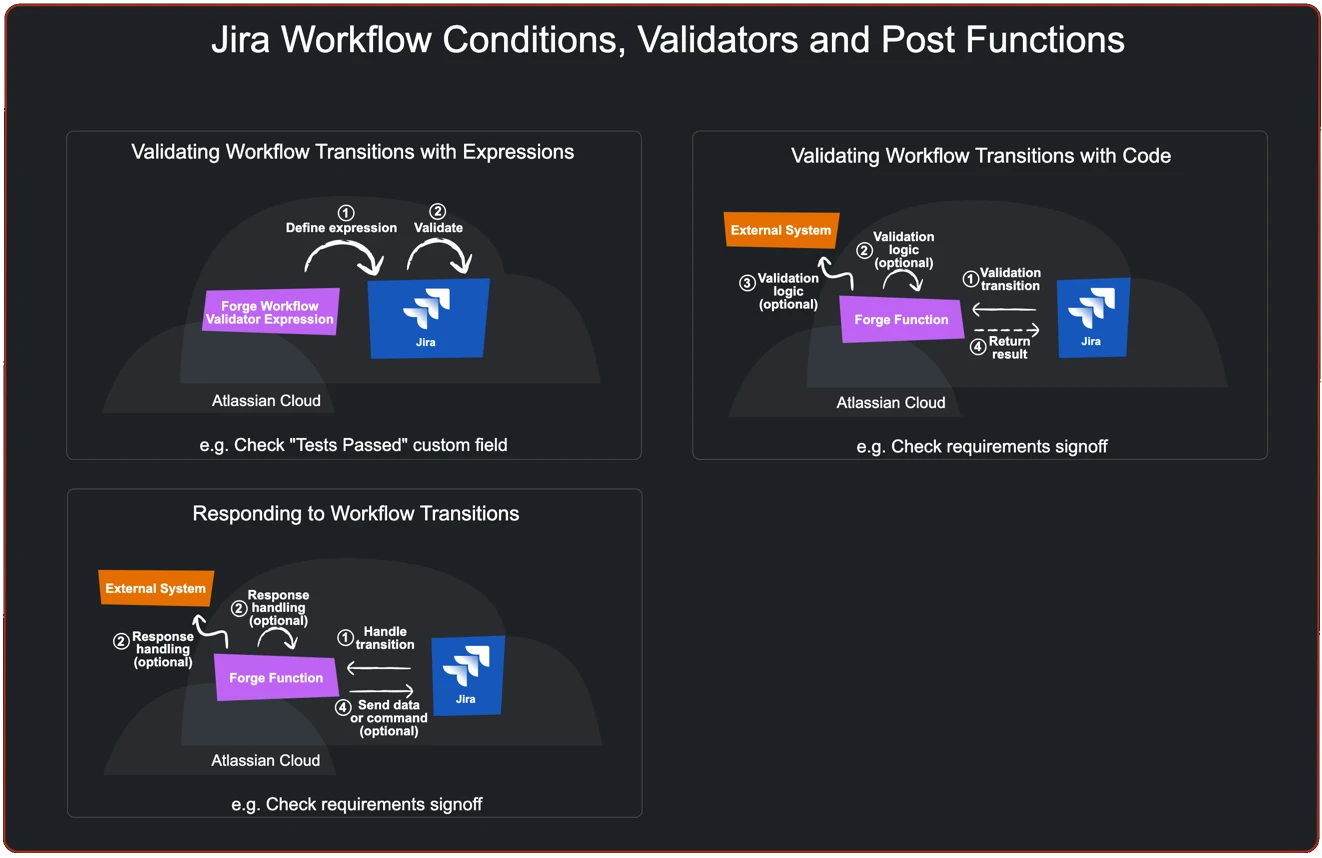
Jira’s workflow engine can be extended by Forge apps using a number of extensions points.
- Validating Workflow Transitions with Expressions: Jira expressions is a language allowing for the evaluation of conditions relating to the context in which they are invoked. A Forge app can register Jira expressions that Jira will evaluate in order to allow workflow transitions to occur. Either (or both) the workflow condition and workflow validator extension points can be used to control workflow transitions.
- Validating Workflow Transitions with Code: An alternate to the previous pattern involves registering a Forge function that will be invoked to evaluate whether a transition should proceed rather than using a Jira expression. This pattern allows for more complex evaluation logic such as invoking an external system to retrieve data that the transition logic is based on.
- Responding to Workflow Transitions: Forge apps can define workflow post functions for users to configure in workflows to ensure certain kinds of post processing occurs following the relevant transition(s).

Jira Custom Fields
There are several ways in which Forge apps can define and implement Jira custom fields:
- Define a Custom Field: Forge apps can define custom fields and implement associated user experiences to view and edit the data. Like any custom field, Jira administrators need to configure spaces with Forge custom fields in order to use them.
- Define a Custom Field Type: Forge apps can also define custom field types. This allows Jira administrators to create one or more custom fields based on the type. The custom field type defines the behaviors in the same way that it would if defining a single custom field.
- Fetch Custom Field Data on Demand when Editing: A Forge app can utilise an external system when editing a custom field. This allows the custom field data to be sourced externally.
- Push Custom Field Data to Jira: An alternate means of utilising external data in a custom field involves pushing the data from an external system into the app and then accessing it during custom field editing.


Utility Patterns
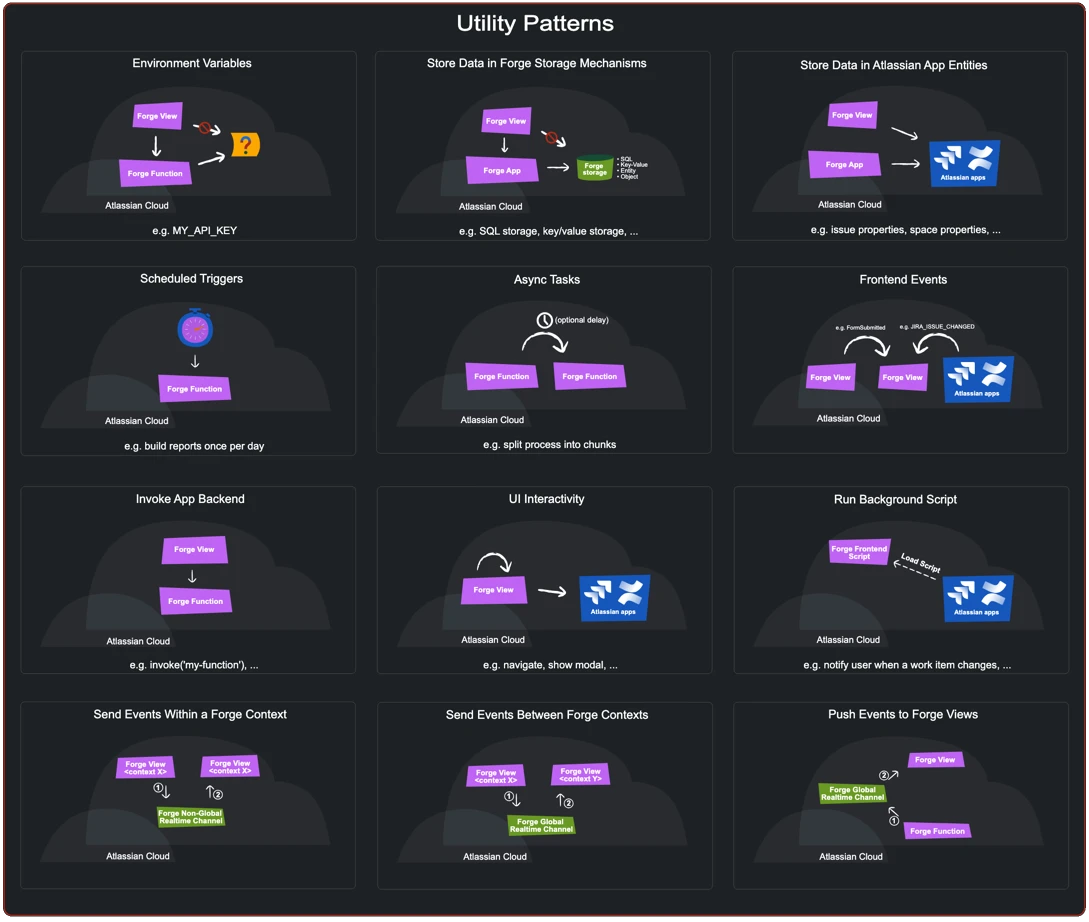
By now you may have observed that various patterns share features. Some of these shared features can be isolated in order to define various utility patterns. On its own, a utility pattern doesn’t provide customer value, but they are designed to be composed like lego bricks to form patterns that provide customer value.
- Environment Variables: Variables can be defined on a per environment basis and accessed via any function of a Forge app. It is common for environment variables to be defined in a CICD process. Environment variables are a good choice for storing certain kinds of credentials such as an external API key that an app requires.
- Store Data in Forge Storage Mechanisms: Forge provides a number of different kinds of storage mechanisms including a Key-Value store, Custom Entity Store, Forge SQL and an Object Store. Each storage mechanism is isolated at the tenant and app level.
- Store Data in Atlassian App Entities: Forge apps can invoke Atlassian app APIs to store data with Atlassian app entities such as work items, pages, users and spaces.
- Scheduled Triggers: Scheduled triggers allow Forge apps to perform periodic processing.
- Async Tasks: Whilst a Forge function has a limited time to execute, async tasks allow Forge apps to split processing across multiple function invocations.
- Frontend Events: Frontend events allows a Forge app to send events between its frontend components.
- Invoke an App Backend: Forge app views and background script can invoke a Forge function by declaring entry points known as resolvers.
- UI Interactivity: Javascript APIs and UI frameworks allow Forge apps to provide highly interactive behaviour.
- Run a View Background Script: A view background script is functionality that runs within a frame within an Atlassian app frontend (browser window). Background scripts can invoke Atlassian app APIs and app functions.
- Send Events Within a Forge Context: A Forge app can broadcast and receive events within a single context (e.g. view) of an app.
- Send Events Between Forge Contexts: A Forge app can broadcast and receive events across contexts of an app.
- Push Events to Forge Views: One form of cross context events allows a Forge app to push events from its backend to its frontend (views and background scripts).

Wrapping up
These patterns aren’t exhaustive, but they cover most scenarios customers and partners are likely to encounter when building on Forge. They’re intentionally composable: a single app will often combine several patterns to deliver its functionality.
Each pattern warrants a deeper dive – including implementation guidance, trade-offs, and usage notes – but this page is intended as a high-level map of what’s possible with Forge, and a shared vocabulary for discussing Forge app architecture.