
Mobbing with AI is a tight loop where the mob designs the work, sets standards, and reviews everything, while AI accelerates execution with fast drafts, tests, and options. Together they iterate in small cycles, capture learnings, and update specs so the AI keeps improving at “how this team works,” boosting speed without sacrificing shared understanding or maintainability.
Introduction
Software teams constantly face a tradeoff: deliver features fast, or invest time to ensure code quality and maintainability. Mobbing development—where the whole team works together—maximizes shared understanding and quality, but can slow progress. In contrast, AI-assisted development accelerates coding, but often at the expense of maintainability and team alignment.
What if we could combine the strengths of both? Over the past two months, the Micros Extensibility team, responsible for provisioning resources for Atlassian’s Micros platform (our internal PaaS), experimented with Mobbing with AI: blending the collaborative rigor of mobbing with the speed and exploratory power of AI tools. Our goal: achieve rapid delivery without sacrificing long-term code health.
In this blog, we share what we learned, why this approach works, and practical tips for teams interested in trying mobbing with AI.
The Tradeoff: Speed vs. Maintainability
At the heart of every software project lies a constant tradeoff: how quickly can we deliver, and how well will the code hold up over time? These two forces often pull in opposite directions.
- Speed means shipping features quickly, responding to stakeholders fast, and keeping momentum high. It’s the measure of throughput: how fast can we turn ideas into running software.
- Maintainability means building code that’s understandable, consistent, testable, and resilient. It ensures future developers — including your future self — can safely extend and adapt the system without fear of breaking it.
The challenge is that optimizing for one often sacrifices the other. Pushing purely for speed can result in shortcuts, duplication, or unclear logic that slows the team down later. Focusing only on maintainability can lead to “gold-plating,” where progress feels painfully slow as every edge case and abstraction is polished.
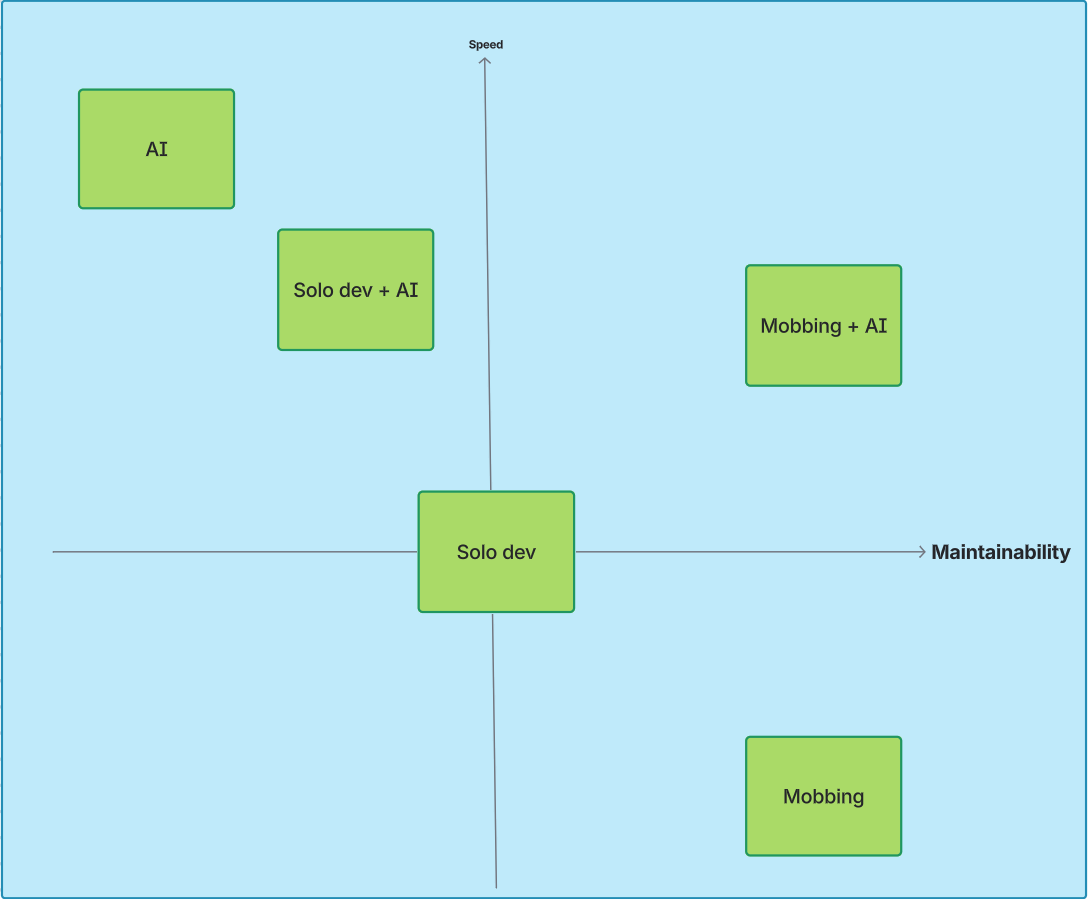
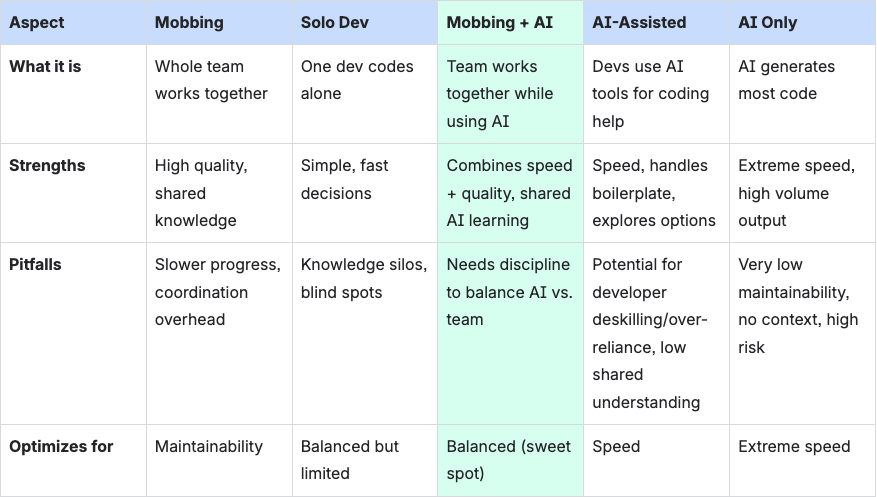
Finding the Balance: Mobbing, AI, and Everything Between


Why Mobbing + AI Works
If mobbing leans toward maintainability and AI leans toward speed, why do they work so well together? It comes down to synergy: each one fills in the gaps of the other.
- AI accelerates the boring parts. Instead of the mob spending half an hour writing boilerplate or scaffolding tests, AI can generate it in seconds. The mob then reviews and adapts it, ensuring it fits the team’s standards.
- The mob ensures quality and understanding. AI suggestions can be brittle or inconsistent, but with everyone reviewing them together, mistakes are caught early. The result is code the whole team understands and owns — not just something one developer and an AI produced in isolation.
- Exploration without splitting the mob. When the team hits an unknown — a tricky API, a new library, or an unfamiliar pattern — the old approach was to pause and send someone off to spike. With AI, the mob can generate quick prototypes on the spot, evaluate options together, and make faster, more informed decisions without breaking flow.
- Collective AI literacy. By using AI in a mob setting, the entire team learns how to prompt, critique, and refine AI outputs. This prevents the “AI power user” silo and spreads skills evenly.
Together, these dynamics mean that Mobbing + AI doesn’t just average out the tradeoffs — it multiplies the benefits. Speed and maintainability stop being a zero-sum game, and the team can deliver fast while building software that lasts.
Mobbing with AI in Action
This section shares a real example from our team’s recent project, showing how we applied mobbing with AI in practice. Our process has evolved along the way—what follows reflects our current workflow and learnings.


The MOB
We often hold MOB sessions with 2 to 4 developers, allowing participants to join and leave as needed. Typically, one person takes on the facilitator role: sharing their screen, driving the editor, and handling AI prompts. To keep everyone engaged and spread knowledge evenly, the facilitator role rotates among participants during the session.
The AI Squads
- AI Agent for Code Generation – Rovo Dev CLI
- Handles the main task of generating code.
- In-Editor AI for Code Completion
- Each team member has their own setup of editor with coding assist agent for live coding with autocompletion, suggestions, and quick fixes.
- AI Chat Agent for Ad-Hoc Questions – Rovo
- Used for quick exploration, clarifying language/library usage, or proposing design ideas.
- AI Reviewer Agent – Rovo Dev Code Review for Bitbucket
- Review PRs based on custom code review instructions.
The Process
A loop where the MOB guides the process and [AI] accelerates execution.
- Define coding and testing standards MOB
Start by agreeing on the ground rules: naming conventions, file structure, testing framework, and code style. This gives the AI a clear frame of reference and keeps output consistent.
🚀 Keep the standards short and precise. Lengthy standards will clutter AI context
🚀 Add examples in the standards to help AI understand better.
Examples: https://github.com/atlassian-labs/mobbing-with-ai-blog-examples/tree/main/standards
- Defining spec MOB
Align on what needs to be done. Write a lightweight specification and split the work into small, well-scoped tasks.
🚀 Smaller tasks lead to a faster feedback loop and improved quality.
🚀 Create and refine a spec template for future tasks.
🚀 Ask AI to generate a task spec using the spec template and existing spec, then modify it so we do not need to build a spec from scratch.
🚀 When our team encounters an unknown, such as an architectural decision or direction choice, we use AI to quickly generate multiple options or prototypes with the entire mob. The mob can prompt the AI for different approaches, review the outputs together, and discuss the pros and cons in real time. This enables the team to make informed decisions rapidly without losing shared context.
Examples: https://github.com/atlassian-labs/mobbing-with-ai-blog-examples/tree/main/spec
- Working on Each Task MOB + AI
For each task, the MOB and AI collaborate in a feedback loop:
- AI generates initial code based on the current specifications and coding standards.
- MOB reviews and refines the code, adjusting logic, style, or architecture. MOB also reflects those changes in the guidelines and specifications so AI can produce better output.
- AI generates tests for the refined code (unit, integration, or scenario-based).
- MOB reviews and refines the tests, ensuring they are meaningful, cover edge cases, and follow agreed patterns.
- Repeat the generate–review–refine loop for each task. Keep cycles small to avoid rework and maintain momentum.
🚀 Start small and iterate. For example, write 1 or 2 tests first, then refine them to serve as examples for AI to generate additional tests.
🚀 Always seek to understand and question AI responses, decisions, and code.
- Iterate each task until done MOB + AI
Feed the refined spec, guidelines and refined existing code back to the AI. Ask it to generate the next piece of code. Because the spec and standards evolve, the AI keeps learning our style.
🚀 Early tasks may require more iteration. As the spec evolves and coding/testing standards become clearer, the AI adapts and produces more accurate output. Later tasks typically need fewer review cycles because the AI can use earlier code as an example of “how this team works.”
- Capture knowledge MOB + AI
Once the feature is complete, ask the AI to update the original spec to reflect what was actually built. This ensures our documentation matches reality.
At the end, ask AI update the spec to match what has been done. Also ask it to update documents (e.g class diagrams, flow charts) to reflect the current state.
🚀 Mermaid is a great syntax for AI to generate diagrams and charts.
- Reflect MOB
End with a quick retrospective. Did AI save time? Did it create confusion? Should we adjust how our prompt or how detailed our specs are? Capture learnings for next time.
The Result
Across the project, we implemented or updated roughly ten features, with changes ranging from 10 to 50 files per PR and anywhere from 50 to 4,000 lines of code. Most of these pull requests were merged within a day or two, with very little PR back-and-forth. Under our usual workflow, this level of change typically takes close to a week, often stretched out by multiple rounds of reviews, clarifications, and rework.
We also saw a clear improvement in AI-generated code quality as we went. Early in the project, the AI’s first draft matched less than half of what we expected — it took several rounds of prompting and editing to get the code into shape. But as the mob refined prompts, specs, coding standards, and as we accumulated more code as examples, the quality improved significantly. By the end, the AI was producing drafts that hit around 80% of what we wanted, usually needing only one or two small adjustments before being ready to merge.
And beyond speed, the bigger benefit was shared understanding — the entire team now knowing exactly how the feature was implemented and how it fit into the wider system, which significantly improves long-term maintainability.
Beyond the Workflow: Other Ways AI Helps
This blog has focused on mobbing with AI at the feature level, but our team also uses AI in other development stages:
- Requirements Gathering and Analysis
- AI assists in drafting, refining, and clarifying both functional and non-functional requirements. It helps ensure that requirements are complete, consistent, and well-structured by identifying ambiguities or gaps early in the process. AI can also summarize stakeholder discussions, generate user stories, acceptance criteria, and even suggest edge cases based on similar past projects or domain knowledge.
- Example: When designing a new system from the ground up, we outline the business objectives and technical context to AI. It then proposes a structured set of system requirements—covering data flow, scalability expectations, performance targets, and integration needs. This provides the team with a solid starting point for discussions, helping us quickly align on priorities and translate business goals into actionable technical specifications.
- Spikes and Prototyping
- When exploring new technologies or architectural patterns, AI accelerates the process by generating quick proof-of-concept code, sample integrations, or API usage examples. This reduces the time spent on research and allows the team to validate ideas rapidly.
- Example: When deciding between two competing libraries or architectural approaches, we ask AI to generate a simple “happy path” implementation for each option. This allows the team to quickly compare the trade-offs, evaluate code clarity and integration effort, and make an informed decision together.
- Design and Architecture
- AI helps generate diagrams (using tools like Mermaid), propose architecture options, and facilitate trade-off discussions. By providing multiple design alternatives, AI enables the team to compare approaches and make informed decisions faster.
- Example: We prompt AI to create sequence diagrams or flowcharts based on our specs and code.
- Code Review Support
- During pull request reviews, AI highlights potential issues, suggests improvements, and checks for adherence to coding and testing standards. This acts as a second set of eyes, catching things the team might miss and ensuring consistency across the codebase.
- Example: We use AI to automatically flag code smells, missing tests, or deviations from our agreed standards.
Tips for Working with AI
- Start small and iterate
Don’t ask AI to build an entire feature in one go. Begin with small, well-scoped tasks, review the output, and gradually expand the scope once AI “learns” your standards. - Manage expectations
AI is a strong accelerator, not an autopilot. Don’t expect it to deliver 100% correct code on the first try. Aim for a draft you can refine together as a mob. - Keep prompts and specs evolving
Treat your prompts and specifications as living documents. Update them when the mob makes decisions or adjusts standards so the AI stays aligned. - Use examples to guide AI
Show AI snippets of existing code or tests so it can mimic your style and structure. Concrete examples reduce ambiguity and improve output consistency. - Review everything
Never accept AI output blindly. Mob review is where you catch edge cases, maintain quality, and ensure shared understanding.
Conclusion: The Future of Teamwork with AI
Our experiment with mobbing and AI showed us that speed and maintainability don’t have to be at odds. By combining the collective wisdom of the team with the rapid-fire capabilities of AI, we delivered features faster—without sacrificing code quality or shared understanding.
The key isn’t just using AI, but using it together. When the whole team is involved in prompting, reviewing, and refining AI-generated code, you avoid silos, spread new skills, and keep everyone aligned. AI becomes a force multiplier, not a shortcut.
If you’re looking to boost your team’s productivity while keeping your codebase healthy, give mobbing with AI a try. Start small: set clear standards, experiment with different AI tools, and reflect as a team on what works. You might be surprised at how much you can achieve—together.