
We’re excited to introduce a new step condition that lets you dynamically skip a step based on a boolean expression using variables available in the Pipeline context. This new capability makes pipelines smarter, faster, and more flexible.
Previously, the only type of condition customers could implement were very simplistic and based on information determined prior to the Pipeline running. There was no way to utilise information determined during the Pipeline execution to control whether certain parts of a Pipeline should execute or not.
This new capability allows you to define a new state condition type (in addition to the existing changesets type). Simply specify a boolean expression and it will be evaluated just before the step starts. If the output is true, the step will run, otherwise it will be skipped.
Getting started with Dynamic Step Condition
Globally Block deployments during an incident by using workspace variable.
- Define a workspace variable e.g. block_deployment with a boolean value true or false
- Add a state condition block_deployment == false
pipelines:
  default:
    - step:
        name: Deploy to production
        condition:
          state: block_deployment == false
        script:
          - echo "Only run when block_deployment == true"
That’s it! If you ever want to block the deployment, just set the variable to true and your normal deployment workflows will be be skipped.
Skip deployment to production when there are critical vulnerabilities by using pipeline variable.
Prepare a pipeline with 2 steps
- The first step –
Snyk Scannerscans for vulnerabilities withsnyk. The number of critical issues detected is output to the pipeline variablecritical_count - The second step –
Deploy to Produses astateconditioncritical_count == 0to only allow deployment to production when no critical vulnerabilities detected.
pipelines:
  default:
    - step:
        name: Snyk Scanner
        image: node:21
        script:
          - apt-get update && apt-get install -y jq && npm install -g snyk && npm install
          - snyk auth $SNYK_TOKEN
          - snyk test --severity-threshold=critical --json > snyk-result.json || true
          - |
            critical_count=$(jq '[.vulnerabilities[] | select(.severity=="critical")] | length' snyk-result.json)
            echo "critical_count=$critical_count" >> $BITBUCKET_PIPELINES_VARIABLES_PATH
        output-variables:
          - critical_count
    - step:
        name: Deploy to Prod
        condition:
          state: critical_count == 0
        script:
          - echo "Deploying..."
Combining changesets and state condition
It’s possible to use changesets and state conditions together. Both must be satisfied for the step to run, changesets are evaluated first, then state.
In the following example the step Deploy to Prod only runs if there are changes made to any file under folder path1 and no critical vulnerabilities detected.
pipelines:
  default:
    - step:
        name: Snyk Scanner
        image: node:21
        script:
          - apt-get update && apt-get install -y jq && npm install -g snyk && npm install
          - snyk auth $SNYK_TOKEN
          - snyk test --severity-threshold=critical --json > snyk-result.json || true
          - |
            critical_count=$(jq '[.vulnerabilities[] | select(.severity=="critical")] | length' snyk-result.json)
            echo "critical_count=$critical_count" >> $BITBUCKET_PIPELINES_VARIABLES_PATH
        output-variables:
          - critical_count
    - step:
        name: Deploy to Prod
        condition:
          changesets:
            includePaths:
              - "path1/**"
          state: critical_count == 0
        script:
          - echo "Deploying..."
Key Capabilities
Context variables
The state expression can reference all variables in https://support.atlassian.com/bitbucket-cloud/docs/variables-and-secrets/ except for secured and vault variables.
DefaultvariablesWorkspace,Repository&Deploymentvariables (set in Bitbucket UI)Pipelinevariables (output by earlier steps)
Variables are treated as strings by default (unless they are boolean or numbers), so when assigning a string to a context variable, avoid adding additional double quotes. For e.g.
- when the variable value is
hello- the condition
var_3 == "hello"will be evaluated totrue
- the condition
- when the variable value is
"hello"(double quotes are explicitly used)- the condition
var_3 == "hello"will be evaluated tofalse - the condition
var_3 == "\"hello\""will be evaluated totrue
- the condition
Simple yet powerful expressions
- All expressions must resolve to a boolean value, state conditions “fail closed”, so invalid expressions will assume the step should be skipped.
- Example:
(var_1 > 100 || var_2 != "ok") && var_3 == true && glob(var_4, "feature/*") - The expression’s result must explicitly evaluate to
trueorfalse. Non-boolean expressions like"hello world"will cause the step to fail.
- Example:
- We support following syntax:
- Comparison:
>, >=, <, <=, ==, != - Grouping:
() - Logical:
&&, || - Function:
glob(value, pattern)— Pattern matching using glob syntax
- Comparison:
- Simple literal data types:
string,number,booleannullis not supported. Use string"null"instead.
- Context variables:
- No need to add
$when referencing a variable. - Dynamic type inference: as context variables are stored as string we automatically infer the data type of the variable when it’s compared to a literal value.
E.g.var_1 == true=> var_1 is expected to be aboolean.var_2 > 100=> var_2 is expected to be anumber.var_3 == "ok"=> var_3 is expected to be astring.
- No need to add
Expressions are limited to a max of 1000 characters
Easy troubleshooting with detailed logging
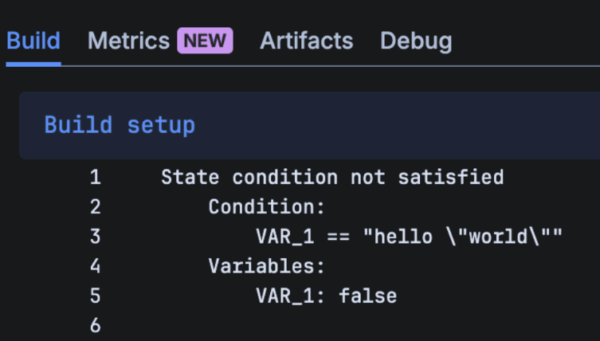
The condition and variables are printed in Build setup log for easy debugging.

Understand when conditions are evaluated
For automatic triggered step:
Conditions are evaluated immediately before the step executes.
Beware of race conditions: Because multiple parallel steps can all write to the single Pipeline variables state, it is possible to create non-deterministic race conditions between steps.
For manual triggered step:
- If the only condition is changesets, it is evaluated when the step is ready to start.
- If the conditions include a state condition, they are evaluated when the user selects the Run or Deploy button.
Special cases:
- Step with retry strategy: conditions are re-evaluated every time the step retries.
- Step queued in a concurrency group: Condition is executed when step is queued. No re-evaluation when the step is resumed.
Feedback
We’re always keen to hear your thoughts and feedback. If you have any questions or suggestions on this feature, please share them via the Pipelines Community space.