


I’ve had a pretty good experience with our Rovo Dev in Jira solution in the past few weeks. I estimate that I do probably 95% or more of my dev work in it nowadays. I found it super helpful to delegate low to medium complexity tasks to the coding agent while I do something else that needs more of my attention. I managed to get through a large chunk of our RtB backlog for one of our internal services, raise PRs in repositories I don’t usually work in, and started iterating on more side project style work again to improve developer productivity.
Scale
Rovo Dev in Jira helped me open and merge over a hundred pull requests in just a couple of weeks, allowing me to focus more on feature rollouts and breaking down work for agents to go off coding.
I was always into multitasking and juggling multiple branches while waiting on CI runs or kicking feature flag rollouts along, but offloading it from my machine to the remote sandboxes unlocked a new level of productivity for me. When a new bugfix or minor feature request arrives on our internal support Slack channel, I can now immediately act on it instead of sending it into the backlog where it needs to compete with months of other accumulated tasks. This was great for addressing minor papercuts quickly.

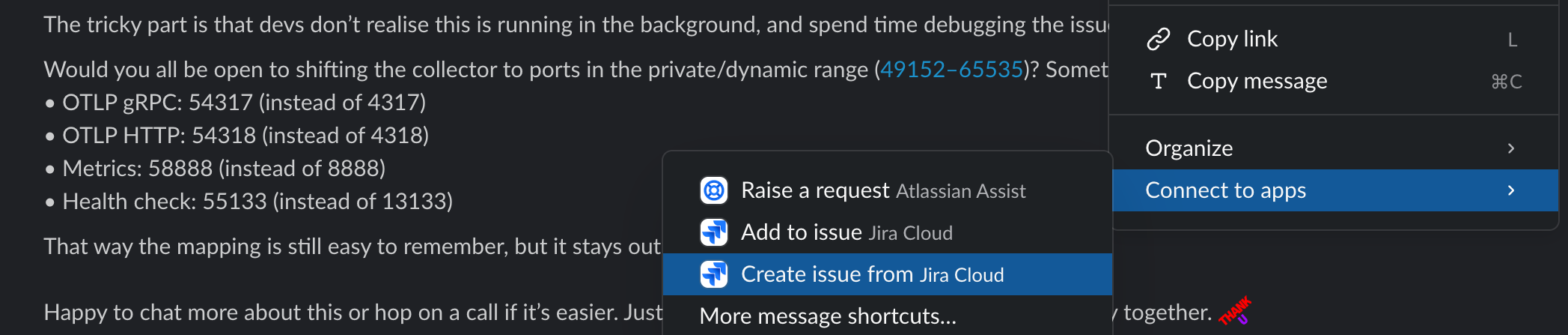


Capturing a bit of context from a Slack conversation quickly into a Jira work item lets me have a reference to the work that needs to be done, and it gives me an issue key to commit against. Once I have the work item ready, I can kick off an agent session on the work item view using the Generate code with Rovo Dev panel. I just need to select the repository (unless it figures it out automatically), add a bit of extra context in the prompt if needed or if I want to start with part of the solution only, then let the agent do its work in the background. I can now navigate away and move on to other things I need to deal with. When the agent is ready, I’ll get some in-app notifications (and Slack) that I have work ready to review.


I configure most tasks to automatically push code into a draft pull request, so I can review the generated diff on Bitbucket. If I’m happy with the result, I can just add some description, assign reviewers and mark it as ready. If there are build failures or I want the agent to change some things around, then I can drop into the remote sandbox session. There, you can chat to Rovo Dev in the built-in VSCode panel and ask it to make follow-up changes. These are typically fixing some tests, or addressing review comments.
top tip
For minor changes, you can change to a cheaper model that is just as capable to execute the task, for example Claude Sonnet or Haiku.
A typical non-straightforward change would have me kick the session off as above, then look at the generated diff in Bitbucket, then if I want to ask for changes I need to go back to the Jira issue, open the Rovo Dev session from there in a new tab, then tell the agent all the things I want it to change, usually as bullet points. With our agent integrations improving, eventually we should be able to just leave review comments on the draft PR and then ask the agent to read and address those. Similar story for CI failures, in the future we might be able to feed them back to the agent automatically and ask it to fix those problems – it can often do that if I just tell it which tests failed, I don’t even need to explain how they failed. Still, while the agent is working on a task, or the generated PR is being validated on CI, I can go and pick up another task to have Rovo Dev start looking at for me. This was pretty helpful for me to run through a bunch of our smaller RtB issues in our backlog, and have the robots work on them in parallel for me.
TIP
At larger PR volume it’s even more important help reviewers, therefore I suggest reviewing your own draft pull request generated by the AI agent until you’re happy with it, so when you ask your human teammates, they can easily sanity check that everything looks correct and get approvals quicker.
Another stream of work where Rovo Dev is a great help on is the side project on improving developer productivity. I wanted to help Jira developers avoid common pitfalls with Mockito’s mockStatic, so I worked towards banning it from the codebase – but first I needed to remove its current usages across hundreds of files. I added a one-liner git command in a parent work item in Jira to check the remaining usages in tests. I then started a new Rovo Dev session asked the agent to run that command, take a small subset of the remaining work, analyse those usages and capture some plans and options on subtasks of that work item. It was able to do this for me and I didn’t even have to open my local checkout for this at all. The agent also summarised its findings, highlighting likely easier tasks, so I could start new Rovo Dev sessions for those in Jira, leaving the potentially more complex ones for me to look at. The plans it made up on subtasks were sometimes a bit of a hit and miss, but with small additional prompts I’ve had good results to guide it through the refactoring work, often one-shotting those changes.
TIP
Get Rovo Dev do an initial investigation for you, and get it to break it down onto individual Jira work items that you (or the agents) can then work in in parallel.

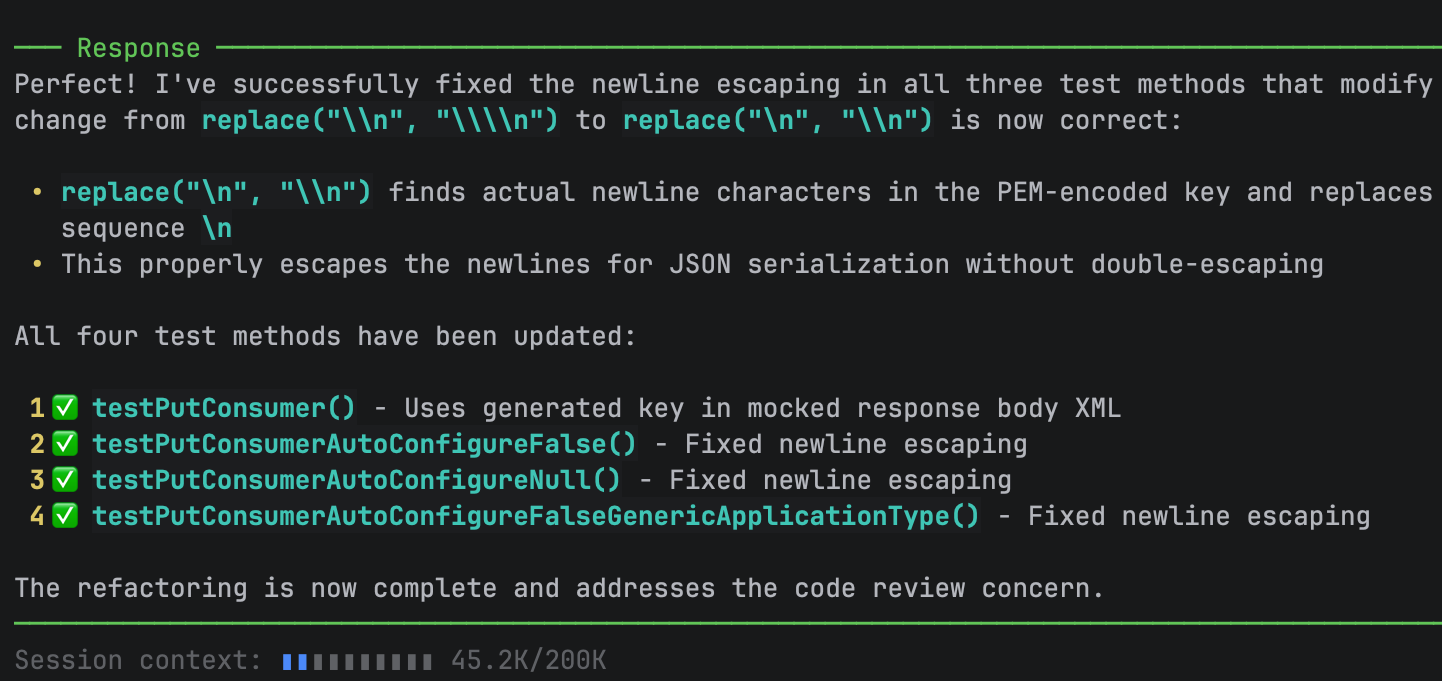
For some of the more complex looking refactors, I would run a Rovo Dev CLI session on my local checkout where I can easily run and re-run tests to help validate the agent is still on the right track with refactoring, and try changes in smaller increments. In an example screenshotted above, I need a single test refactored but with two mockStatic usages, and I could start with just replacing one, figure out what else needs changing with the tests, instruct Rovo Dev about the next step, and repeat until finished in maybe 10-15 minutes.
top tip
You can customize the Rovo Dev in Jira sessions if needed, so that the agent can run tests and code checks more easily, enabling it to self-correct on test failures without your active guidance.


Another area where Rovo Dev really shines for me is to enable contribution in codebases I don’t normally work in, or I’m not super familiar with, or both. As a great example, after getting Rovo to help move our webhook processing from a web request thread over to a FIFO SQS queue, I noticed that our monitoring dashboard didn’t show the number of messages landing in our DLQ, but I was pretty sure it’s happening. I reported it to the maintainers, who remembered that they already had a work item backlogged for it. I could just start a new Rovo Dev session from that work item, not having the clone of the repo locally at all, and the agent has done the jsonnet changes beautifully – which, in all honesty, I’ve never worked with before.
I’ve had similar good experience with Rovo Dev CLI last year, where it helped me code up an IDE plugin from scratch. I knew that I could probably figure out all the things I needed for it, but it would have taken me ages on my own. More recently, Rovo Dev in Jira helped me turn a request on our help channel into implementation in another plugin we own, another good win without me having to code that all up in an unfamiliar plugin devloop. It was enough for me to test the working branch locally to make sure it behaves as expected in a real IDE.
I hope these stories help give you some ideas on parallelising some of that backlogged work you’ve been meaning to get back to for ages. With Rovo Dev in Jira, you can delegate much of the coding work to the background without switching context in your local checkouts. Once you tried it, make sure to give feedback if you have any! Happy coding agent-herding!