


Update Dec 3rd, 2025: Bitbucket Packages is now generally available. Learn more
A few months ago, we introduced Bitbucket Packages in open beta, our native container registry in Bitbucket Cloud, supporting pushing and pulling container images directly within your workflow, unifying code, CI/CD, and artifact management to eliminate fragmented workflows, permission challenges, and the costs of maintaining external tools.
Today, we’re expanding its capabilities with support for deleting container images and tags, along with automated garbage collection running in the background. These updates give you greater control over your storage and helps your teams prepare for the upcoming general availability release, currently targeted for December 3, 2025.
For those who haven’t explored Bitbucket Packages yet, it’s accessible to all Bitbucket Cloud Standard and Premium workspaces on monthly plans that are linked to your company’s Atlassian organization. Learn how to link your workspace and review our getting started guides to begin pushing container images to your workspace-level registry.
Why this matters
As we move closer to the official release, managing your container storage has never been more important. This release directly addresses one of your top priorities: the ability to clean up and optimize your registry to manage your costs.
Now, your teams can:
- Remove outdated, experimental, or unused images and tags
- Keep only what matters in production
- Free up storage space
And because multiple images often share the same blobs, our new automated garbage collection runs in the background to safely delete unreferenced blobs ensuring space is reclaimed only when it’s truly no longer needed.
How deletion works
You can delete either a container image tag or an entire container image (including all its associated tags).
Delete an tag
Only users with repository write permissions can delete a tag. Deleting a container image tag permanently removes it from Bitbucket Cloud, and once deleted, the tag cannot be pulled again. To delete a container image tag:
- From the packages list view under your repository, select the image containing the tag you want to delete.
- In the image tags list view, select the tag you want to delete.
- Open the Actions (…) menu and select Delete tag

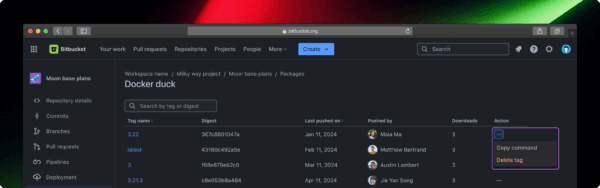
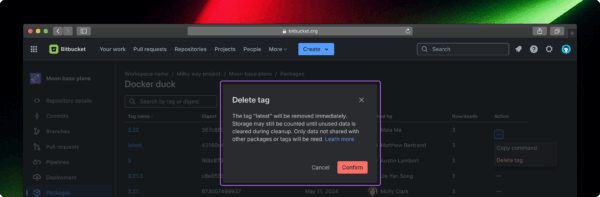
- When the confirmation modal appears, confirm the correct image tag is selected, then choose Confirm to delete it.

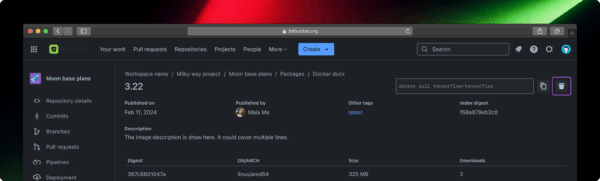
Alternative: You can also delete tags from the tag details page by clicking the delete icon.

Delete a container image
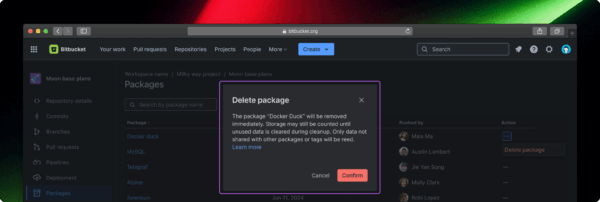
Only users with repository admin permissions can delete a container image. Deleting a container image permanently removes the image and all of its tags from Bitbucket Cloud, the image and its tags can no longer be pulled. To delete a container image:
- In the package list view under your repository, find and select the image you want to delete.
- Open the Actions (…) menu and select Delete package.

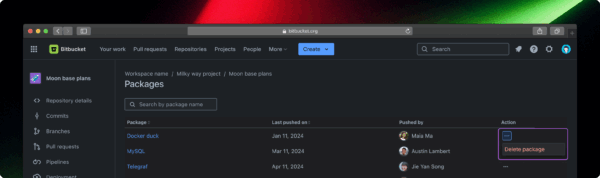
- When the confirmation modal appears, confirm the correct image is selected, then choose Confirm to delete it.

For more information on managing storage, review our support documentation.
How our garbage collection works
Since multiple images or tags can point to the same blob, deleting one doesn’t always free up storage right away. That’s where garbage collection comes in. When you delete an image, remove a tag, or overwrite a tag, Bitbucket automatically runs garbage collection in the background to find and remove unreferenced blobs, gradually freeing up storage space over time.
During this process, Bitbucket:
- Identifies blobs (data layers) no longer referenced by any image or tag in your workspace
- Safely removes those blobs to reclaim storage space
- Updates your workspace’s storage usage after cleanup completes
Get ready for general availability
As we prepare for the official release on December 3, 2025, Bitbucket Packages will transition to a consumption based billing model that includes both storage and network traffic. This change gives you time to plan ahead and avoid unexpected costs.
To help keep your usage, and your costs predictable, we recommend reviewing your container images now. If you no longer need older images or tags, consider deleting them before billing begins. Proactive cleanup today can help you manage storage efficiently and reduce future charges.
Below is a detailed pricing breakdown so you know what to expect:
| Plan | Included Monthly Storage | Included Monthly Network Traffic |
|---|---|---|
| Standard | 1 GB | 5 GB |
| Premium | 2 GB | 7 GB |
Overage charges (beyond included limits):
- Storage overage: $0.35 USD per GB per month for storage exceeding your plan’s allowance.
- Network traffic overage: $0.70 USD per GB for traffic beyond the included limits.
Notes this changes take effect in your next billing cycle after December 3rd, 2025
Feedback
Bitbucket Packages is evolving, and your experience will help shape its future. We’re counting on you to try out the container registry, explore its capabilities, and share your feedback. Give the new deletion feature a try today and let us know how they work for you. If you have any questions or suggestions, we’d love to hear from you in the Bitbucket community.